Motivation
Goethe wrote “You must either conquer and rule or serve and lose, suffer or triumph, be the anvil or the hammer.” Pretty grandiose stuff for an Oracle EPM blog, eh?. Maybe the German saying, “Ambos oder Hammer” which loosely translates to “One must be either anvil or hammer” is more germane.
I quote one of the world’s greatest writers not because this has suddenly become camerons-blog-for-philosophers.com (although that does have a nice ring to it) or camerons-blog-for-developers-that-have-an-overblown-sense-of-imporantance.com (perhaps a bit closer to the truth) but because sometimes a seemingly simple task in Oracle EPM-land (see, I am able to bring things back down to earth) really does pose a Manichaean struggle.
The bad
The seemingly simple problem was this (and yes, this is a bit of an intellectual letdown after the above but bear with me): in a hierarchical security model for Essbase (or Planning or HFM or whatever), how do I know what users have access to an Essbase application?
That doesn’t seem very difficult, does it? As this question was in regard to Essbase, all I need do is simply go to the Technical Reference guide and look for the MaxL statement that lists all of the users that have access to a particular application.
Here’s one in MaxL that’s pretty close: display user in group all ;
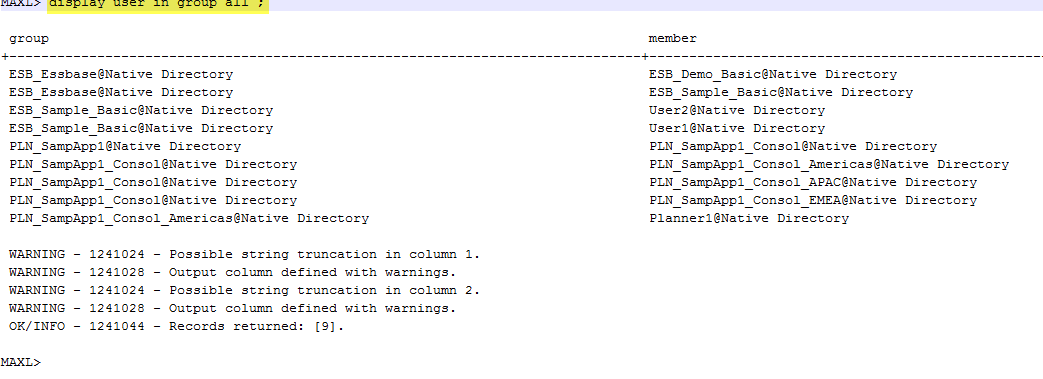
That really is pretty close, showing me all of the groups, all of their members, and even the users (I only have two Native users: User1 and User2) in the output.
But actually, that’s more than I want. What if I just want to know what’s in the group ESB_Essbase? Or just the group ES_Sample_Basic? Remember, it’s easy to parse the above as there’s so little output. But what happens when I try to read a production system? Pain, and plenty of it, would be my guess.
So obviously I simply need to change that query so that I only go after ESB_Essbase, right? Wrong.
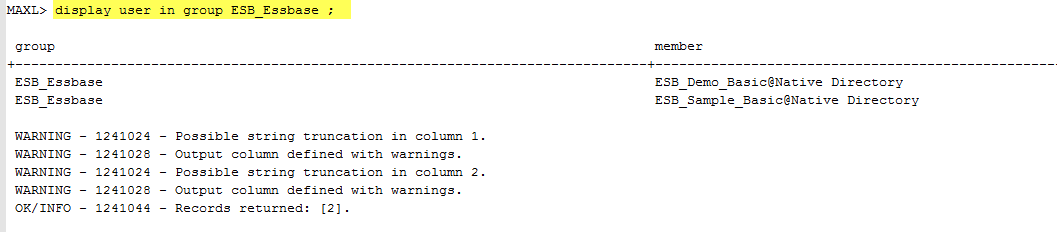
Now I can only view the children of ESB_Essbase. What about the members that are in ESB_Sample_Basic, User1 and User2? Bummer. What to do?
Also, do you see what none of these MaxL statements do? They don’t:
- Give me the full parent/child relationship for a given anchor group (already noted).
- Give me security as directly assigned to the groups or the users.
- Give me security as implicitly assigned to the users (or the groups).
- Give me any of this information in nicely formatted output.
It’s enough to make a geek wail in frustration.
Shared Services to the rescue?
Wait, you say (You do say this, don’t you? I hope you do or else why are you here?), what about Shared Services? Isn’t that where security is assigned to Essbase? And surely if we can assign security, we can report on security? Yes?
No, or at least the security that Shared Services returns is either too atomic or just too much.
Right down to the electrons and protons
I can view the security of one of my users, but only one at a time.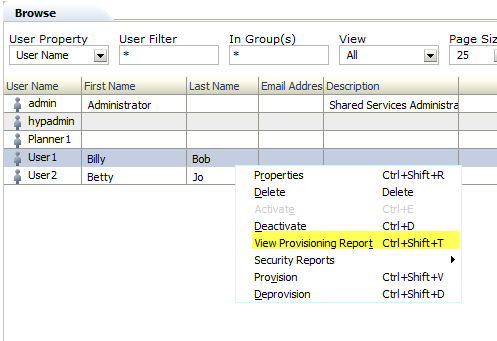
For this one user, this effective roles report is a good start.
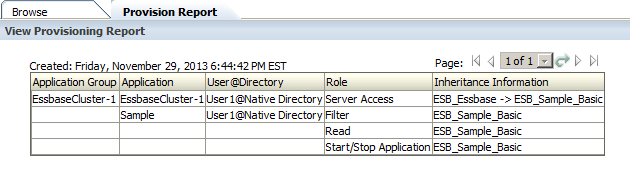
But it isn’t enough and I have to know beforehand that Billy Bob (Imagine this former Philadelphia student’s agony when he found out that Billy Bob’s is CLOSED – where oh where will I go for chicken cheesesteaks?) is a descendant of ESB_Essbase. Remember, the whole point was to point at group and get everything associated with it.
The universe
And if I want everything I can right click on Groups in Shared Services and get…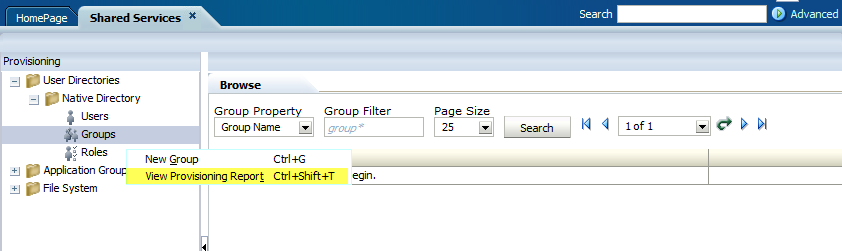
…too much. Again.
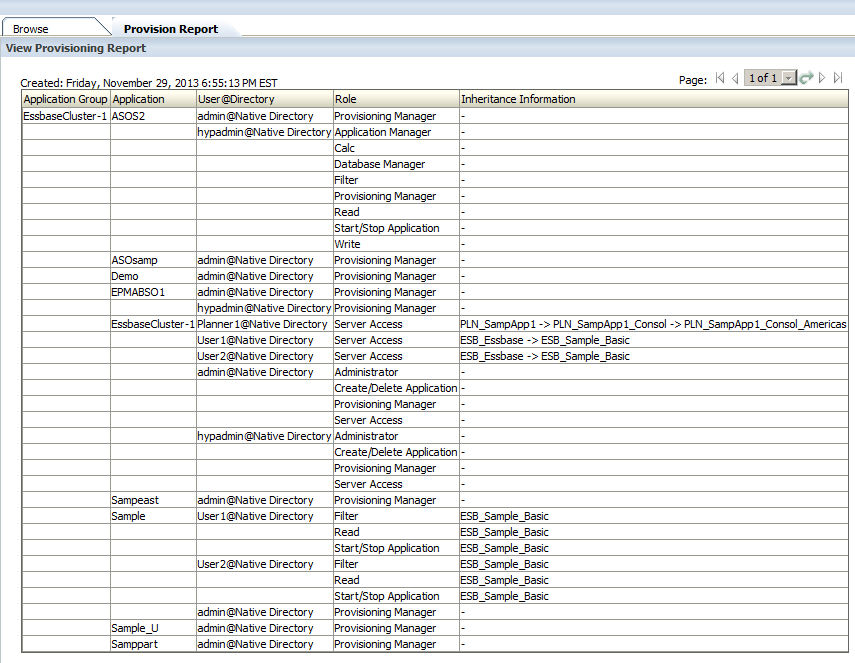
Now I really am annoyed. Surely finding out the descendants and their explicit and implicit security for a group in Shared Services (see, I am not just limiting this to Essbase although that is where my quest began) isn’t a big deal? Well, actually, yes, it is a big deal, or at least not something that the Oracle EPM stack provides out of the box.
But as Rabbie Burns wrote, “Ah, but a man’s grasp must exceed his reach.” My grasp exceeds my reach all the time. In this instance, can we resolve the above unanswered questions somehow?
The good
A short introduction to the good
SQL and the Oracle EPM repositories provide the answer. And why not? If security is assigned in Shared Services and that security is stored in the Shared Services relational repository then it is a logical place to look for that security.
That’s the theory, but the actual practice has shown that hacking Shared Services repositories is quite a bit more involved than I anticipated. Given that there’s so much ground to cover I simply am not going to be able to cover this all in one post.
Here’s how I am going to break this up across multiple posts:
- The part you are reading right now will be where I illustrate how to get a parent child/recursive table view of an anchor Shared Services group and all of its descendants from the Shared Services repository. This answers the initial question I had long (it seems like a long time ago) ago: what are the users in this upper level group.
- The second part will cover what is the direct access of these groups. This is harder than it sounds and it will cover undocumented views in the Shared Services repository.
- The last bit, and the one that has given me a lot of trouble, is the implicit and explicit security (given the techniques in number two that actually is no big deal) and even more importantly, how to present that security. I’ll even show two different ways to get there (one by yr. obdnt. srvnt. and a better one by Dan Pressman) and go into some pretty interesting (sort of) recursive theory approaches.
Whew, it’s been a lot of work (I have 99% of the code written at this point and yeah, that last 1% could be a real stinker) thus far.
So where to start?
As always when trying to figure out what’s going on in the schemas, go take a look at the excellent schema overview in the Deployment and Installation section of the 11.1.2.3 documentation.
It’s all there except for the undocumented views (go on, take a look at VW_APPLICATIONS – yes, I will be covering this view in the second post) and you will need (or at least I needed) to spend some quality time pondering what each one of these tables do and how to query them.
But that’s all background. Let’s start out with something easy – a recursive query to get all of the descendants of an upper level Shared Services group. I’ve written about this before within the context of a Planning query and, if you attended my Practical SQL for EPM Practitioners at Kscope13 (believe it or not, you can hear yr. obdnt. srvnt. present this session as it was recorded; of course you can download the presentation from ODTUG’s web site), I covered how this works in pretty good detail.
If you’re not familiar with recursive queries (all three parts of this series will use them), and if you want theory, I really suggest you download the above presentation as I go into how a recursive query works. No worries, I’ll wait for you to read/listen to the presentation. I’m not going anywhere.
Skip the theory, go right to the code
All done? Or you already knew all about recursive queries? Terrific, as we can now dive into the code.
Tables you should know
This whole query only uses three tables to get the groups, members of the groups, and native users. Yes, I cheat a bit with users as I do not have a MSAD/LDAP environment to go after the users. That gets a bit more complicated but can be done.
CSS_GROUPS
Native groups are stored in this table. I have read about, but never seen, MSAD/LDAP groups in Oracle EPM environments. They make sense if your firm’s IT department are moving MSAD/LDAP users in and out of groups but the norm seems to be Native groups.
It’s a bit hard to read, but here are all of the groups in my EPM instance.

Note that I use LOWER_IDENTITY_ID as I never have to worry about case or throwing LOWER or UPPER functions around id codes.
CSS_GROUP_MEMBERS
This table does just what its name suggests: members in groups.
Note that MEMBER_TYPE can be either a 1 or a 2. 1’s are uses, 2’s are groups.

CSS_USERS
As I wrote, this is where I cheat a bit, as I only have Native users on my 11.1.2.3 VM. You will likely need to go against CSS_IDENTITY which stores external users and have some sort of way of getting at your directory services’ user names.
In any case, here’s what my CSS_USERS table looks like and only a bit of it because there are so many fields. Again, I suggest you read the docs if you want to look at all of the fields.

The code
Here it is in SQL Server’s T-SQL.
-- NB – My VM’s Shared Services repository is in a SQL Server
-- database called, unsurprisingly, HYP_SharedServices
USE HYP_SharedServices
GO
WITH TopCat AS
(
-- Set up the anchor member
SELECT
G.LOWER_IDENTITY_ID AS 'Parent_ID'
, G.LOWER_IDENTITY_ID AS 'Child_ID'
, G.NAME AS 'Parent'
-- Need to CAST as VARCHAR(200) to allow UNION ALL
, CAST('' AS VARCHAR(200)) AS 'Child'
, 1 AS 'Gen'
FROM CSS_GROUPS G
-- This is where you put in the topmost member of the tree
WHERE G.NAME = 'ESB_Essbase'
),
Related AS
(
-- Almost Parent/Child, but not quite
-- I made this a separate CTE because it's cleaner down in the true Parent/Child query
SELECT
GM.LOWER_GROUP_IDENTITY AS 'Parent_ID'
, GM.LOWER_MEMBER_IDENTITY AS 'Child_ID'
, G1.NAME AS 'Parent'
-- 1 = user, 2 = group; Cast both as VARCHAR(200) to allow UNION ALL
, CASE
-- Subqueries for Users and Groups to get the names
WHEN
GM.MEMBER_TYPE = 1
THEN
(SELECT
CAST(U.NAME AS VARCHAR(200))
FROM CSS_USERS U
WHERE U.LOWER_IDENTITY_ID = GM.LOWER_MEMBER_IDENTITY)
WHEN
GM.MEMBER_TYPE = 2
THEN
(SELECT
CAST(G2.NAME AS VARCHAR(200))
FROM CSS_GROUPS G2
WHERE G2.LOWER_IDENTITY_ID = GM.LOWER_MEMBER_IDENTITY)
END
AS 'Child'
FROM CSS_GROUP_MEMBERS GM
INNER JOIN CSS_GROUPS G1 ON
GM.LOWER_GROUP_IDENTITY = G1.LOWER_IDENTITY_ID
),
-- Bring it all together to figure out the recursive table output
ParentChild AS
(
-- Set the anchor
SELECT
T.*
FROM TopCat T
UNION ALL
-- Oooh, fancy, we're going recursive here
SELECT
R.Parent_ID
, R.Child_ID
, R.Parent
, R.Child
, PC.Gen + 1
FROM Related R
-- This is the recursive JOIN that ties child to parent
INNER JOIN ParentChild PC
ON R.Parent_ID = PC.Child_ID
)
SELECT * FROM ParentChild
The results
And all of that leads to this single group list of descendant Shared Services users and groups:
Btw,Parent_ID and Child_ID are not needed for the purposes of reporting this information but I use them later to get security so they are sticking around. Comment them out in your own environment.
Were I to change the above query’s anchor member from ESB_Essbase to PLN_SampApp1, I would get the following:

That seems like an awful lot of work to get a simple list of an upper level group and its descendants but it all becomes worthwhile later in this series. I like to think, in my humble way, that I dive into some really interesting SQL techniques (that is half the idea of these query series) thanks to the Great False God Google (from whom I found and stole techniques and some intersting theory) and, as I mentioned before, Dan Pressman who showed me a better way to create good looking security reports.
What do we have?
Well, has Oracle’s EPM system been hammer or anvil? This blog post lends credence to the argument that good has triumphed over evil, or at least over annoyance, and that I have made the EPM Shared Services schema bend to my will. So I suppose one could argue that I was the hammer.
On the other hand, as this took an embarrassingly long time to figure out, I have to sort of wonder if maybe I more resemble that anvil. My head does kind of hurt and something has been hammering away at it. Oh well, at least I got to write some interesting code and learn new stuff.
What’s next?
A parent child table is great, but I want more, more, more.
How about the above but tied to directly assigned:
- Roles
- Projects
- Applications
- Products
Fwiw, yes, yes, I know that you can export out Shared Services to LCM and then look at the .csv files that result (I did this earlier this year because I was too dumb/pressed for time to write the above queries/they wouldn’t give me SELECT access), but my query is faster, easier, and more customizable as well.
Neither native Shared Services nor LCM will report implicit security for all users in a group, by level of hierarchy. A SQL query will as I will show in part three of this series and that is the power of SQL and why every EPM practitioner should cultivate these skills.
Be seeing you.