Introduction
Arrrgh, this one really got me going. Actually, I have noticed that I have never written a query against the Planning tables unless I am unable to get whatever it is out of Planning easily. And I suppose that sort of makes sense. And I also that means I am always annoyed and that missing Planning reporting features are my opportunity to increase my SQL skills, such as they are. Of course writing the query took way longer than I thought it would. Read on for the reason...With that preamble, have you ever wondered what security is assigned to Calc Mgr rules in Planning? You basically have to go into each rule and edit the security to see what user or group has been assigned and what rights are set. Annoying, isn't it? And not practical when there are many rules. Here's an example of what it looks like:
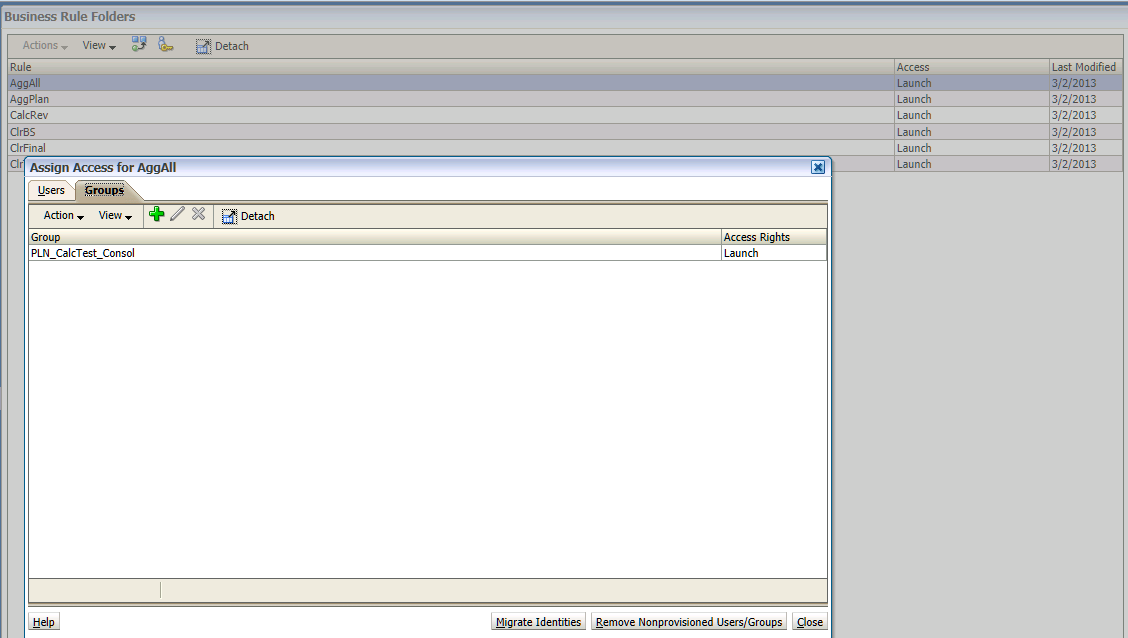
I can see that the group PLN_CalcTest_Consol has Launch access to the rule AggAll, but what about AggPlan, CalcRev, etc., etc., etc.?
So yes, this is yet another opportunity to query the tables. And oh yes, I am using this as a teeny part of the Planning presentation I am giving with Jessica Cordova (hi, Jessica) at Kscope13.
NB – One other note, I was inspired to get around to this query in response to “vaio” and his Hyperion Business Rules security query from this Network54 thread: http://www.network54.com/Forum/58296/thread/1362011042/Export+only+Webform+security I figured if world+dog had it for EAS’ business rules, we needed it for Calc Mgr as CM is all there is from 11.1.2.2 onwards.
The reason this query drove me up the wall
Would you believe that deployed Calculation Manager rules do NOT have an object type in Planning? Would you believe that I spent more than a little bit of time trying to find it?Oh yes, both statements are true. The latter one you are going to have to take on trust. The former I can prove.
Here are the Object Types in the Planning app schema:
SELECT DISTINCT
OT.OBJECT_TYPE,
OT.TYPE_NAME
FROM
HSP_OBJECT_TYPE OT
| OBJECT_TYPE | TYPE_NAME |
1
| Folder |
2
| Dimension |
3
| Attribute Dimension |
4
| Calendar |
5
| User |
6
| Group |
7
| Form |
8
| FX Table |
9
| Currency |
10
| Alias |
11
| Cube |
12
| Planning Unit |
30
| Attribute Member |
31
| Scenario |
32
| Account |
33
| Entity |
34
| Time Period |
35
| Version |
37
| Currency Member |
38
| Year |
45
| Shared Member |
50
| User Defined Dimension Member |
And here is the OBJECT_TYPE that goes with Calc Mgr rules:
SELECT
*
FROM HSP_OBJECT
WHERE
OBJECT_TYPE = '115'
See the 115? I only know that because I did a search on the name of one of the rules and thus figured it out.
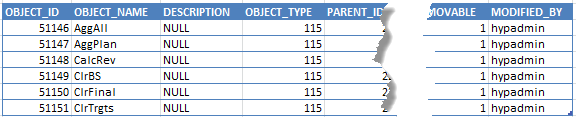
Why would you care about OBJECT_TYPE 115?
Well, once you (or I) knew this, you (or I) could write this:/*
Purpose: Calculation Manager security report by rule, group, and user
Modified: 1 Feb 2013
Notes: Common Table Expressions make joining mostly disparate objects
relatively easy.
NB -- Calc Mgr rules do NOT have an OBJECT_TYPE in HSP_OBJECT.
The OBJECT_TYPE seems to be 115.
*/
-- I am in love with CTEs over subqueries
WITH
-- CTE for Calc Mgr OBJECT_ID, Plan Type, and Name
BRName (CMID,PlanType, BRName) AS
(
SELECT
CMR.ID,
CMR.LOCATION_SUB_TYPE,
O.OBJECT_NAME
FROM
HSP_CALC_MGR_RULES CMR
INNER JOIN
HSP_OBJECT O ON O.OBJECT_ID = CMR.ID
),
-- CTE for Calc Mgr user OBJECT_ID, Calc Mgr OBJECT_ID, and Launch rights
BRAccess (UserID, CMID, Launch) AS
(
SELECT
AC.USER_ID AS 'User ID',
O.OBJECT_ID AS 'CM Obj ID',
--O.OBJECT_NAME 'CM Name',
CASE AC.ACCESS_MODE
WHEN -1 THEN 'No Launch'
WHEN 4 THEN 'Launch'
ELSE 'Unknown'
END AS 'Access'
FROM
HSP_ACCESS_CONTROL AC
INNER JOIN
HSP_OBJECT O ON O.OBJECT_ID = AC.OBJECT_ID
WHERE
O.OBJECT_TYPE = '115'
),
-- CTE for user OBJECT_ID, user name, group name
UsersInGroups (UserID, [User Name], [Group Name]) AS
(
SELECT
--O.OBJECT_ID AS 'User ID',
O2.OBJECT_ID AS 'CM Obj ID',
O.OBJECT_NAME AS 'User Name',
O2.OBJECT_NAME AS 'Group Name'
FROM
HSP_USERS U
INNER JOIN
HSP_OBJECT O ON O.OBJECT_ID = U.USER_ID
INNER JOIN
HSP_USERSINGROUP UG ON UG.USER_ID = U.USER_ID
INNER JOIN
HSP_OBJECT O2 ON O2.OBJECT_ID = UG.GROUP_ID
)
SELECT
BRN.BRName AS 'Calc Mgr rule',
BRN.PlanType AS 'Plan Type',
BRA.Launch AS'Launch',
UIG.[User Name] AS 'User name' ,
UIG.[Group Name] AS 'Group name'
FROM
BRAccess BRA
INNER JOIN
UsersInGroups UIG ON UIG.UserID = BRA.UserID
INNER JOIN
BRName BRN ON BRN.CMID = BRA.CMID
ORDER BY BRN.BRName, UIG.[Group Name], UIG.[User Name]
And then you (or I) could run the above query, and get the following:
| Calc Mgr rule | Plan Type | Launch | User name | Group name |
| AggAll | Consol | Launch | TestPlanner1 | PLN_CalcTest_Consol |
| AggAll | Consol | Launch | TestPlanner2 | PLN_CalcTest_Consol |
| AggAll | Consol | Launch | TestPlanner3 | PLN_CalcTest_Consol |
| AggPlan | Consol | Launch | TestPlanner1 | PLN_CalcTest_Consol |
| AggPlan | Consol | Launch | TestPlanner2 | PLN_CalcTest_Consol |
| AggPlan | Consol | Launch | TestPlanner3 | PLN_CalcTest_Consol |
| CalcRev | Consol | Launch | TestPlanner1 | PLN_CalcTest_Consol |
| CalcRev | Consol | Launch | TestPlanner2 | PLN_CalcTest_Consol |
| CalcRev | Consol | Launch | TestPlanner3 | PLN_CalcTest_Consol |
| ClrBS | Consol | Launch | TestPlanner1 | PLN_CalcTest_Consol |
| ClrBS | Consol | Launch | TestPlanner2 | PLN_CalcTest_Consol |
| ClrBS | Consol | Launch | TestPlanner3 | PLN_CalcTest_Consol |
| ClrFinal | Consol | Launch | TestPlanner1 | PLN_CalcTest_Consol |
| ClrFinal | Consol | Launch | TestPlanner2 | PLN_CalcTest_Consol |
| ClrFinal | Consol | Launch | TestPlanner3 | PLN_CalcTest_Consol |
| ClrTrgts | Consol | No Launch | TestPlanner1 | PLN_CalcTest_Consol |
| ClrTrgts | Consol | No Launch | TestPlanner2 | PLN_CalcTest_Consol |
| ClrTrgts | Consol | No Launch | TestPlanner3 | PLN_CalcTest_Consol |
Isn't that pretty? And useful? I (or you) think so.
The sting in the tail
Would you believe I spent a good half hour poking around in the Calculation Manager tables?Would you believe that the CALCMGROBJECTACCESS table in the Calc Manager schema is completely empty? I have no idea what it is for, but it isn't for rules deployed to Planning. Terrific.
But the good news is that with a little poking about writing a simple (well, CTEs aren’t totally beginner’s stuff but they are so easy to read and work with) query, you (or I) can easily look at who and what kind of access planners and groups have to deployed CM business rules.
Be seeing you.