Want to know The Truth About CPM?

06 January 2014

This blog by the numbers

This blog in review

I’ve been writing, working, and in general sweating over this blog for almost five years.  That is sort of a shocking statistic, but I started in May 2009 and here we are at the beginning of 2014.  Okay, so sue me, four and a half years, not five.  It’s true, I promise you.  (You have to watch the link to get the sort-of joke.)  Fwiw, I can’t decide if Frank Sinatra (Nathan Detroit) or Vivian Blaine (Adelaide) is the better in this scene.


That is a sobering amount of time and effort to apply to one project, especially an unpaid one.  Why do it?  Indeed why?


At the risk of sounding maudlin, I do it for three reasons, in order of decreasing selfishness:
  1. Putting pen to paper (okay, keyboard to editor) forces me to really think out ideas.  Oft times really thinking out ideas means, “I thought this could be done; now I have to teach myself how to do it.”  I write for this blog, but ultimately I learn from the writing.  
  2. In my own (exceedingly) small way, what I write moves the collective knowledge of EPM practitioners just that little bit forward.  I always know that I stand on the shoulders of giants (so perhaps this blog should be entitled Cedalion’s Blog for Essbase Hackers) but I do my l bit.
  3. I know that you, Gentle Reader, get value from this blog.  How?  Emails, people I meet at conferences (The requests for photographs are weird, but not as surreal as the guy that insisted that I was “awesome” at UKOUG 2010.  I like being classified as awesome but I have not been to Dear Old Blighty since 1996 so someone was robbed of the awesomeness that was rightfully his.  Of course everyone is welcome to talk to me at conferences, assuming I am not running desperately towards a meeting I am five minutes late for, which is most of them.), and the statistics that this blog generates.


And that, really, is what this blog post is about – you:  where you come from, how you get here, and what you care about.  I am no mind reader, but instead a devotee of Google Analytics (GA).  Surely all EPM devotees are interested in analytics.  This bit of blog-based navel gazing is more than mere indulgence but is instead a view into what the EPM world cares about, circa 2013.

A bit of sobering information

You’re about to see lots of numbers, and think, “Wow, Cameron sure is full of himself, bragging about how popular his work is.”  Lest you think this, know that once upon a not too distant ODTUG board meeting, we bloggers were asked to reveal how popular our blogs were.  I was quite chuffed with my ~3,500/month visits.  I was however, mildly shattered when Tim Tow revealed that he got more than 17,000 per month.  Maybe Tim should do a post like this.  :)  I have no insight into other blogs like John Goodwin’s, or Glenn Schwartzberg’s, or Edward Roske’s, or whoever’s, but I imagine that their numbers dwarf mine.


Regardless, this is Cameron’s, Not Someone Else’s Blog For Essbase Hackers, so on with your numbers, courtesy of GA.

How many are you?

2013, A.D.

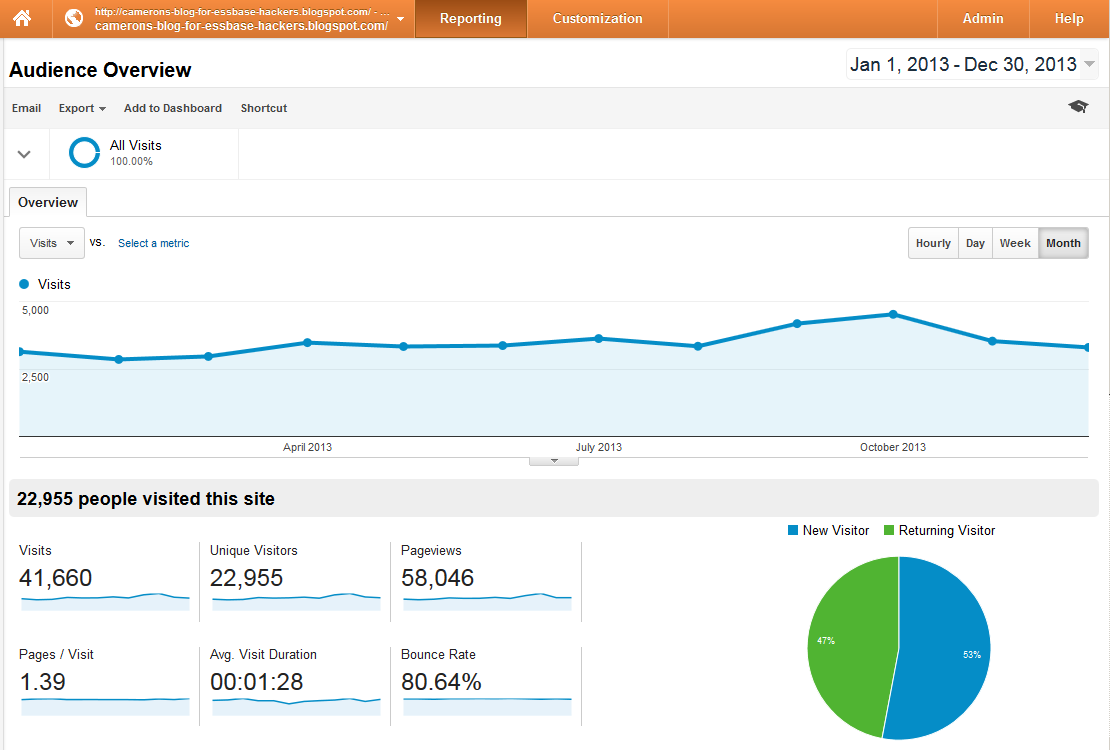
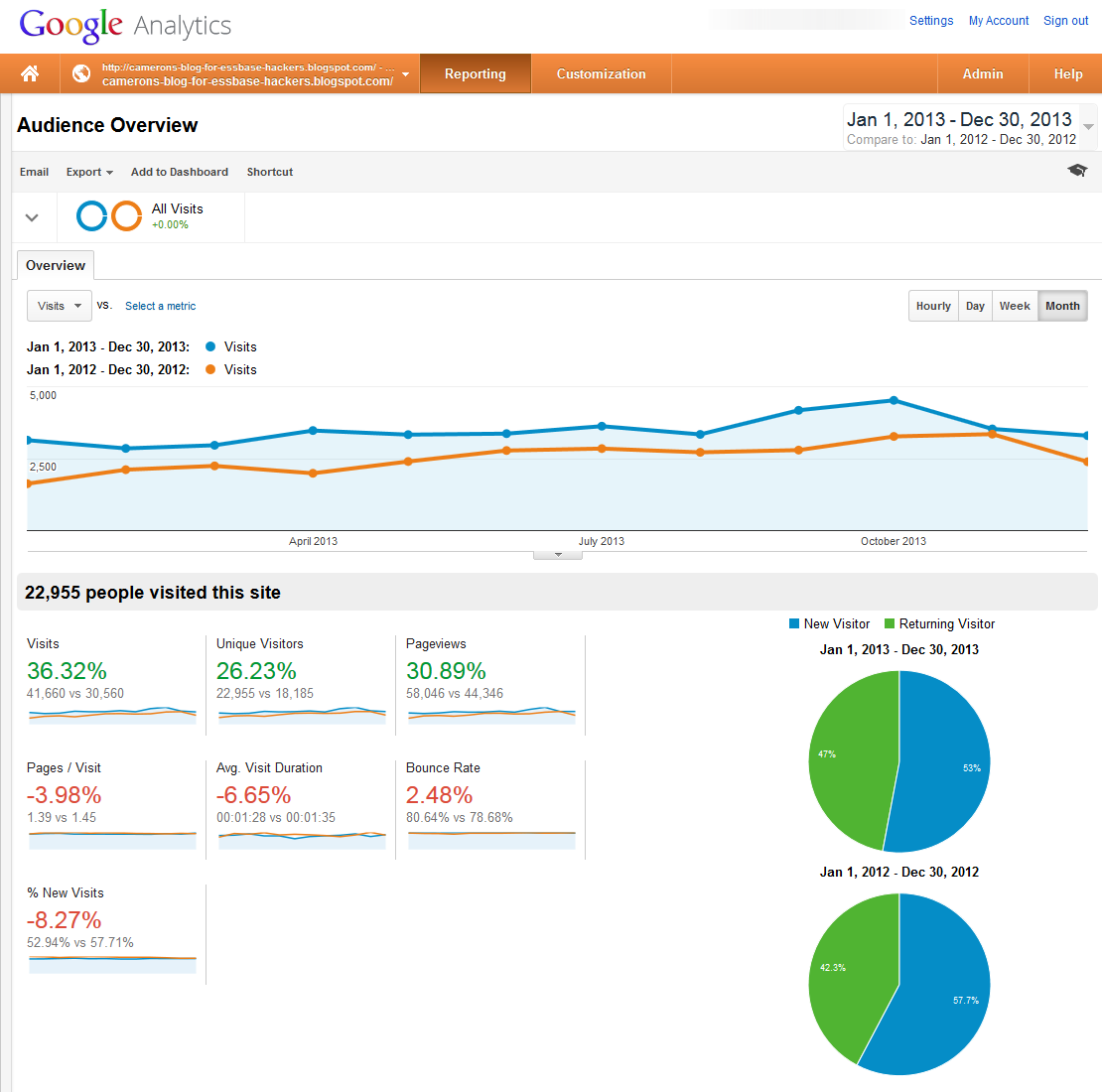
In 2013, there were just under 23,000 of you.  You made over 40,000 visits.  Thanks to Blogspot’s (owned by Google) cookies on your computer (please do not blame me for this – it’s the way it works and I have no control over this), GA can track how often you visit.
Year over year

Depending on how you want to look at it, one could argue the blog is up about a third in visits, visitors, and page views.
From the beginning

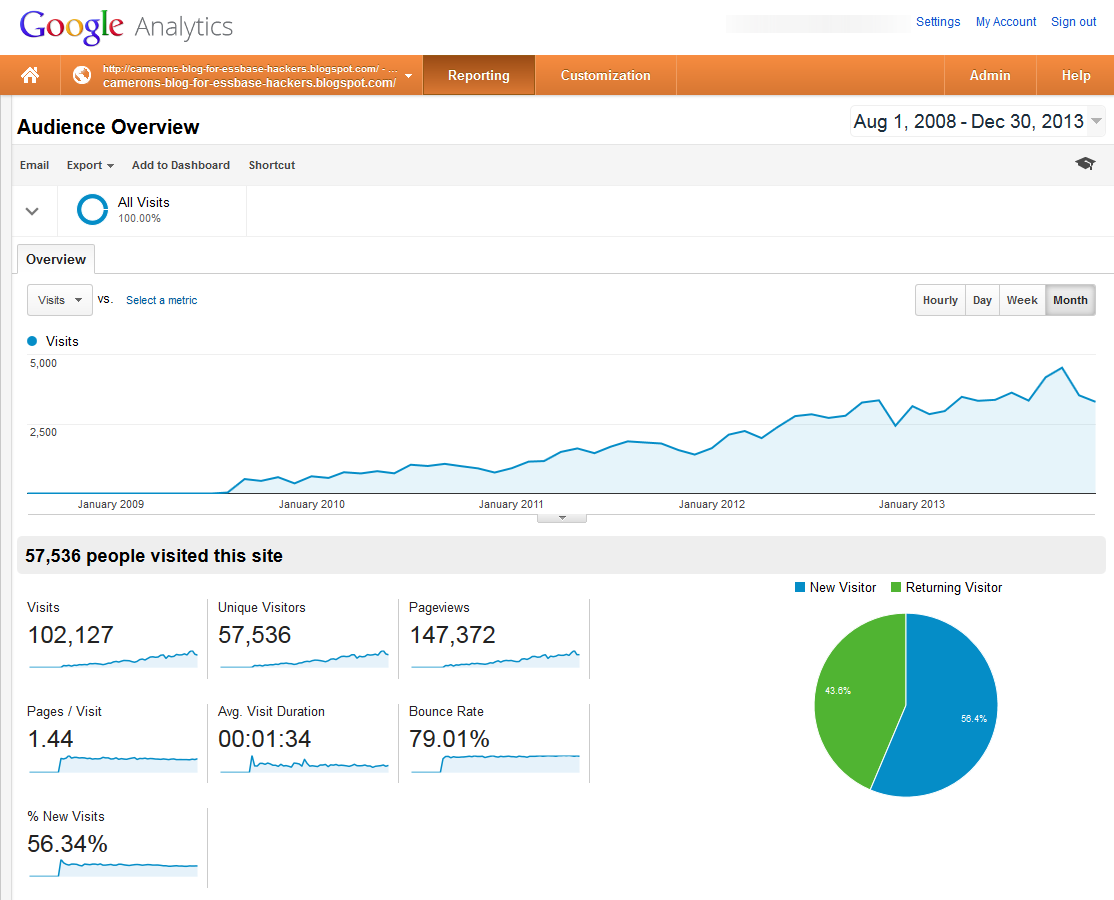
How many of you have read this blog from its inception?  Just under 60,000, according to GA.  You can see how the audience growth really hit its stride in 2012.


For giggles, I like to look at BlogSpot’s own numbers which show “better” values.  Alas, the difference in data is due to all of the automated web crawlers that search for content.  GA is able to filter that out, hence the lower numbers.
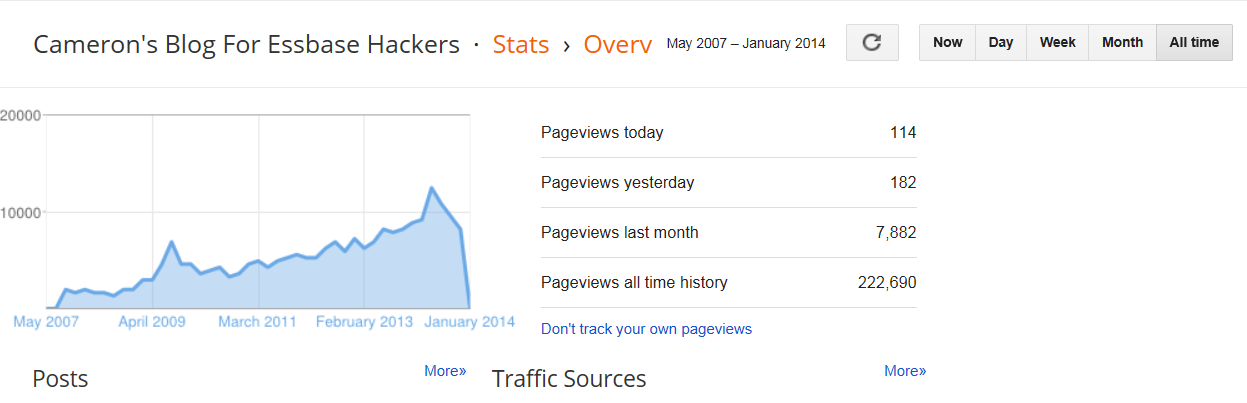

Regardless, there’s a lot of you reading this blog, for which I am thankful.

Where are you from?

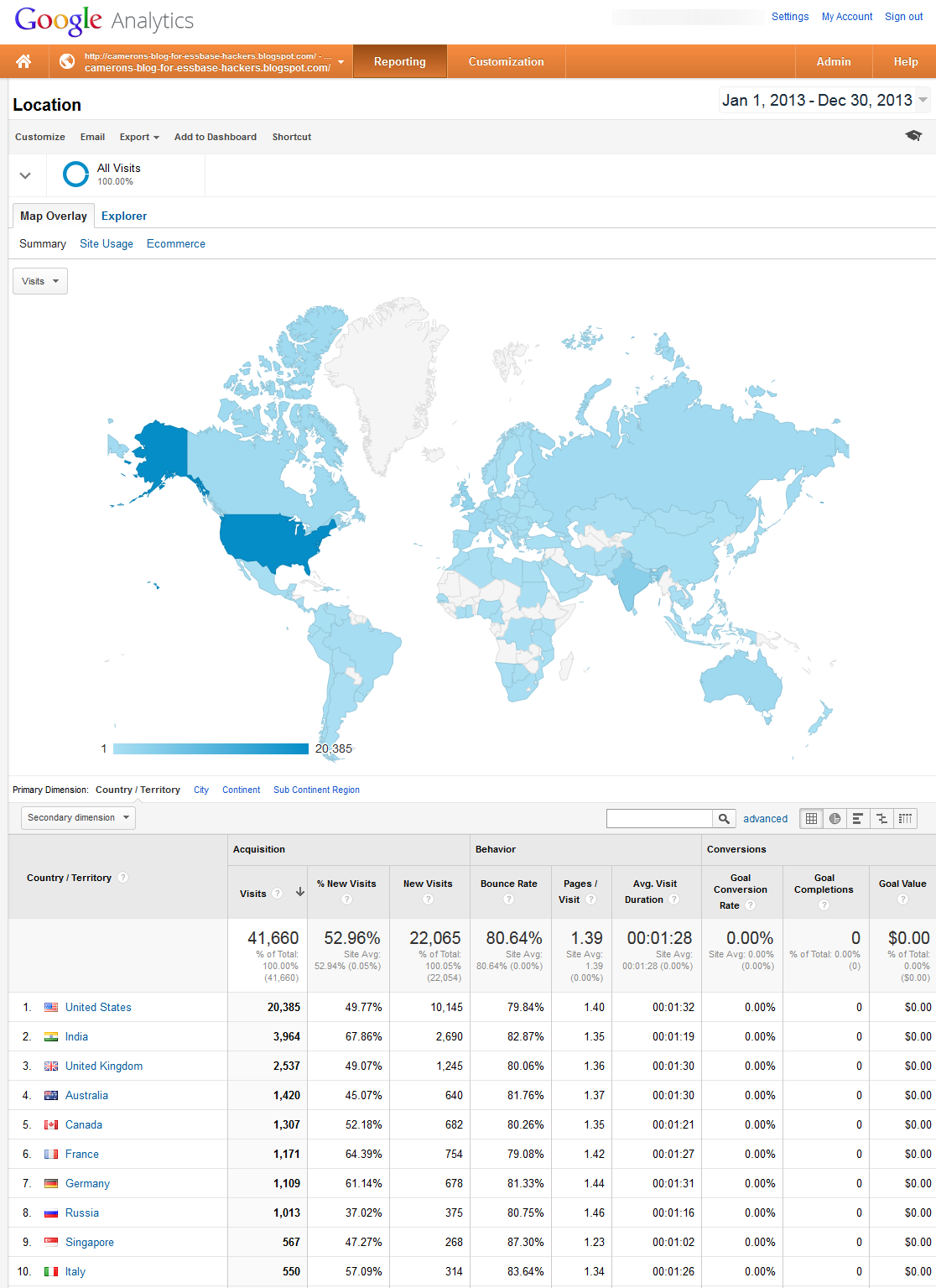
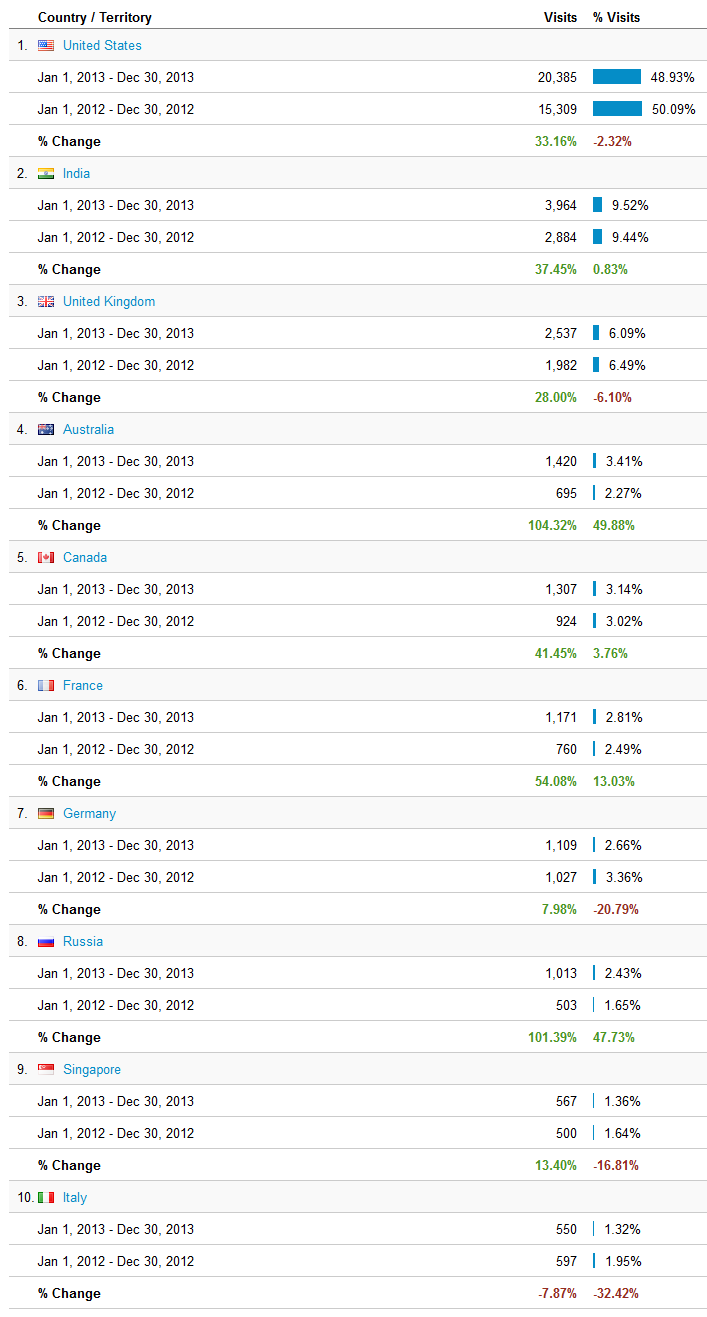
All over the world, actually.  Not all that surprisingly, the United States is my primary audience.  India, given its population and IT presence, is also not a shock.  I am pleased that my (distant) cousins in the United Kingdom are number three and am amazed at Australia’s high rankings, although I have to put that down to my ODTUG Seriously Practical conference.  

YoY by country

You can see that although the absolute numbers in the US are higher, the blog is becoming more international in its readership as the States are actualy just over 2% down as a percentage of total readers.


Otherwise, in the top 10 countries, it’s a case of growth, except for Italy.  I put that down to the economic disaster that is southern Europe.
 

What about the U.S. of A.?

What’s up with Wyoming?  I guess cowboys don’t need Essbase.


Want to know where the most Essbase activity exists in the States?  Take a look at the top ten.
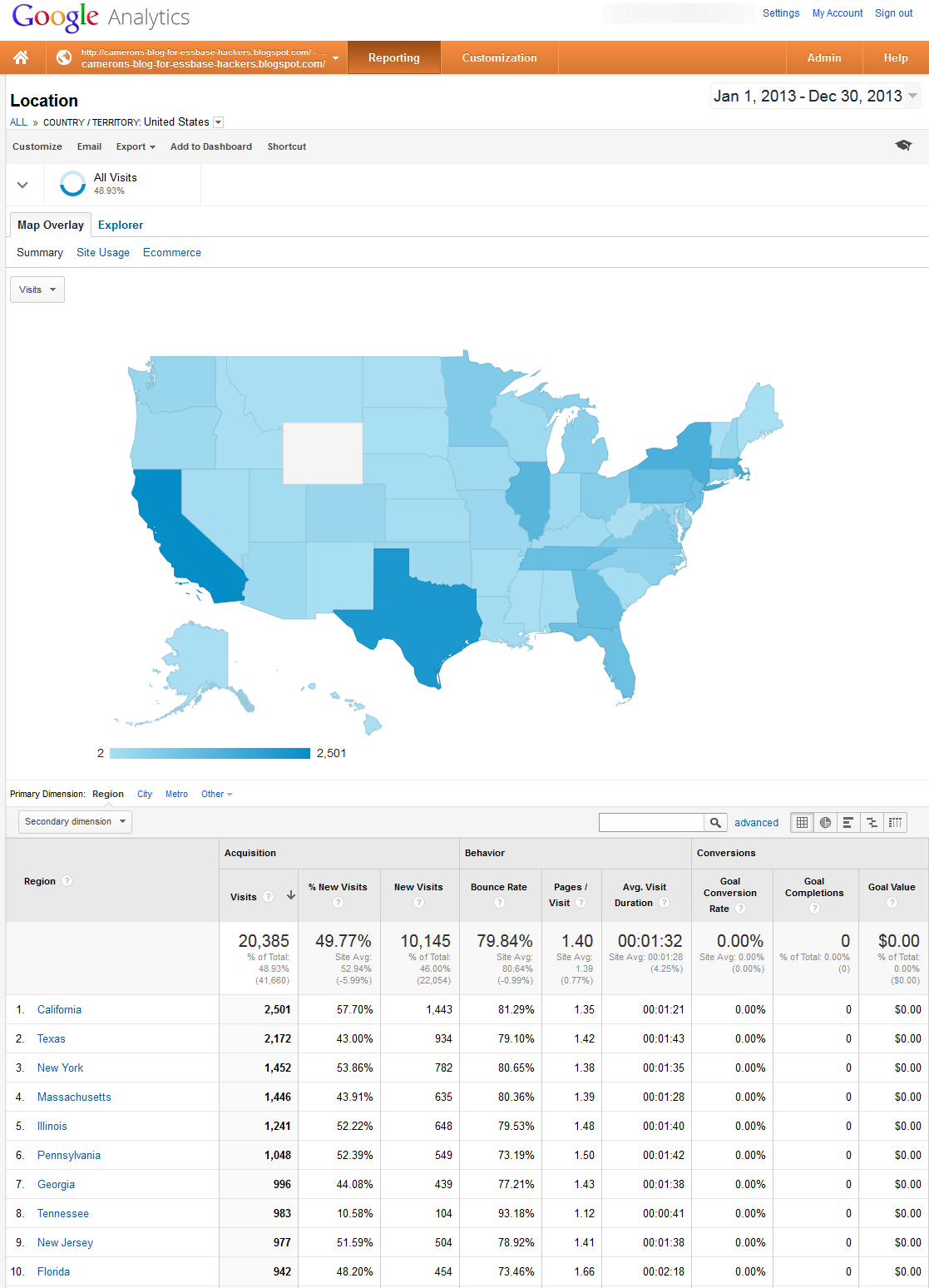

To be absolutely fair, I am not sure that the top ten stats really and truly are where the most Essbase activity exists as I seem to have consulted in most of those states at one time or another.  It could be a trailing effect (assuming that I do not leave my clients in a state of outrage) from me being there.  


Also, it isn’t surprising that large populous states have a lot of readers but it is still interesting to see how the numbers fall out.

YoY by state

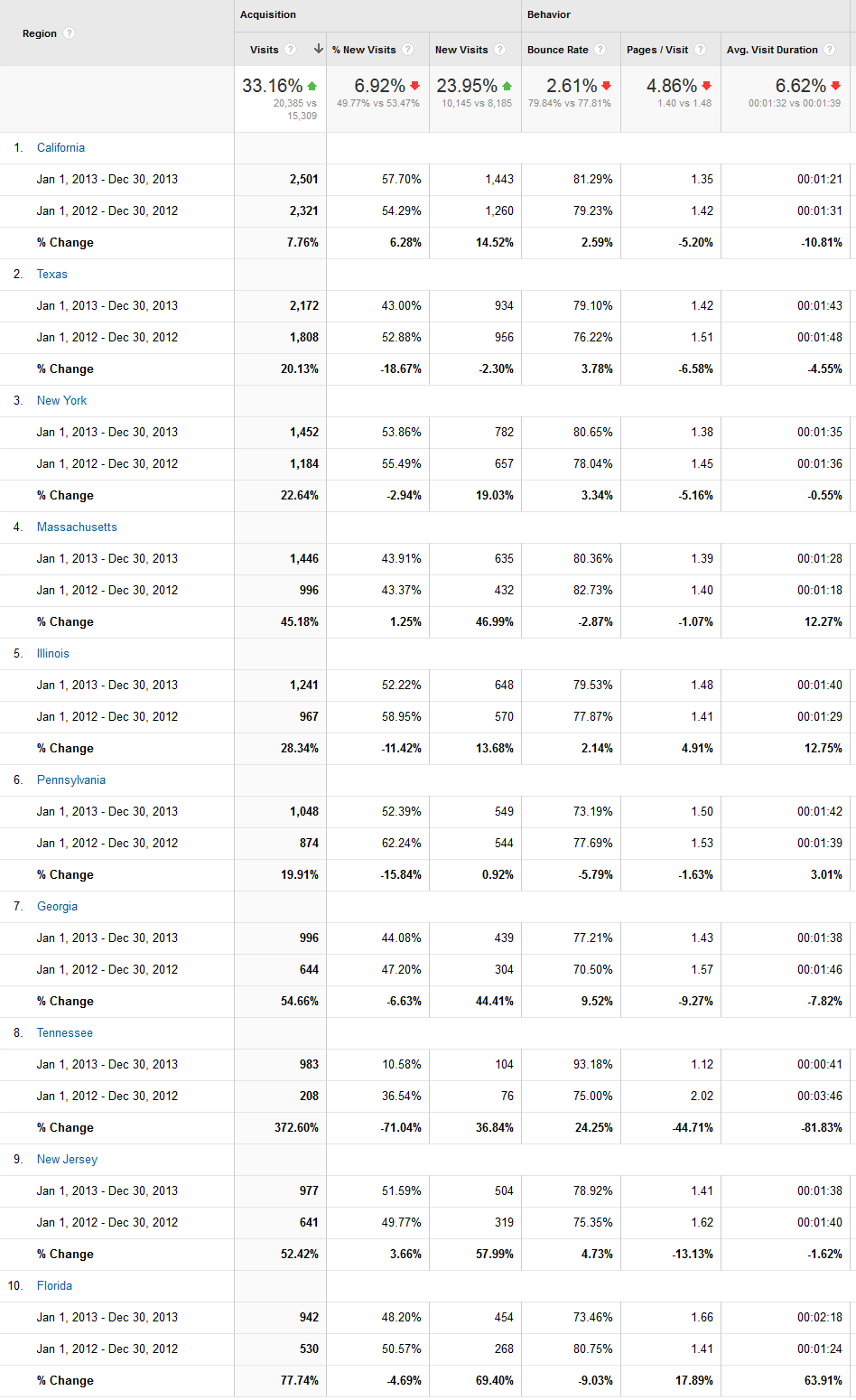
This blog was super popular in Tennessee, Florida, Georgia, and New Jersey.  The other top ten states saw growth, but not to the same level.  California was almost flat – hmm, what do I have to do to appeal to them?
 

Who are you?

No, I can’t tell who you are, really, but I can tell (in aggregate) where you are from and your primary language.

Your providers

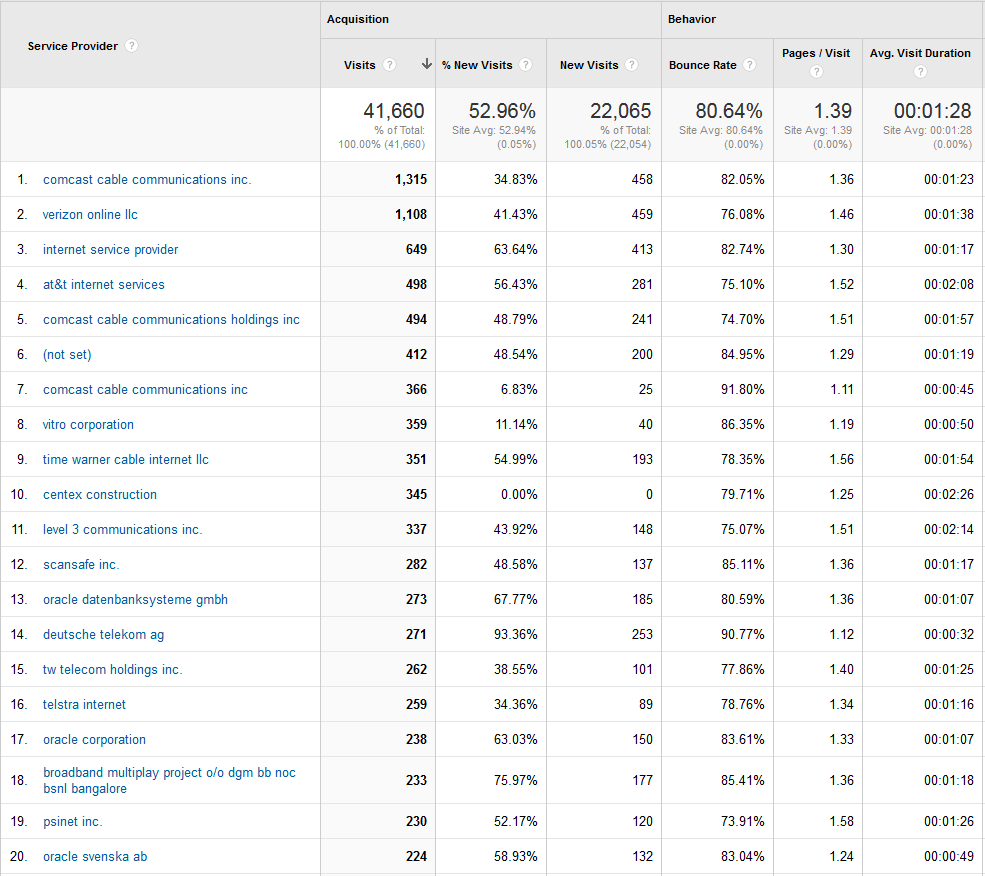
This is primarily a US blog, so it is not a shock to see Comcast trump Verizon.


Individual corporations are harder to spot as so often they use the big providers (including the intriguingly named “Internet Service Provider” one).  It is kind of cool to see that Oracle reads this blog, if only to identify the mistakes and have a good laugh.
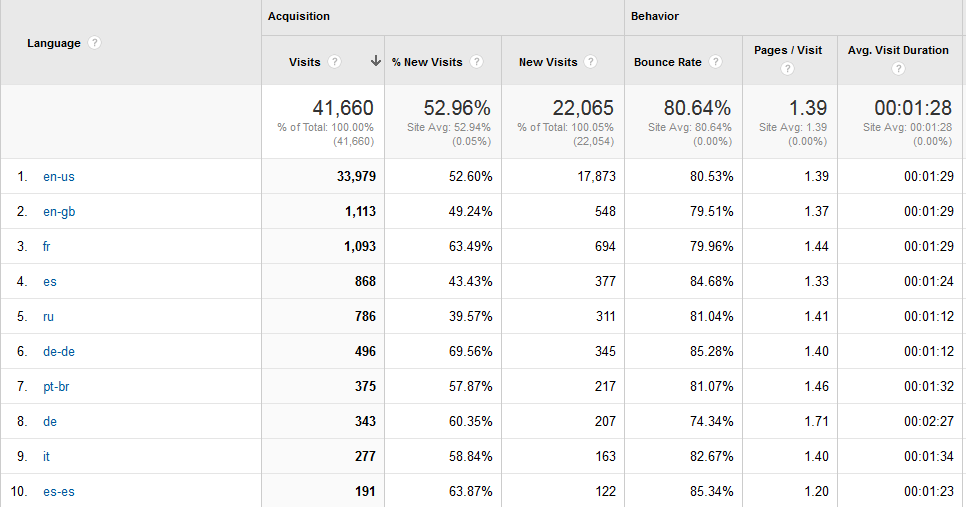
Tower of Babel

English (‘Murican and Queen’s Own), French, Spanish, Russian, German, and Portuguese (Brazilian) are the primary languages.
How did you get here?

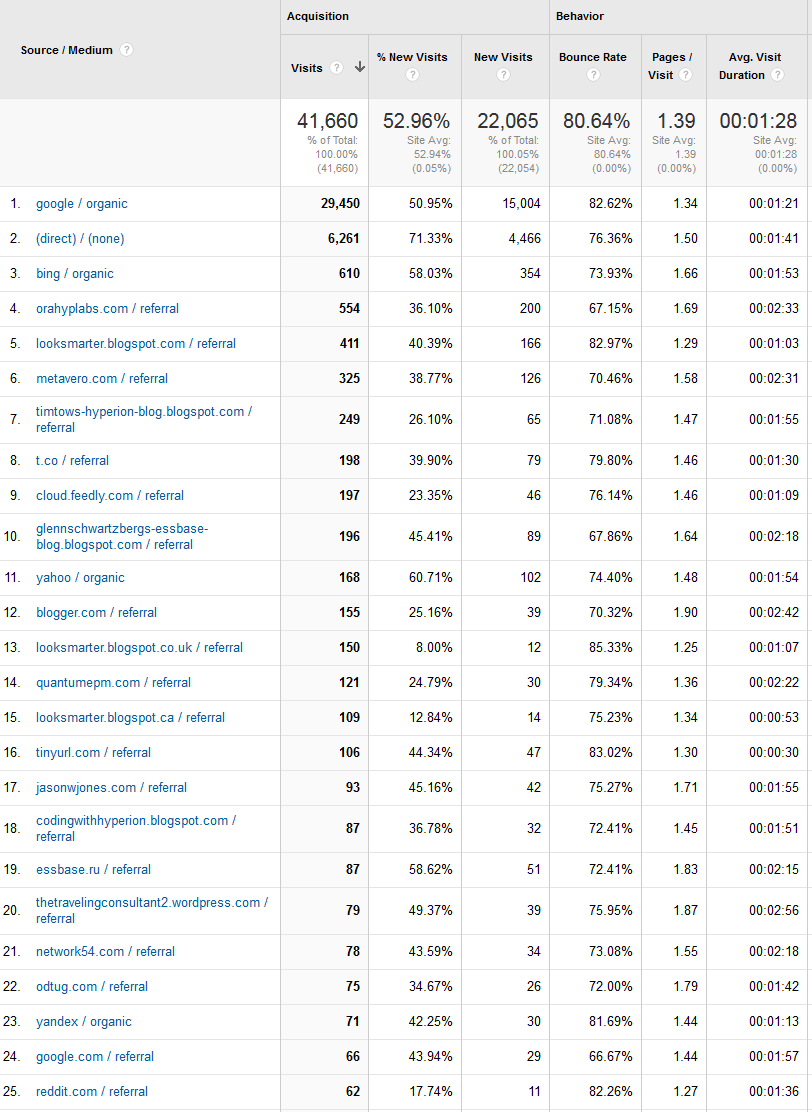
Most of you came from Google, then bookmarks, then Bing (I am having visions of Bing Crosby doing one of his jazzier routines), and then blogs.


I find it interesting that Edward’s blog is ranked number five as it is (mostly) not updated very often.  Of course, when there is a new post, an awful lot of people read it, hence the high referral rate.  Or maybe they go there first, get disappointed at the lack of new content (Edward, can you tell I am beseeching you to write more?), and then in reluctance turn to my blog.  
What do you use to read this blog?

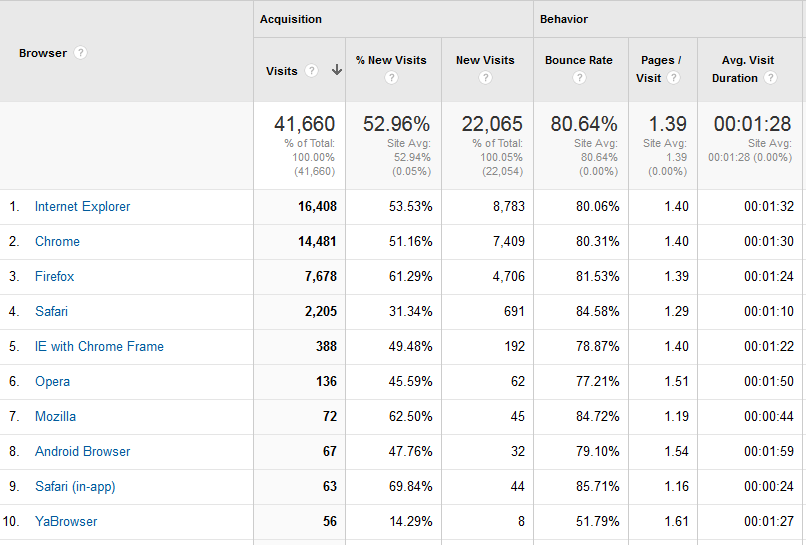
The top ten are no great surprise.  Explorer continues as the corporate standard -- people who don’t work for corporations don’t much care for Essbase, as hard as that may be to believe.  As a Firefox fan, I am surprised at Chrome’s second place finish.  I love the many add-ons that Firefox allows and as far as I can tell, Chrome is a take-it-or-leave-it proposition.  To each his own, I suppose.


Not much of the readership is on mobile if I understand how browsers get reported.  Android devices pip Apple’s products, but just by a hair.

What do you care about?

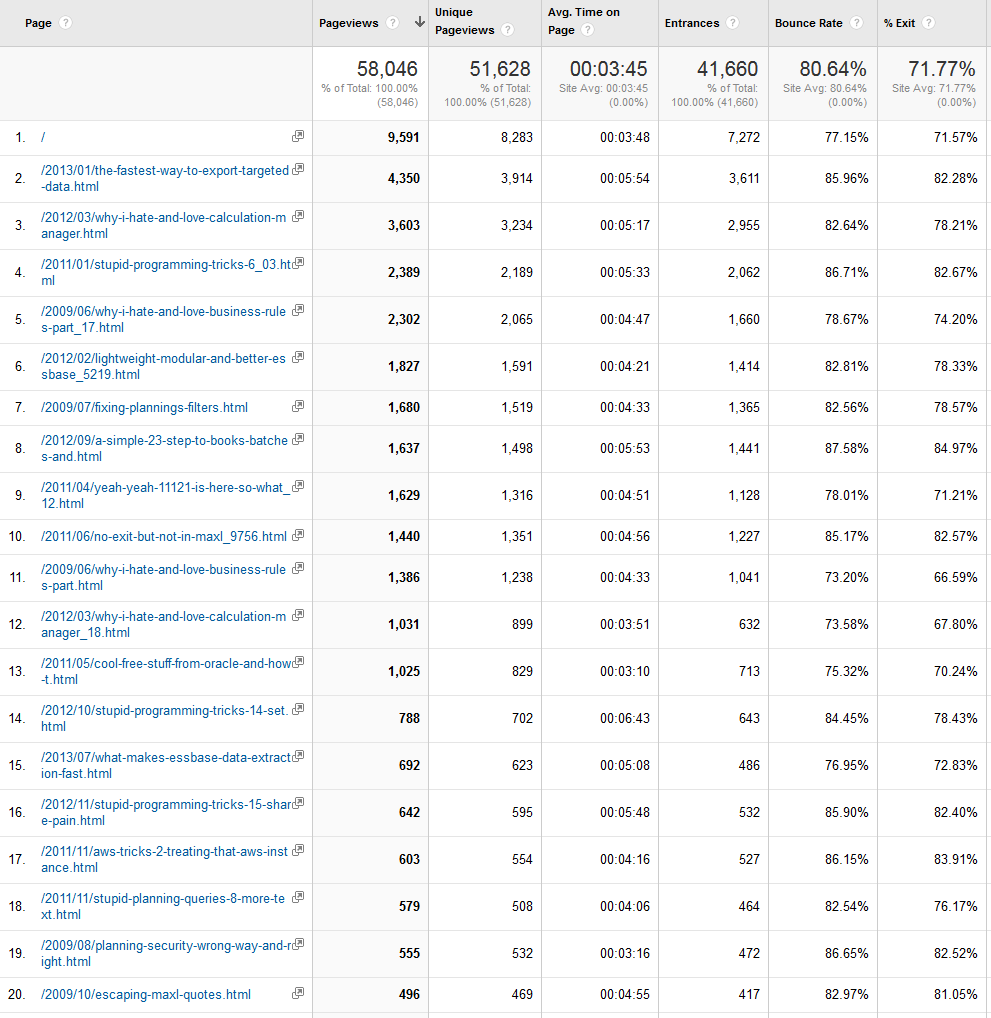
Ah, here’s the interesting bit.  Other than the first entry, which represents this blog’s home page, I can tell that in 2013 you cared about:
  • Data export
  • Calculation Manager
  • Hyperion Business Rules
  • BSO Backups
  • Making Planning’s filters METAREAD
  • 11.1.2.1 (this one puzzles me given the latest release is 11.1.2.3)
  • Error handling in MaxL
  • Offerings from Oracle Support
  • Various Essbase tricks, features, and frustrations
  • Data export approaches from Essbase
  • Amazon Web Services


If you look at the year of the post, you’ll see that of the top 20, only one post, the on an undocumented MDX function called NONEMPTYBLOCK, came from 2013.  The rest of the entries are “famous” in that they answer perennial questions and thus get read a lot.  Note to self -- you must find more undocumented MDX keywords and blab about them to world+dog.

Where do we go from here?

The above is sort of like hitting you over the head with a spreadsheet.  Numbers yes, but what does it all mean?


I think this blog’s continued success, as borne out by the above data, mean a couple of things:
  • A slightly changed emphasis in effort
  • Deeper, longer, blog posts
  • Proof that I am doing the right thing

A slight change of emphasis

I do spend quite a bit thinking about what I write and even more time doing the writing.  I am very encouraged by your support of this blog and am committed to continuing its success.  In an attempt to have a life/be gainfully employed/do all of the other volunteer work I have purposely cut back a bit from the forums as I simply can’t do everything I want to do and do it at the same (at least to me) high level.  


Don’t worry (or maybe rapture is the correct emotion if you are not a fan of my forum contributions), I will not be withdrawing from Network54/OTN by any means, but my day is 24 hours, just like yours, and I can’t create time where none exists.

More of the same, but better

With that in mind, what I can promise (I hope) is more of the deeply researched posts with the same attention to detail.  Yes, sometimes the posts will be slightly shorter (I have one on Excel coming up that isn’t very involved although it lost me an afternoon of my life trying to figure it out) and yes, the same linked references to things Not Oracle EPM will continue.  As always, don’t bother clicking if you don’t wish to, but I do hope that you too have interests outside of work, and that maybe you’ll share some of my admittedly odd interests.

Hopefully, this is the right thing to do

As Maurice Chevalier once sang in I’m Glad I’m Not Young Anymore, “I’ve never been so comfortable before”.  What do I mean by this?  No, I will not be starring in a Broadway revival of Gigi (the mind recoils).  Neither is Methuselah my patron saint.  But consistently writing this blog for so long has given me the perspective and confidence of hard data.  Experience does sometimes equal serenity and if I will never have the je ne sais quoi of Chevalier then at least I have the numbers as noted in the above sections that prove what I’m writing is useful to more than just me.


Maybe a slightly less cynical take on all of this is by Messrs. Armstrong, Crosby, Sinatra, and the exquisite Miss Lee in their opening for the 1959 Bing Crosby Oldsmobile Show (What, you can’t see me as a fan of Der Bingle?  It’s true, I promise you (to quote a song), as I have pretty much rejected all of American culture post-1965.).  This blog has been around, and perhaps its forevermore is shorter than before, but I’m glad it’s not young anymore because the best is yet to come.  Oh, the puns, they hurt.

It’s all about you

Something that we in the EPM world might forget is that numbers are meaningless without context, and in the case of this blog, that context is you.  I could write until the cows come home but if you didn’t read it, there wouldn’t be much point.


Be seeing you.

24 December 2013

Shared Services Stupid Trick No. 3

Introduction

Writing this blog post was an absolute stinker.  It really is a pity (at least from my bank account’s perspective) that I don’t get paid for this stuff because I spent days figuring out how to write this.  Weekends gone – poof!!!  Evenings eaten up – zip!!!  Walking around in a fog thinking about how this has to work – duh!!!  Sigh.  All because, really, my mad SQL skilz are pretty bad.  But I finally stumbled into the answer and, if you continue on, I will stop whining, show you the code, give a whole bunch of cool links that illustrate interesting SQL theory, somehow relate this all to Essbase, and finally show this in action.  It actually is kind of cool – or at least I tell myself that in an attempt to convince myself that this was worthwhile.  Read on and decide for yourself.

The problem

I started this series off with figuring out how to get a simple parent child view of users and groups in Shared Services and then followed it up querying the direct security against said Shared Services objects.


But as I wrote, I then wanted to know how to get the implicitly assigned (assigned at higher levels in the group security and then inherited downwards) user security and to do that I would need to figure out how to display group membership inheritance at a user level.  And then I would need to do the same thing, but only for security, which isn’t really in a parent/child format.  Oh, interesting.

A review of Common Table Expressions

I have used CTEs quite a bit in this blog, mostly for recursive query purposes as so much of what we do in Oracle OLAP land (Essbase, Planning, HPCM, etc.) is hierarchal.  I also like CTEs because they are an easy way to break complicated code into understandable chunks and do away with most subqueries which I personally find very difficult to follow.  

Even Oracle agrees

All of your PL/SQL aficionados out there be aware that CONNECT BY has been deprecated and CTEs are the way forward in Oracle as well.  Again, I like the syntax better than that command, and the example you will see (sooner or later) below is in Microsoft’s T-SQL.  Yeah, I know, I need to install my 11.1.2.3 install with Oracle.  It’s on my list of Things To Do.

Some theory for you to mull over

If you’ve been reading this series of queries (there actually is one more to come, but it may come in the new year) you know that I’ve used CTEs to derive hierarchy.  There is actually quite a bit out there on hierarchy theory out there on the web.  I found this excellent overview by Mike Hillyer on hierarchies in MySQL.  


Don’t get hung up on the flavor of SQL – it is an excellent overview on how hierarchy in SQL works and even more importantly, it goes into the different models for dealing with hierarchy in SQL:  Adjacency List and Nested Set.  Read Mike’s (btw, I have no idea who Mike is, but it is an excellent post and is of a style I try, and usually fail, to emulate) post, see that I have used the inferior Adjacency List approach, and finally note that there is an entire book about managing hierarchies in SQL:  Joe Celko’s Trees and Hierarchies in SQL for Smarties.  (NB – My Wheel of Trust add-in for Firefox says don’t go to the link in Mike’s blog post; the one I have linked is to Amazon.)  I have ordered the book and reflected yet again that maybe dropping out of my school’s Computer Science program in favor of Business Administration was not the best academic decision I could have made.  So it goes.

A tale of two queries

All of the above is prelude – the real meat of this post is the generation of two separate queries.  At Cameron’s Blog for Essbase Hackers, you get two for the price of one.  Actually, since it’s free (cf. my comment about how I would be rich if I wrote this for a client), you get two for the price of none, but I digress yet again.

Query the first

If you think about how Shared Services represents inherited rights (effective roles in Shared Services Speak), there is an Inheritance Information column that shows how the user received rights as shown below.


As I wrote about in the last post, I most definitely tried to use SQL Server’s SQL Profiler to try to capture the SQL that created the above report.  If the best programmers are lazy then I must be awesome because sloth is one of my manifold sins.  Alas, this is all I get out of SQL Profiler:


Shared Services, like the other EPM products, is a mix of SQL metadata and application level logic and those stored procedures are created and destroyed by the application layer.  This just meant I had to come up with a different approach to figuring out how to get that hierarchy.


I spent quite a bit of time trying to figure out how to present the information (the above screen shot from Shared Services is okay for a single user but not a good fit for multiple users) and surveyed my storied Stupid Tricks email list consisting of the Best and Brightest.  Celvin Kattookaran and Markus Shipley both suggested that both the user group inheritance (the ancestry of the user) and the product provisioning path (the ancestry of the roles) be displayed on a single line.  

Use case

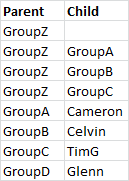
Imagine a Parent Child table as below:


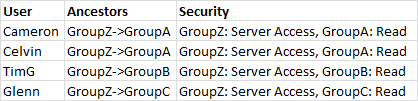
Then imagine the following provisioning:


I wanted to create something that looks like this:


Or at least something close to the last setup as that gives me both group ancestry (who’s in what) and provision (who has what).  In the end I came up with something pretty close to this as the bit about having the group assignment within the security column turned out to not be necessary.  

What did I already have

I already had a hierarchical query from part one of this series that would give me something like this:


Nice, but how oh how oh how do I translate that to something that looks like the Ancestors column?  The trick, thanks to an assist from Dan Pressman, is to use the recursive nature of a CTE and the additive nature of fields within that CTE to build the Ancestors field.  Think about what I just wrote – you can, in essence, treat a recurisve CTE like a traditional loop and concatenate strings (or mathetmatically add values to numeric fields).  Pretty cool, eh?  Let’s look at the code:
USE HYP_SharedServices
GO


WITH TopCat AS
(
     --    Set up the anchor member
     SELECT
           G.LOWER_IDENTITY_ID AS 'Parent_ID'
           , G.LOWER_IDENTITY_ID AS 'Child_ID'
           --, G.NAME AS 'Parent'
           , CAST('' AS VARCHAR(200)) AS 'Parent'
           , CAST(G.NAME AS VARCHAR(200)) AS 'Child'
           --    Need to CAST as VARCHAR(200) to allow UNION ALL
           --, CAST('' AS VARCHAR(200)) AS 'Child'
           , 1 AS 'Gen'
     FROM CSS_GROUPS G
     -- This is where you put in the topmost member of the tree
     --WHERE G.NAME = 'GroupZ'
     --WHERE G.NAME = 'ESB_Essbase'
     WHERE G.NAME = 'PLN_SampApp1'
),
Related AS
(
     --    Almost Parent/Child, but not quite
     --    I made this a separate CTE because it's cleaner down in the true Parent/Child query
     SELECT
           GM.LOWER_GROUP_IDENTITY AS 'Parent_ID'
           , GM.LOWER_MEMBER_IDENTITY AS 'Child_ID'
           --, G1.NAME AS 'Parent'
           , CAST(G1.NAME AS VARCHAR(200)) AS 'Parent'
           -- 1 = user, 2 = group; Cast both as VARCHAR(200) to allow UNION ALL
           , CASE
                 --    Subqueries for Users and Groups to get the names
                 WHEN GM.MEMBER_TYPE = 1 THEN (SELECT CAST(U.NAME AS VARCHAR(200)) FROM CSS_USERS U WHERE U.LOWER_IDENTITY_ID = GM.LOWER_MEMBER_IDENTITY)
                 WHEN GM.MEMBER_TYPE = 2 THEN (SELECT CAST(G2.NAME AS VARCHAR(200)) FROM CSS_GROUPS G2 WHERE G2.LOWER_IDENTITY_ID = GM.LOWER_MEMBER_IDENTITY)
                 END
           AS 'Child'
     FROM CSS_GROUP_MEMBERS GM
     INNER JOIN CSS_GROUPS G1 ON
           GM.LOWER_GROUP_IDENTITY = G1.LOWER_IDENTITY_ID
),
ParentChild AS
(
     -- Set the anchor
     SELECT  
              T.*  
            , CAST( '' AS nvarchar(4000) ) as Ancestors
            , CAST( '' AS nvarchar(4000) ) AS sortkey
      FROM TopCat T
     UNION ALL
     -- Oooh, fancy, we're going recursive here
     SELECT    
              R.Parent_ID  
              , R.Child_ID  
              --, R.Parent
              -- This is the really cool part
              , PC.Child -- Overload from recursive query that is the same value as R.Parent
              , R.Child
              -- Note that is is being incremented as it advances a generation, items at the
              -- same generation are the function of the INNER JOIN.
              , PC.Gen + 1
              , PC.Ancestors
                + CASE WHEN LEN( PC.Ancestors ) = 0  
                       THEN ''
                       ELSE '/'
                   END
                + R.Parent AS Ancestors
              , PC.sortkey + LEFT(R.parent + space(50), 50) AS sortkey
       FROM   Related R     
              --    This is the recursive JOIN that ties child to parent
              INNER JOIN ParentChild PC
                      ON R.Parent_ID = PC.Child_ID  
)  
SELECT
    Parent
    , Child
    , Gen
    , Ancestors
    , sortkey
FROM ParentChild


ORDER BY Gen, sortkey + LEFT(Parent + space(50), 50)


And that gives us something pretty darn close to what I wanted, at least for the group inheritance part of it:


And if I change this to something a little more complicated like the PLN_SampApp1 group I used before, the query (I am only changing the anchor in the TopCat CTE) returns:


Btw, you will note that GroupZ and PLN_SampApp1 are in the Child, not the parent, fields.  This is not by accident and is needed to build the lineage in Ancestors.


Nice, isn’t it?  Pretty awesome, actually, and half of what I am looking for, but it’s not enough.  I still want to know:  who’s a user and who’s a group (so I can filter), what at each level is the inherited security, and finally at the user level, what is the inherited security?  Demanding, aren’t I?

Query the second

I already have a query that gives me the directly assigned security to a user or group although of course that isn’t quite the same as a query that returns that information in an inherited mode for each level of the hierarchy.  


I spent a lot of time trying to meld that direct query with the one Dan helped me with.  It was more time than I really want to think about and was one of my better exercises in frustration.  


It finally occurred to me that what I really wanted to do was take this:


And combine it with this:


And all I needed to do was:
  1. Put both queries into CTEs (and the queries were already 95% there with just the last displaying SELECT statement to put into a CTE)
  2. LEFT JOIN the direct security to the inherited group ancestry query.


But this left me in a quandary – could I apply a recursive CTE to the output of a recursive CTE?  And I was getting confused with all of the code – I needed a simple example of this.  To my delight and surprise I found one with a personal connection.

Scotland the Brave

I went searching the web for a super simple CTE and happily found one that had both a CTE and an example of how to do build an Ancestors field on stackoverflow.com.  If you are not sure how an Adjacency List CTE manipulates data, this is the one to read.


And even better, this query mentions one of my favorite places on earth, Edinburgh, Scotland as I come from lowland Scots stock (where did you think “Cameron” came from?) .  Here’s the query in its direct form:
--    Declare temporary table
   DECLARE @tbl TABLE (
    Id INT
   ,[Name] VARCHAR(20)
   ,ParentId INT
   )


--    Value temporary table
INSERT INTO @tbl( Id, Name, ParentId )
VALUES
(1, 'Europe', NULL)
,(2, 'Asia',   NULL)
,(3, 'Germany', 1)
,(4, 'UK',      1)
,(5, 'China',   2)
,(6, 'India',   2)
,(7, 'Scotland', 4)
,(8, 'Edinburgh', 7)
,(9, 'Leith', 8)
;


--    1st recursive CTE
WITH  abcd
   AS (
         -- anchor
       SELECT  id, [Name], ParentID,
               CAST(([Name]) AS VARCHAR(1000)) AS "Path"
       FROM    @tbl
       WHERE   ParentId IS NULL
       UNION ALL
         --recursive member
       SELECT  t.id, t.[Name], t.ParentID,
               CAST((a.path + '/' + t.Name) AS VARCHAR(1000)) AS "Path"
       FROM    @tbl AS t
               INNER JOIN abcd AS a
                 ON t.ParentId = a.id
      )
SELECT  * FROM abcd


We can see the descendants of Europe and Asia:


So what happens if I want to try out that second recursive CTE?  The code would then look like this:
--    1st recursive CTE
WITH  abcd
   AS (
         -- anchor
       SELECT  id, [Name], ParentID,
               CAST(([Name]) AS NVARCHAR(1000)) AS "Path"
       FROM    @tbl
       WHERE   ParentId IS NULL
       UNION ALL
         --recursive member
       SELECT  t.id, t.[Name], t.ParentID,
               CAST((a.path + '/' + t.Name) AS NVARCHAR(1000)) AS "Path"
       FROM    @tbl AS t
               INNER JOIN abcd AS a
                 ON t.ParentId = a.id
      ),
--    2nd recursive CTE       
TryMe AS
    (
        SELECT
            A.id, A.Name, A.ParentId, A.Path
            , CAST(A.Id AS NVARCHAR(1000)) AS "Ancestry"
        FROM abcd A
        WHERE A.Id = '1' --OR A.Id = '2'
        UNION ALL
        SELECT
            R.Id , R.Name, R.ParentId, R.Path
            , CAST(CAST(T.Ancestry AS NVARCHAR(1000))
                + '/' + CAST(R.ID AS NVARCHAR(1000)) AS NVARCHAR(1000)) AS "Ancestry"
        FROM
            abcd R
        INNER JOIN TryMe AS T
            ON R.ParentId = T.Id
    )
SELECT  * FROM TryMe


Note that I made the TryMe anchor just Europe as I am trying to make the output as straightforward as possible.  That second query gives me:


Isn't that stoatin’? This code proves that a recursive CTE can call on the output of another CTE.  Once I knew that, the road ahead was clear.

Slight digression

My grandfather, who hailed from Bathgate, West Lothian, liked this tounge-twister:
The Leith police dismisseth us
They thought we sought to stay;
The Leith police dismisseth us
They thought we'd stay all day.
The Leith police dismisseth us,
We both sighed sighs apiece;
And the sighs that we sighed as we said goodbye
Were the size of the Leith police.


It is quite hard to say, even slowly.  And completely impossible when one is giddy on geek triumph.

Combining the CTEs

So what does it all look like?  Like this:
USE HYP_SharedServices
GO


--    Declare the anchor member as a variable as it will be referenced more than once
DECLARE @TopCat AS nvarchar(4000)
SET @TopCat = 'GroupZ' ;


--    Define the anchor member
WITH TopCat AS
(
     --    Set up the anchor member
     SELECT
           G.LOWER_IDENTITY_ID AS 'Parent_ID'
           , G.LOWER_IDENTITY_ID AS 'Child_ID'
           --, G.NAME AS 'Parent'
           --    Need to CAST as VARCHAR(200) to allow UNION ALL
           , CAST('' AS VARCHAR(200)) AS 'Parent'
           , CAST(G.NAME AS VARCHAR(200)) AS 'Child'
           , CAST('Group' AS VARCHAR(200)) AS 'Type'
           , 1 AS 'Gen'
     FROM CSS_GROUPS G
     -- This is where you put in the topmost member of the tree
     WHERE G.NAME = @TopCat
),
-- Get related information
Related AS
(
     --    Almost Parent/Child, but not quite
     --    I made this a separate CTE because it's cleaner down in the true Parent/Child query
     SELECT
           GM.LOWER_GROUP_IDENTITY AS 'Parent_ID'
           , GM.LOWER_MEMBER_IDENTITY AS 'Child_ID'
           --, G1.NAME AS 'Parent'
           , CAST(G1.NAME AS VARCHAR(200)) AS 'Parent'
           -- 1 = user, 2 = group; Cast both as VARCHAR(200) to allow UNION ALL
           , CASE
                 --    Subqueries for Users and Groups to get the names
                 WHEN
                        GM.MEMBER_TYPE = 1
                    THEN
                        (SELECT
                            CAST(U.NAME AS VARCHAR(200))
                        FROM CSS_USERS U
                        WHERE U.LOWER_IDENTITY_ID = GM.LOWER_MEMBER_IDENTITY)
                 WHEN
                        GM.MEMBER_TYPE = 2
                    THEN
                        (SELECT
                            CAST(G2.NAME AS VARCHAR(200))
                        FROM CSS_GROUPS G2
                        WHERE G2.LOWER_IDENTITY_ID = GM.LOWER_MEMBER_IDENTITY)
                 END
           AS 'Child'
           , CASE
                WHEN GM.MEMBER_TYPE = 2 THEN CAST('Group' AS VARCHAR(200))
                WHEN GM.MEMBER_TYPE = 1 THEN CAST('User' AS VARCHAR(200))
                END
            AS 'Type'
     FROM CSS_GROUP_MEMBERS GM
     INNER JOIN CSS_GROUPS G1 ON
           GM.LOWER_GROUP_IDENTITY = G1.LOWER_IDENTITY_ID
),
--    Recursive CTE to show the basic parent/child hierarchy
SimplePC AS
(
    -- Set the anchor
    SELECT
        T.*
    FROM TopCat T
    UNION ALL
    -- Oooh, fancy, we're going recursive here
    SELECT
        R.Parent_ID
        , R.Child_ID
        , R.Parent
        , R.Child
        , R.Type
        , PC.Gen + 1
    FROM Related R     
    --    This is the recursive JOIN that ties child to parent
    INNER JOIN SimplePC PC
        ON R.Parent_ID = PC.Child_ID
    ),
--    Figure out all of the possible roles in each project
RolesByProduct AS
(
    SELECT
        R.LOWER_IDENTITY_ID
        , R.ROLE_ID
        , R.PRODUCTCODE
        , R.PRE_CONFIG_STATUS
        , L.VERSION
        , L.NAME
        , L.DESCRIPTION
    FROM CSS_ROLES R
    INNER JOIN CSS_ROLE_LOCALES L
        ON R.LOWER_IDENTITY_ID = L.LOWER_IDENTITY_ID
    WHERE
        LOWER(L.LOCALE) IN (LOWER('en_US'))  
        AND L.LOWER_NAME LIKE LOWER(N'%')
        AND LOWER(L.VERSION) = LOWER (N'11.1.2.0')
),   
--    Figure out direct security assignments for all levels of the hieararchy.
--    Use the undocumented view VW_APPLICATIONS to get a pretty descriptions of the
--    products and projects.
DirectSecurity AS
    (
    SELECT
        --PC.*
        --I.LOWER_ROLE_IDENTITY
        --, I.LOWER_APPLICATION_ID
        PC.Parent_ID
        , PC.Child_ID
        , PC.Parent
        , PC.Child
        , PC.Gen
        , PC.Type
        , VA.PROJECT_NAME
        , VA.APP_DISPLAY_NAME
        , R.NAME
        , R.DESCRIPTION
        , VA.PRODUCT_NAME
    FROM SimplePC PC
    LEFT OUTER JOIN CSS_PROVISIONING_INFO I
        ON PC.Child_ID = I.LOWER_MEMBER_IDENTITY
    LEFT JOIN VW_APPLICATIONS VA
        ON I.LOWER_APPLICATION_ID = LOWER(VA.APPLICATION_ID)       
    LEFT JOIN RolesByProduct R
        ON I.LOWER_ROLE_IDENTITY = R.LOWER_IDENTITY_ID
    ),
--    Parent/child ancestor lineage
ParentChild AS
(
     -- Set the anchor
     SELECT  
              T.Parent_ID
            , T.Child_ID
            , T.Parent
            , T.Child
            , T.Gen   
            , T.Type
            , CAST( '' AS nvarchar(4000) ) as Ancestors
            , CAST( '' AS nvarchar(4000) ) AS sortkey
      FROM TopCat T
     UNION ALL
     -- Oooh, fancy, we're going recursive here
     SELECT    
              R.Parent_ID  
              , R.Child_ID  
              --, R.Parent
              , PC.Child -- Overload from recursive query that is the same value as R.Parent
              , R.Child  
              , PC.Gen + 1
              , CAST(R.Type AS VARCHAR(200))
              , PC.Ancestors
                + CASE WHEN LEN( PC.Ancestors ) = 0  
                       THEN ''
                       ELSE '->'
                   END
                + R.Parent AS Ancestors
              , PC.sortkey + LEFT(R.parent + space(50), 50) AS sortkey
       FROM   Related R     
              --    This is the recursive JOIN that ties child to parent
              INNER JOIN ParentChild PC
                      ON R.Parent_ID = PC.Child_ID  
            --    Cannot put an outer join in the recursive part of a recursive
            --    common table expression.
            --    But it sure would have been nice.
),
--    JOIN the direct security to the Ancestors inherited lineage query
AlmostThere AS
(
    SELECT
        PC.Parent_ID
        , PC.Child_ID
        , PC.Parent
        , PC.Child
        , PC.Gen
        , PC.Type
        , PC.Ancestors
        , PC.sortkey
        , ISNULL(DS.PROJECT_NAME + '|' + DS.APP_DISPLAY_NAME + '|' + DS.NAME + '|' + DS.DESCRIPTION + '|' + DS.PRODUCT_NAME, '') AS 'Security'
    FROM ParentChild PC
        LEFT OUTER JOIN DirectSecurity DS
            ON PC.Child_ID = DS.Child_ID
),
-- AlmostThere is, as the name implies, almost there but does not have security in an
-- inherited column
LastRecursive AS
(
    --    Set the anchor
    SELECT
        A.*
        , CAST('' AS NVARCHAR(4000)) AS 'Path'
    FROM AlmostThere A
    WHERE A.Child = @TopCat
    UNION ALL
    --    Recursive bit
    SELECT
        R.*
        , CAST(LR.Path + '/' + LR.Security AS NVARCHAR(4000)) AS 'Path'
    FROM
        AlmostThere R
    INNER JOIN LastRecursive LR
        ON R.Parent = LR.Child
)
SELECT  
    LR.Parent
    , LR.Child
    , LR.Gen
    , LR.Type
    , LR.Ancestors
    , LR.Path
FROM LastRecursive LR
ORDER BY Gen, sortkey + LEFT(LR.Parent + space(50), 50)


And that outputs:


Did you see that?  The ancestry in the Ancestors column (‘natch) and the group security inheritance in the Path column (double ‘natch).   That is straight from the fridge.  And this is for all groups, users, and levels.  What if I only want the users as I originally wrote?  Simply stick a WHERE clause to filter just Type = ‘User’ as below:
.
.
.
SELECT  
    LR.Parent
    , LR.Child
    , LR.Gen
    , LR.Type
    , LR.Ancestors
    , LR.Path
FROM LastRecursive LR
WHERE LR.Type = 'User'
ORDER BY Gen, sortkey + LEFT(LR.Parent + space(50), 50)


And that returns:


Let’s try it for PLN_SampApp1 while limiting the columns (I also cut back on the product provisioning information):


And finally ESB_Essbase:


That’s it – easy peasy lemon squeezy.  Except it wasn’t.  But now that’s it done, well, the work doesn’t seem so bad.  Except it was.   But it’s also all over.  Mostly.

That’s it?  Really?

So what do we now have in this three part series, other than proof I eat pain like candy?
  1. A query to get a Shared Services group into a parent/child hierarchy.
  2. A query that dives into provisioning and reports it against the parent/child hierarchy.
  3. A query (this post) that displays both the inherited group ancestry and the concomitant role provisioning.


And of course digressions into German literature, philosophy, Original Sin, the Invisible Hand, the architecture of Oracle EPM applications, their tables, CTE theory, Scotland, Edinburgh, tongue twisters, Bathgate, and 1950s hipster slang.  Like I wrote, value for money is what this blog is all about.  Or maybe this 14 page opus (at least where I draft all of this in Word) just my way of saying, “Merry Christmas!”


But are we done with this?  Nope, or at least I think that we’re not quite done.


It was mentioned to me in a Network54 thread that all of this was nice, but an XML-based approach that uses LCM output (always out of date, IMHO) was “better” because it could link across products.  That may be, but I have a sneaking suspicion that it would be easy to link the above (really, any of the three query types) to Planning security output which, miracle diablu, I appear to have written.


So the next challenge will be tying the Shared Services security to Planning security.  Can it be done?  Stay tuned to this blog.


Be seeing you.