A bit of a tease
I’m not talking about me. If anything I am more than a bit too straightforward. I try not think of all of the own goals I have scored in my Cameron-tells-it-like-it-is way when a bit of discretion would have been better employed. At least I am learning as I enter my dotage.
Nope, what I’m talking about is this first part of a three part blog post on how to achieve awesomeness in ASO Planning and beyond. I really wanted to do this all in one shot but it simply became overwhelming in its length and complexity, so I am reluctantly going to break it into three parts with this first one simply laying the ground work.
Here’s how I plan on putting it out in over the next three weeks:
What’s the mystery
As you read this, remember what’s in the title: Calculation Manager, ASO Planning, ASO Essbase procedural calculations, and BSO Planning. If you came to the Kscope14 session Tim German and I gave on ASO Planning I went a bit into this but there was simply no time to go into detail. You won’t remember what I am about to show you because it got cut. And, as I noted, this is just the introduction. Hopefully that will keep you coming back for the next two installments because what I stumbled into is pretty damn cool.
Here are the clews
Beginning with, I think, Planning 11.1.2.2, standard Essbase (Custom Defined Functions) CDFs are installed with every copy of Essbase. Surprised? They’re definitely there in Essbase 11.1.2.3.500 and they actually differ between what’s available to Essbase and what is installed with each Planning application. Even more surprised? Oh the things we can find if we but search. Of course as I am in the “Even a blind pig occasionally finds an acorn” set, I am putting this down to luck.
Two ways to find them
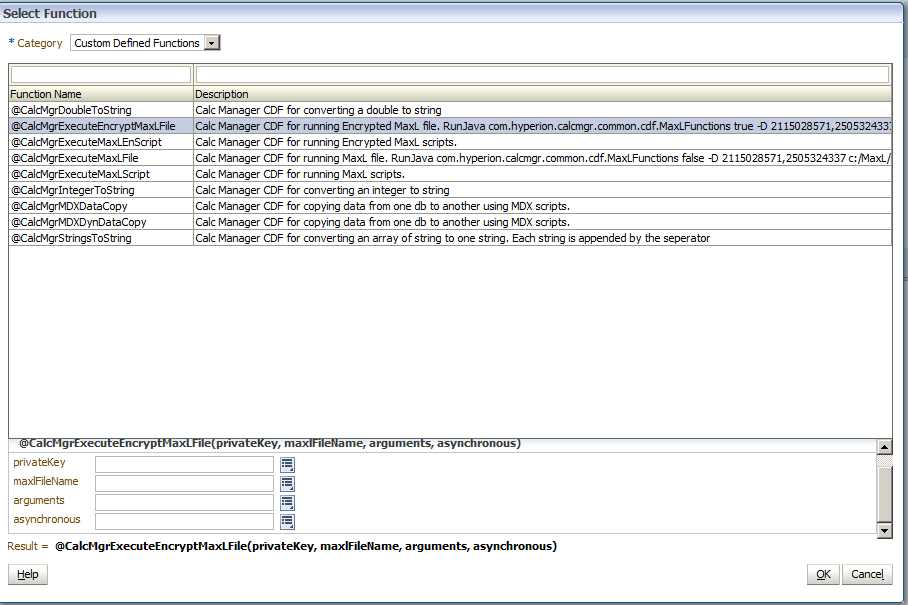
The first (and boring/safe/approved) way to figure out what these CDFs is to be a good little boy (or girl) and use Calculation Manager to insert functions:
Create and insert
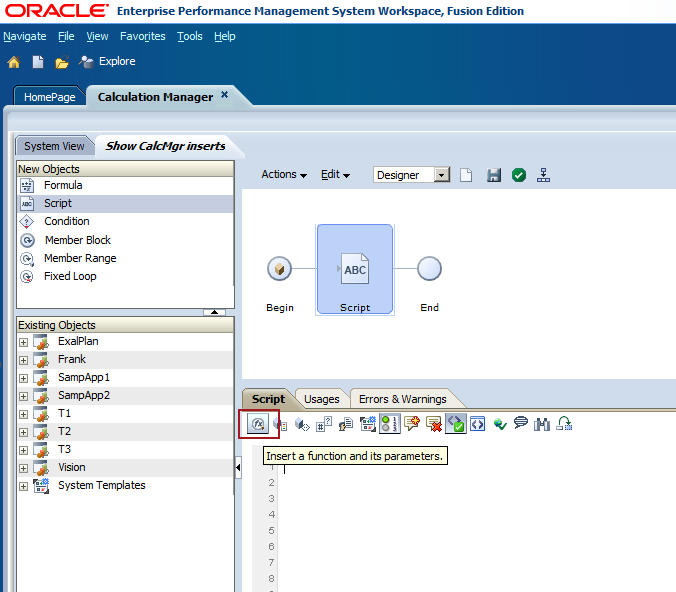
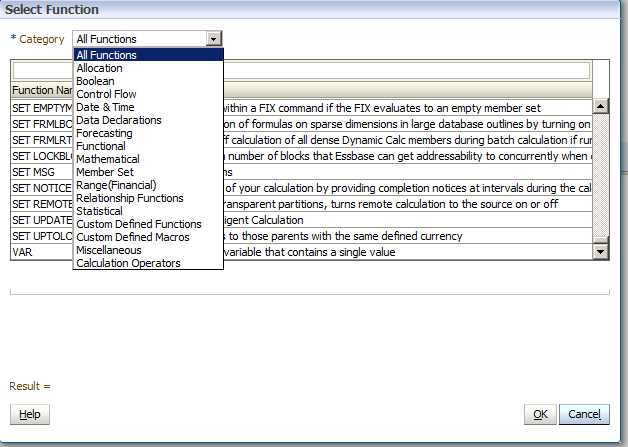
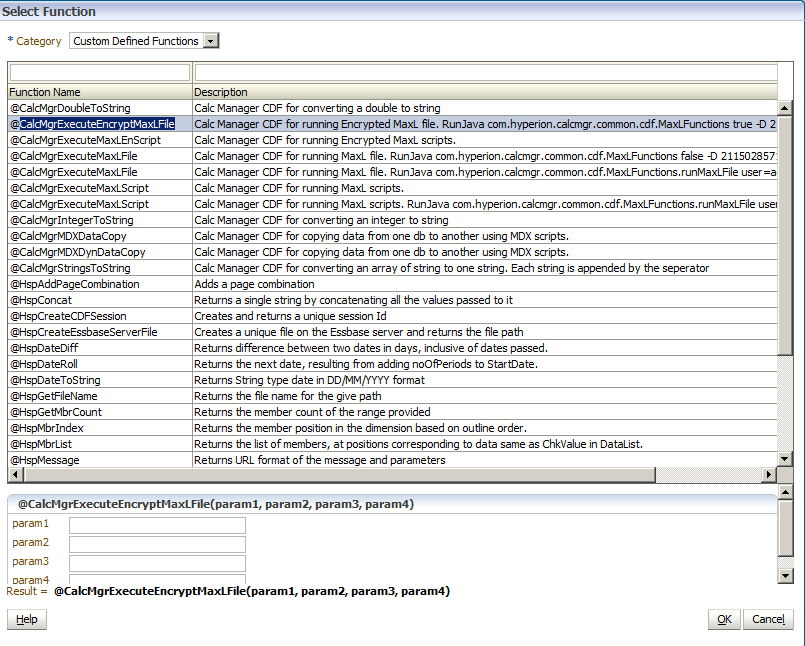
Create a rule, insert a script object, and then click on the Insert Function toolbar button. It’s the very first button – it’s like Oracle wants you to use it or something crazy like that.
Waddayasee?
I hope you see all kinds of functions. We’re going to be focusing on the Custom Defined Functions (CDFs).
NB – I am doing this in a BSO Planning application. As we will see in a bit, there are nuances between what’s available to Planning Plan Types and pure Essbase applications.
Here’s the list of functions. Nothing much new here except the fourth and third from the bottom although for the purposes of this post I will ignore Custom Defined Macros and leave that as an exploratory exercise for you, Gentle Reader.
What’s in the CDFs?
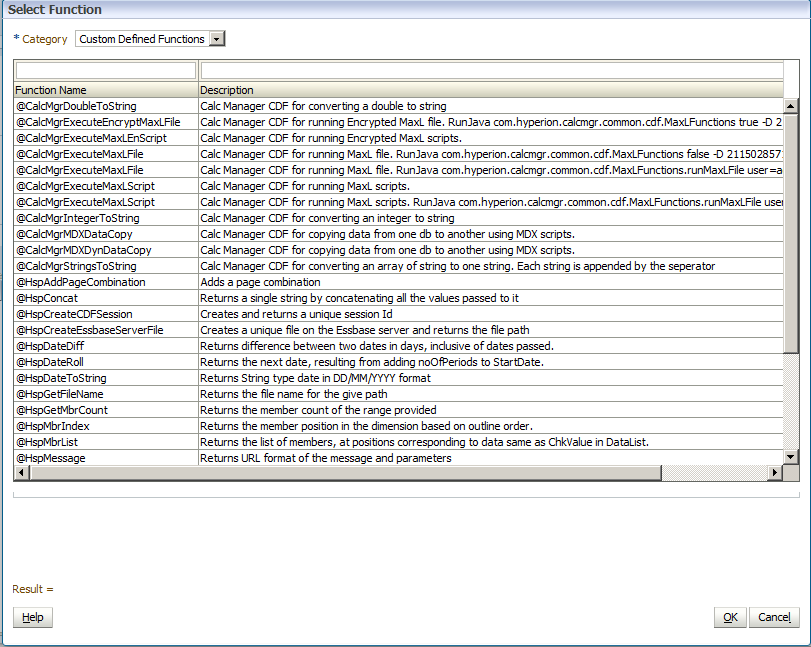
Lots and lots of interesting stuff is what. Here’s most of what’s available to a Planning application.
Naming standards
I’m not going to cover most of these, but if you look at the above, you will note that there are CDFs that start with @CalcMgr and ones that start with @Hsp. Telling you that if it starts with @CalcMgr it has to do with Calculation Manager and if it starts with @Hsp it has to do with Planning is not giving away the game.
So what does that mean for Essbase?
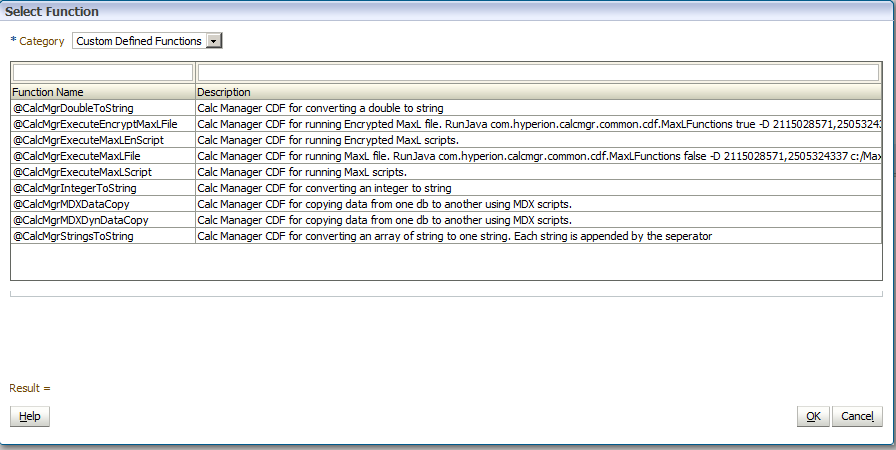
The @Hsp functions are only usable in Planning applications. Don’t believe me? Create a BSO Essbase Calculation Manager script and go through the same insert functionality. What do you see?
This makes sense, right? You’re not in Planning so the CDFs that Oracle wrote to support Planning aren’t there.
There’s more to Calculation Manager than Calculation Manager
Go into good old EAS and create a BSO calc script. Now look over in the lower left hand side of the script window and select Categorical->User Defined Funcitons – they are the same @CalcMgr functions. Here’s another hint (possibly a bit of a red herring) to the puzzle – those functions say @CalcMgr but they’re available in plain old calc scripts as well.
The plot thickens, eh? :) What oh what oh what would you do with all of this?
An alternate, and cooler, and faster way to get to all of the above
I know, I know, Cameron has been a good little boy and painted within the lines. As Donald Fauntleroy Duck would say, Ah, Phooey!
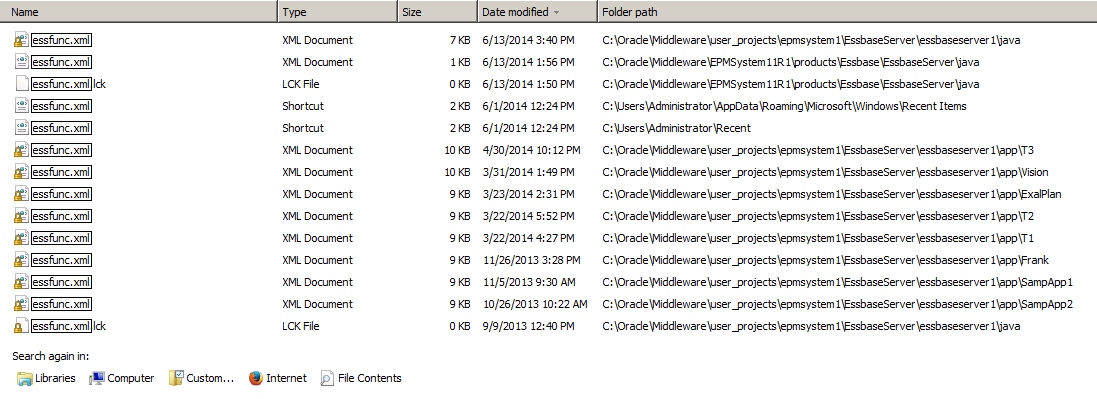
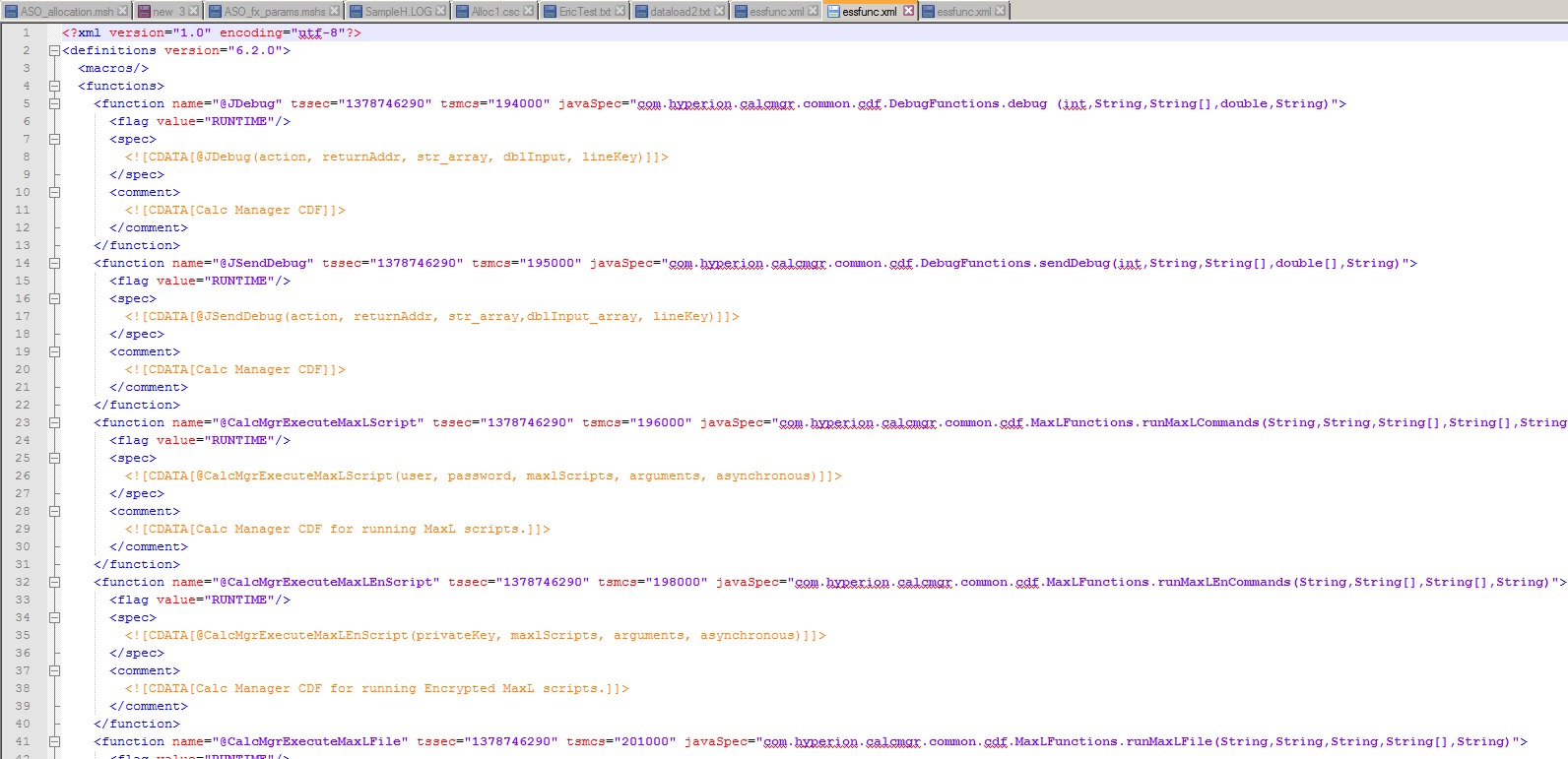
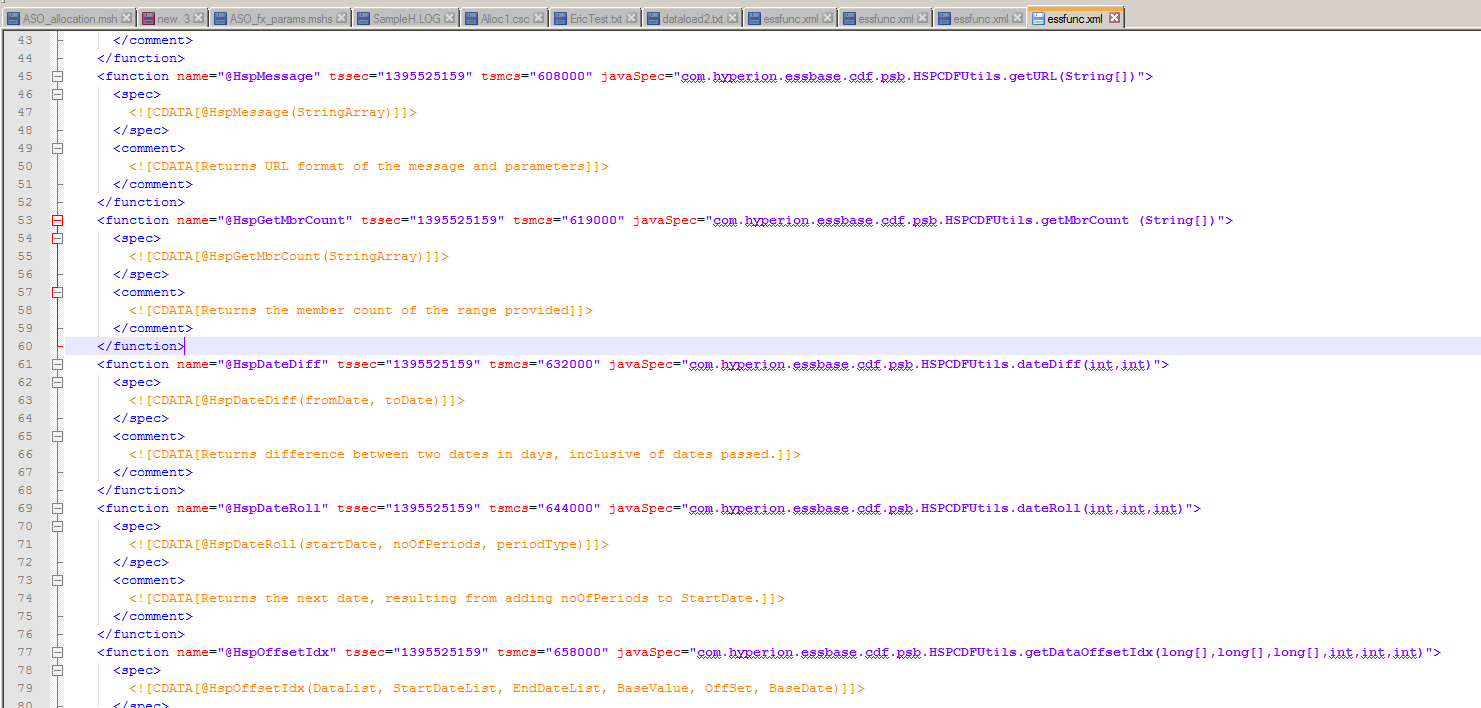
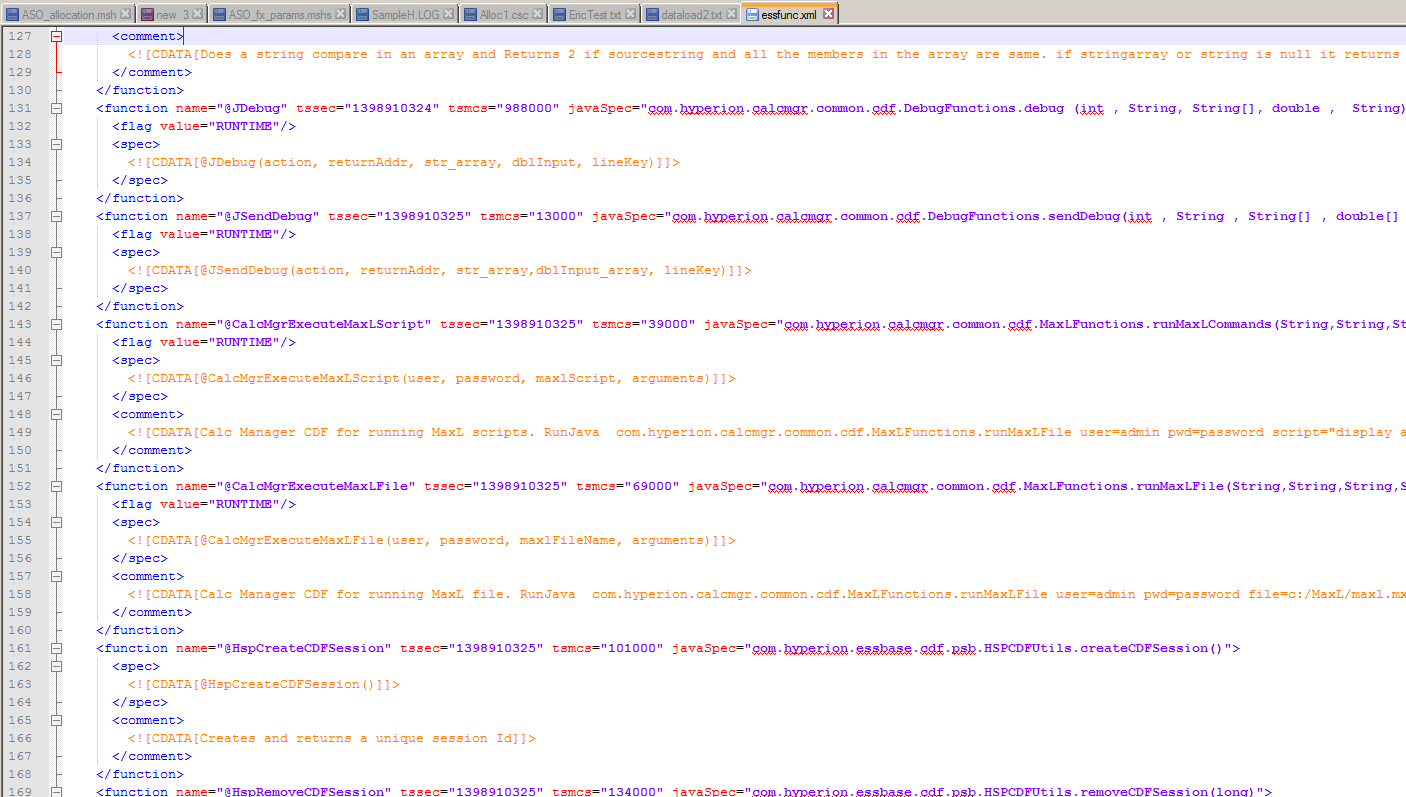
A much faster, and hackier, and more informative, and thus more awesome way to do this is to simply go looking for essfunc.xml on your Essbase server. Oh, the things you will see.
Lookatthat
There’s lots of files with that name. How oh how oh how do they differ?
Two differing properties
Size matters
Discounting the Windows shortcuts, note the spread in size from 7K to 10K. What do you suppose is in the 7K one?
Nothing but @CalcMgr functions.
And the 9K one?
Nothing but @Hsp functions.
And the 10K one?
A mix of @CalcMgr and @Hsp CDFs. Curiouser and curiouser.
Location, location, location
Where you live matters, and where essfunc.xml domiciles matters as well.
The @CalcMgr functions that are available to Plannnig and Essbase live in c:\oracle\middleware\user_projects\epmsystem1\EssbaseServer\essbaseserver1\java\essfunc.xml.
Planning applications get (it appears) dynamically generated essfunc.xml files that are stored in each Plan Type’s Essbase application folder. Even more interestingly, it looks like @CalcMgr functions are added to the Planning/Essbase application’s essfunc.xml file on an as-needed basis. That accounts for the mix of @Hsp (always there in Planning) and @CalcMgr (but only a handful) CDFs in the 10K file.
Why essfunc.xml is better than Calculation Manager’s insert functions
Although you can get the parameters in both Calculation Manager and EAS’ calc script editor, I personally find that many parameters hard to follow and the interface itself is kind of kludgy. It turns out that the function dialog box in both tools simply reads the examples from essfunc.xml.
A difference in parameters
Planning
It’s probably a bug, but param1, param2, param3, etc are not particularly helpful when it comes to figuring out what and how the @CalcMgrExecuteEncryptMaxLFile.
Essbase
Ah, that’s a bit better. Now we can see that the private key, maxlFileName, arguments, and asynchronous parameters are used with @CalcMgrExecuteEncryptMaxLFile although there is still no way to know what the arguments and asynchronous parameters are.
Wouldn’t it simply be easier to read the file? Why yes it would.
Here’s the @CalcMgrExecuteEncryptMaxLFile function in essfunc.xml
<function name="@CalcMgrExecuteEncryptMaxLFile" tssec="1378746290" tsmcs="206000" javaSpec="com.hyperion.calcmgr.common.cdf.MaxLFunctions.runMaxLEnFile(String,String,String[],String)">
<flag value="RUNTIME"/>
<spec>
<![CDATA[@CalcMgrExecuteEnMaxLFile(privateKey, maxlFileName, arguments, asynchronous)]]>
</spec>
<comment>
<![CDATA[Calc Manager CDF for running Encrypted MaxL file. RunJava com.hyperion.calcmgr.common.cdf.MaxLFunctions true -D 2115028571,2505324337 c:/MaxL/maxl.mxl 906388712099924604712352658511 0893542980829559883146306518502837293210. First argument if false, will be an synchromous maxl task]]>
</comment>
</function>
Hmm, same ambiguous @CalcMgrExecuteMaxLFile syntax but there’s now something else here – a RUNJAVA command. At least there’s an example, sort of, although it looks as though both the private key and the encrypted username and password need to passed with this method.
Confusing, isn’t it?
Let’s end the confusion
Whilst I would love to tell you that I figured all of this out, I must confess that I reached out to the Calculation Manager product manager, Sree Menon, and begged for help. Sree and his associate, Kim Reeve, were beyond helpful. I promised them that I would share what they taught me.
A brief foray into the ACE program
Btw, lest you think I know Sree because I am an ACE Director, in fact Sree reached out to me way back when I wrote my second post on Calculation Manager. I don’t think he knew (or cared) about my ACE status. I am not in any way putting down OTN’s ACE program, I am merely noting that Oracle reaches out to everyone who is an advocate of their products. That’s a long-winded way of saying if yr. obt. svt. can do it (it being evangelizing, working with Oracle, and maybe becoming an ACE), you most certainly can too and I very much encourage you to do so. I am on a personal crusade as of this writing to get four people recognized as ACEs because they love Oracle’s products and thus do a ridiculous amount of evangelizing for Oracle. It will take a long time and a lot of work all round but I’m convinced they will get in – they deserve it, at least in my opinion.
Sorry for the digression, but sometimes I think people think becoming an ACE is an impossible task. It is a difficult task, and I might note that the first time I was nominated, I was rejected, but now here I am. Again, if I can do it, you can too. Don’t be intimidated by the process as making it is incredibly rewarding; probably the most rewarding thing I’ve achieved in my career. Note that the evangelism works both ways cf. Sree reaching out to me so aim high and you might just make it.
Back to the code
It’s very simple MaxL code. All that it is doing is logging in to Sample.Basic and running a MDX query.
encryptest.mshs
spool on to "c:\\tempdir\\encryptest.log" ;
login $key 9404266461315012977165999794704691034001 $key 0307596931591918242060507329306599979470 on localhost;
/* The below settings are right out of Developing Essbase Applications */
alter session set dml_output alias off ;
alter session set dml_output numerical_display fixed_decimal ;
alter session set dml_output precision 4 ;
set column_width 40 ;
set timestamp on ;
SELECT {[Measures].$3}
ON COLUMNS,
{[Year].Levels(0).Members}
ON ROWS
FROM [Sample].[Basic]
WHERE ([Scenario].[Actual], [Product].[Product], [Market].[Market]) ;
spool off ;
exit ;
Note that $3 command line parameter – yes, you can pass parameters from a calc script to MaxL. Get your creative juices flowing over that. I’ll try to demonstrate a few bits of it.
Running the code in EAS via CDF3.csc
It’s actually quite straightforward, although it didn’t seem so when I was figuring it out.
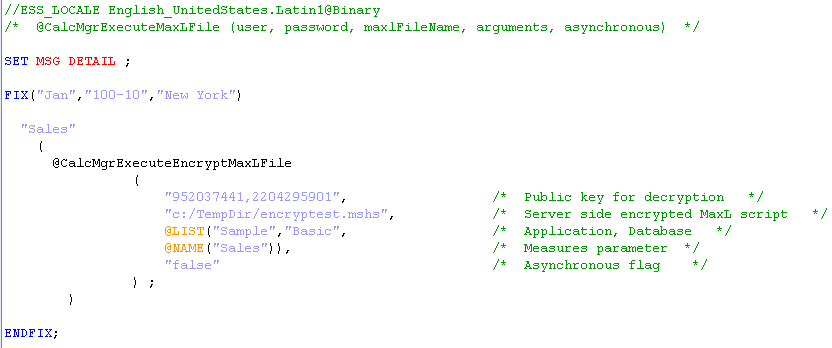
The key syntax notes are as follows:
Pass all strings in double quotes
Use forward slashes only in file paths
Wrap application, server, and any command line parameters in @LIST
Those arguments map to command line parameters, so server = $1, database = $2, the first paramter = $3, etc., etc.
Wrap any member names in @NAME
Two block issues to be aware of
@CalcMgrExecuteEncryptMaxLFile runs as a member calculation block. That means that if the FIX that contains the command defines more than one block, it will run that many times. I only know this because I tried running the command without any FIX and it took (seemingly) forever. That’s simply because it ran once for each block. As my copy of Sample.Basic has 376 blocks, the code ran 376 times. Imagine it in a real database. Shudder.
Of course if there is no block then @CalcMgrExecuteEncryptMaxLFile won’t run. Yep, block creation issues raise their ugly head once again.
So what happens when you run it?
Here’s encryptest.log’s output. Note that $3 resolved to “Sales”.
MAXL> login $key 9404266461315012977165999794704691034001 $key 0307596931591918242060507329306599979470 on localhost;
OK/INFO - 1051034 - Logging in user [hypadmin@Native Directory].
OK/INFO - 1241001 - Logged in to Essbase.
MAXL> alter session set dml_output alias off ;
OK/INFO - 1056226 - Session altered for user [native://nvid=c9d9665628b8695a:6d29254d:1410456fa26:-7adf?USER].
MAXL> alter session set dml_output numerical_display fixed_decimal ;
OK/INFO - 1056226 - Session altered for user [native://nvid=c9d9665628b8695a:6d29254d:1410456fa26:-7adf?USER].
MAXL> alter session set dml_output precision 4 ;
OK/INFO - 1056226 - Session altered for user [native://nvid=c9d9665628b8695a:6d29254d:1410456fa26:-7adf?USER].
essmsh timestamp: Mon Jul 14 16:50:59 2014
MAXL> SELECT {[Measures].Sales}
2> ON COLUMNS,
3> {[Year].Levels(0).Members}
4> ON ROWS
5> FROM [Sample].[Basic]
6> WHERE ([Scenario].[Actual], [Product].[Product], [Market].[Market]) ;
Axis-1 (Sales)
+---------------------------------------+---------------------------------------
(Jan) 31538.0000
(Feb) 32069.0000
(Mar) 32213.0000
(Apr) 32917.0000
(May) 33674.0000
(Jun) 35088.0000
(Jul) 36134.0000
(Aug) 36008.0000
(Sep) 33073.0000
(Oct) 32828.0000
(Nov) 31971.0000
(Dec) 33342.0000
OK/INFO - 1241150 - MDX Query execution completed.
essmsh timestamp: Mon Jul 14 16:50:59 2014
So what about RUNJAVA, and why?
There’s an alternate way of running this MaxL file execute, and it is actually there in the essfunc.xml file although again, it is imperfectly documented.
The syntax (and even the properties) are totally different from @CalcMgrExecuteEncryptMaxLFile.
Start off RUNJAVA with the right object name, in this case com.hyperion.calcmgr.common.cdf.MaxLFunctions.
Then, per the above code, you must pass:
The asynchronous flag of false
A –D to decrypt the MaxL script (just like off of a command line)
The public key for decryption
The already encrypted username
The already encrypted password
The server name
Do not pass the application and database
Any command line prompts
The encryrpted username is command line parameter 1 (but you must still pass it this way)
The enrypted password is command line parameter 2
The server name is command line parameter 3
After that you can pass member names (or whatever) as command line parameters 4, 5, 6, etc.
Wrap all parameters in double quotes
@LIST and @NAME are not required
This is what the MaxL script looks like. It’s the same except the $3 became a $4.
spool on to "c:\\tempdir\\encryptest.log" ;
login $key 9404266461315012977165999794704691034001 $key 0307596931591918242060507329306599979470 on localhost;
/* The below settings are right out of Developing Essbase Applications */
alter session set dml_output alias off ;
alter session set dml_output numerical_display fixed_decimal ;
alter session set dml_output precision 4 ;
set column_width 40 ;
set timestamp on ;
SELECT {[Measures].$4}
ON COLUMNS,
{[Year].Levels(0).Members}
ON ROWS
FROM [Sample].[Basic]
WHERE ([Scenario].[Actual], [Product].[Product], [Market].[Market]) ;
spool off ;
exit ;
Two other things about RUNJAVA
OTOH, I am sure I love stalking him, just like Glenn Schwartzberg loves stalking me. The cycle of abuse continues. Celvin, find someone to pick on. :)
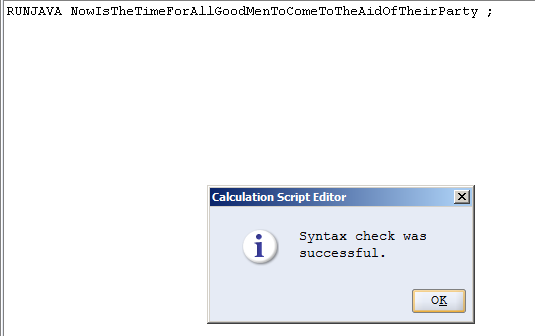
Syntax checking is gone, gone, gone.
This will syntax check:
For those of you old enough (sob) to remember taking typing drills in school (my grandmother was a business teacher, taught typing, and that meant when we visited her in the summer we could use a – ooooh, electric typewriter – bored geeks like yr. obt. svt. typed that again and again and again, and Grandma, I miss you), that’s from the man that invented touch typing and isn’t exactly part of Oracle EPM.
In other words, you had best be sure your syntax is right because Essbase (nor Calculation Manager) will tell you that you’re wrong.
Blocks, what blocks?
RUNJAVA, because it is not a calculation block but in essence a command line, could care less about a block existing, or not. It’ll run just fine with no blocks, e.g.:
MAXL> login $key 9404266461315012977165999794704691034001 $key 0307596931591918242060507329306599979470 on localhost;
OK/INFO - 1051034 - Logging in user [hypadmin@Native Directory].
OK/INFO - 1241001 - Logged in to Essbase.
MAXL> alter session set dml_output alias off ;
OK/INFO - 1056226 - Session altered for user [native://nvid=c9d9665628b8695a:6d29254d:1410456fa26:-7adf?USER].
MAXL> alter session set dml_output numerical_display fixed_decimal ;
OK/INFO - 1056226 - Session altered for user [native://nvid=c9d9665628b8695a:6d29254d:1410456fa26:-7adf?USER].
MAXL> alter session set dml_output precision 4 ;
OK/INFO - 1056226 - Session altered for user [native://nvid=c9d9665628b8695a:6d29254d:1410456fa26:-7adf?USER].
essmsh timestamp: Mon Jul 14 19:20:02 2014
MAXL> SELECT {[Measures].Sales}
2> ON COLUMNS,
3> {[Year].Levels(0).Members}
4> ON ROWS
5> FROM [Sample].[Basic]
6> WHERE ([Scenario].[Actual], [Product].[Product], [Market].[Market]) ;
Axis-1 (Sales)
+---------------------------------------+---------------------------------------
(Jan) #Missing
(Feb) #Missing
(Mar) #Missing
(Apr) #Missing
(May) #Missing
(Jun) #Missing
(Jul) #Missing
(Aug) #Missing
(Sep) #Missing
(Oct) #Missing
(Nov) #Missing
(Dec) #Missing
OK/INFO - 1241150 - MDX Query execution completed.
essmsh timestamp: Mon Jul 14 19:20:02 2014
Again, think about some of the ramifications of the above. They’re pretty heady, aren’t they? I’ll come back to them in part three of this series.
That’s all for today
Has your interest been piqued? We haven’t even gotten to the use case for this and it’s already been a huge amount of work. No kidding, I spent almost two full man weeks trying to figure all of the above (and a bit more) out for Kscope14. It was fun and painful, all at the same time.
Have you guessed where I’m taking this? Send me your comments care of the commend section below. C’mon, I’m lonely.
Hopefully that was enough for you – that’s over 16 pages and over 2,700 words. Given that the above is 100% free, surely you’ve gotten value for money.
Be seeing you.
 .
.