Want to know The Truth About CPM?

07 August 2012

Who would have believed it???

Am I often flummoxed?

I am giddy with excitement, I have been dancing around the house mumbling, "They must have made a mistake, Oh wow, Really, Me! WOW!"  Yes, I gush a bit sometimes, but this is big news and I am very excited, so the title of this blog is not as much of a teaser as you might think.  Just to set the record straight from my perspective -- Dear Oracle ACE Program Office, you made a great decision.  <insert slightly-deranged-from-all-of-the-giddiness grin right here>

Could it be?  Really?

Cameron, For the Love of Mike, get to the point

What am I banging on about?  Well, in the face of all reason (and I imagine there are one or two of you out there that would heartily agree with that qualifying statement  <insert even bigger grin>) the Oracle ACE program have seen fit to recognizing me as an Oracle ACE Director.  Really?  Could that possibly be correct?  Yup, it’s true look at the beautiful golden spade around the A:

To say that I am flattered is to wildly understate how I really feel – I am on cloud nine and more than a little astonished.  All I can really say is that I hope I even approach what the other BI/EPM ACE Directors have done for the Oracle community.  They have set an extremely high bar for outreach, advocacy, and general awesomeness.

But wait, I already was an Oracle ACE -- is there a difference?  From the Ace FAQ
The program comprises two levels: Oracle ACE and Oracle ACE Director. The former designation is Oracle's way of saying "thank you" to community contributors for their efforts; we (and the community) appreciate their enthusiasm. The latter designation is for community enthusiasts who not only share their knowledge (usually in extraordinary ways), but also want to increase their community advocacy and work more proactively with Oracle to find opportunities for the same. In this sense, Oracle ACE is "backward looking" and Oracle ACE Director is "forward looking."

A funny story and what ego does to you

When I became an ACE, I IM’d with MMIC (yes, it is all so true, Glenn and I are simpatico, and I swear that  he is my older, wiser brother from completely different parents, no matter how robustly he denies the familial relationship) that I now felt pressured when I made a post on Network54 or OTN to be 100% right, insightful, and generally brilliant because, hey, I was an Oracle ACE.  Glenn in his wise way pointed out that that there was nothing in the ACE program that said you had to be perfect and for goodness’ sakes be realistic.

And if ego made me think that way as an ACE, what do you suppose being an ACE Director does?  To snip it in the bud Glenn, mildly butchered “If I Were a Rich Man” from Fiddler On The Roof to this:
The most important men in town will come to fawn on me--
They will ask me to advise them, Like a Solomon the Wise--
"If you please, OAD Cameron?"--
"Pardon me, OAD Cameron?"--
Posing problems that would cross a developer’s eyes--
(chanting) Ya va voy, ya va voy voy vum...
And it won't make one bit of difference If I answer right or wrong--
When you're an OAD, they think you really know.

I knew he was strange, and this song snippet secures that perception.  But oh so wise.

Anyway, I can solemnly swear right here and now that I will not be 100% right, insightful, and generally brilliant as an ACE Director.  :)  But I will do my utmost to evince all three properties.

In all seriousness I will keep on plugging away at all of the things (blogging, writing, presenting, Tweeting, ODTUGing, and who knows what else) I have been doing – it has been tremendously fulfilling to share what I know and I have been paid back a hundredfold by your comments, occasional praise, and gentle correction when I have managed to get things completely pear shaped.

Giving thanks where it is due

I must also give thanks to the people who sponsored me:  

The above are just a few of the many who have mentored me along the way – the list goes on and on and the debt I owe to all of you grows and grows.  Unfortunately, to list everyone (and really, there are a lot of you) would make this the Very Longest Blog Post Ever and besides, some of you are bashful.  All kidding aside, please do not feel keeping the list short means that I am not extremely grateful for your insight and guidance.

To all of you – thank you so much for believing in me.  I still cannot believe it myself.

04 August 2012

11.1.2.2 is here, with a twist


With very little thanks to me

Anyone who has read this blog knows I am infrastructure challenged.  Thankfully, there are at least a few others who are better/smarter/more determined than I.  In this case, the glory (is that damning with faint praise given the previous sentence?  Nope, what he’s done is pretty glorious.) is John Booth’s as he did all the hard work making everything in 11.1.2.2 function on Amazon Web Services – I was merely his test monkey.  Go check out John’s excellent blog here to get his take on it.


Yup, that’s right, first he gave us 11.1.2.1 and now 11.1.2.2.  Pretty awesome, eh?  I will note that there are many infrastructure consultants out there and no one, and I mean no one with the exception of the two Johns (Booth and Goodwin) give anything, be that AMIs, knowledge, tips, suggestions, or whatever, away.  Think about it – there are lots of blogs and posts from application developers but those two are the only infrastructure-related contributors to the EPM community.  Given how difficult the EPM installs are (John and I went around and around on a few niggling issues with his AMI so yes, even he gets a little challenged by the install process) we owe them both, but in this case particularly John Booth, a big round of thanks.

Beyond a new version, what’s on offer?

Oh, a few things such as:
  • Essbase
  • Essbase Studio
  • Planning
  • HFM
  • FDM
  • ODI (my favorite)
  • ERPi
  • Financial Reports

In other words, just about everything that is commonly known as the Oracle EPM core.  Like I wrote above, pretty awesome, eh?  This is an expansion of what was there in his 11.1.2.1 AMI.


The only thing that isn’t there is Smart View, and that’s because it requires a copy of Excel.  I’ve already posted how to use your local copy of Excel to go against Essbase – I will be installing Excel itself on the server as it is easier but note that you need a license to do that.

One big difference

Whereas the 11.1.2.1 AMI ran as a normal set of services, this AMI uses the compact deployment option.  That means that EPM takes up way less memory than before and in turn that leads to some interesting options.  See the last section of this post for a teaser.

So where do you go?

Back to business – the AMI is ami-ef933886.  Read the 11.1.2.1 AWS tutorial post on how to launch it – everything is the same as before except of course the AMI id.

What’s the twist?

Merely this:
Take a good hard look at that.  What do you see?  Intrigued?  :)  I will be posting about my experiences with this in a little bit.

31 July 2012

100 posts and Essbase Hacker now available on Twitter

Is that 99 bottles of beer or 99 posts?

99 posts, actually, although some of them made me want to consume 99 bottles of beer all at the same time because they were so painful to write.

So what that means is that this is my 100th post.  Good grief, do I have that much to say?  Do I take that much time to write what I think?  Have I not posted any pictures of The Most Awesome Cat in the Entire World?  Yes to all three.

I hope you’ve enjoyed the work thus far – it is a labor of love for me because sometimes, depending on the topic, it takes me forever and a day to write an idea up.  Generating the ideas is easy, executing not so much, so I suppose this is in line with the rest of reality.  I will say that I have learnt a LOT from the writing of the posts as I struggle to make my ideas come through and I even sometimes get to use them at clients.  So it’s both a form of training (I am selfish) and giving back to the Oracle EPM community (I am generous).  Note my Janus-like personality (or is that Two Face?).  What would one of these blog posts be without multiple references to almost-completely irrelevant trivia?  Not one of my blog posts, I suppose.

In any case, there’s a lot more relevant information to come.  I have some really interesting and cool hacks up my EPM sleeve and I hope you’ll share them with me.

Twitter?  You?  Really?

Yes, it’s true, after years of resisting the temptation I have gone over and started a Twitter account.  Follow me (if I have this new-fangled social media jargon just right) here.  Why?  I spend a fair amount of time on the boards and blogs and come across many interesting posts (sometimes they’re even mine) that I want to share to World + Dog but they’re too short for a blog post.  Twitter seems to be the logical way to get that information out.  

You need not worry, no pictures of my favorite hiking trails, The Most Awesome Cat in the Entire World, or thoughts on the life-sustaining aspects of amazingly good coffee (okay, maybe the last).  This will be strictly EPM-related stuff and, if you look over to the right of this post, the five latest posts will be available via this blog.

16 July 2012

Easy relational drill through with Dodeca

Introduction to the introduction
This thread on relational drill through on Network54 just won’t die.  Is it a zombie?  Nope, just an extremely popular subject.  With that in mind, and as I’m the one that suggested that my fellow Developing Essbase Applications author Joe Aultman ask the initial question over a year ago, an overview into how easy drill through in Dodeca can be is long overdue.


One other note – this is a long post, but that isn’t because doing relational drill through in Dodeca is hard, but because I want to document each and every step so you can see how easy it is.  FWIW, I went from thinking it couldn’t be hard, to realizing I had no idea how to do this, to actually reading the documentation, to doing it for the very first time in about a day.  And now you don’t even have to read the docs.  You’re welcome.

How easy does Dodeca have to be?

Tim Tow has covered on his blog how easy it is to bring relational drill through to your Essbase-based application.


That’s fine you say (These voices, voices, VOICES, ahhhhh!!!!!!!!  Oh, you really are saying that?  Okay, nothing to see, move along folks.), but Tim is well…Tim.  And you (or would that be me?) are not a superstar, but a mere Essbase hacker.  It’s easy for him, but isn’t his effortlessness more a product of his intimate familiarity with Dodeca, his knowledge level (I just spent a week in the patented Tim Tow Java-coding-is-so-cool reality distortion field and let me say this – if you think you’re smart, you really need to spend some time with Tim because you – or is that me? –, umm, aren’t), and maybe, just maybe, isn’t there a soupçon of demo spin behind what he does?

I’m here to tell you I am no Geek Idol, nor am I particularly smart (note the comment about being around Tim), nor am I even remotely capable of spin.  I wish I were capable of the last trait as I would likely be a lot richer.  

Nope, you’ve got old honest Cameron to take you through a simple and quick tour of how to incorporate SQL drill through from your Essbase database
today with a minimum of effort.  Do you need EIS or Studio to do drill through?  Nope.  The long-obsolete drill through package for Essbase?  Nope.  A programming talent the size of a 1965 Buick Electra 225?  Nope.  Just little old Sample.Basic and Dodeca.  

Make Sample.Basic more Basic

Long time readers, all three of you, of my blog know that My Very Favorite Essbase Database In The Whole Wide World is none other than Sample.Basic, which I shall henceforth refer to as MVFEDITWWW.  For those who care, it is pronounced “mfffeditwaa,” which I believe is akin to the initial sound made upon dropping a 14 pound sledgehammer on one’s foot.  Other, less family-friendly sounds can then occur – imagine away.  

My future plans

One day I shall discover a company called The Beverage Company, they will sell soda pop (Michigan influence bubbling up there) in a few oddly distributed states, and will have a remarkably limited view of their chart of accounts.  When this happy day occurs, I am going to be the most productive consultant ever.  Interested packaged goods IT managers can contact me care of this blog.

Back to reality

Love everlasting for Sample.Basic?  Yes, but regardless I’m going to take the shears to my beloved MVFEDITWWW and remove most of the Product dimension (but not clear out the upper level data) as that is what we are going to drill from.  A silly example as low level product information is already there in Essbase but hey, it’s a demo.

Product in MVFEDITWWW

Product in Sample.DrilThru

Note the absence of the Caffeinated, Intro Date, Ounces, and Pkg Type attribute dimensions – they cannot be used because the corresponding base members in the Product dimension no longer exist.

Base data

Here’s the data I extracted out of the database-that-shall-not-be-named:

I wanted each record to represent all dimensions with a data column at the end.  I could have run two Essbase report scripts, one for Actual, one for Budget, back to back by placing an explanation mark “!” between the two report scripts  but I am feeling all kinds of SQL so I used my child-like skills to do it in SQL Server and besides I wanted the member names “Actual” and “Budget” in the record.  Yes, you can likely write this better than I can and I invite your suggestions – I will update this post to show a better way.

Here’s the SQL I used to create the drill through table:
IF EXISTS(SELECT TABLE_NAME FROM INFORMATION_SCHEMA.TABLES
     WHERE TABLE_NAME = 'dDrilThru')
  DROP TABLE dDrilThru
GO
USE Blog_Dodeca
CREATE TABLE dDrilThru
    (
        Product nvarchar(80),
        Market nvarchar(80),
        Measure nvarchar(80),
        [Year] nvarchar(80),
        Scenario nvarchar(80),
        [Data] float
    )
INSERT INTO dDrilThru
SELECT
    Product,
    Market,
    LTRIM(Measure),
    [Year],
    'Actual' AS "Scenario",
    Actual AS "Data"
FROM
    dImportSampleBasic
WHERE Actual IS NOT NULL AND
    Actual <> 0
UNION
SELECT
    Product,
    Market,
    LTRIM(Measure),
    [Year],
    'Budget' AS "Scenario",
    Budget AS "Data"
FROM
    dImportSampleBasic
WHERE Budget IS NOT NULL AND
    Budget <> 0
ORDER BY
    Product, Market, LTRIM(Measure), [Year]

And that gives me data that looks like this:

Supporting tables

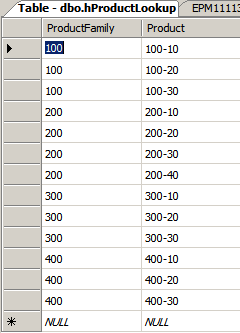
hProductLookup

I also set up a table called hProductLookup that defined the relationship between the now-shortened Product dimension and the level 0 Products in dDrilThru.  Yes, I could have used the leading three character member names but I wanted to take that dependency out.

hProductDescription

Oh, I suppose I could have put the description for the formerly level 0 Products into hProductLookup, but I also wanted to completely normalize (maybe overly normalize) the tables and also I was going to need a relational description of what were the the level 1 Products, so I jammed that all into hProductDescription.
 What does that mean?
The above table, dDrilThru, is now ready to be drilled into.  That wasn’t hard, was it?

Retrieving SQL in Dodeca

There are three components to a SQL retrieve in Dodeca:  a SQL connection (what server/database is Dodeca querying/inserting/updating/deleting), the actual SQL statement, and its application in a Dodeca report.  That’s it – it is all pretty straightforward and even a SQL idiot like yr. obdnt. srvnt. can figure it out.

SQL Connections

All that the SQL Connection defines (btw, I named mine Blog_Dodeca because I am imagination-challenged – you can call it anything you like) is the Dodeca name of the connection, the JDBC url to the database, and the SQL username/password.

SQL Passthrough Data Sets

I really like the name Applied OLAP came up with for the query – “SQL Passthrough Data Set”.  I guess it could have just been called “SQL Query” but you can do so much more than just a simple SELECT as we shall see.  


In any case, we name it, and then we define a query to go with the object.  That query will produce a DataTable that in turn will, when the View is defined, be related to a physical range in the target sheet.

Defining the query

Things get a wee bit more complicated here, but only a tiny bit.  

For the query to work, it needs:
  1. A SQLConnectionID –the login to SQL defined in the previous step and selectable through a dropdown control
  2. A DataTableName – a virtual table that receives the contents of the query results – name it whatever you like
  3. SelectSQL –all four (Delete, Insert, Select, and Update) queries could be defined; in our case, we just want a SELECT statement

What does that query look like?

This is where Dodeca shows off one of its many ultra super powers.

Here’s a query that pulls all of the product information for product family 100.
SELECT
    H.ProductFamily AS 'Product',
    H.Product AS 'SKU',
    PD.Description AS 'SKU Desc',
    D.Market,
    D.Measure,
    D.[Year] AS 'Month',
    D.Scenario,
    D.Data
FROM
    dDrilThru D
INNER JOIN hProductLookup H ON
    D.Product = H.Product
INNER JOIN hProductDescription PD ON
    D.Product = PD.Product
INNER JOIN hMonthSort M ON
    D.[Year] = M.MonthDesc
WHERE H.ProductFamily = '100'

That returns a result set that looks like this:
But it does that for 10,704 rows.  That’s a little bit more than I will want to go through on a drill through sheet (just because there’s lots and lots and lots of data doesn’t mean that I want to view all of it at the same time).  Let’s put a bit more specificity around the query:
SELECT
    H.ProductFamily AS 'Product',
    H.Product AS 'SKU',
    PD.Description AS 'SKU Desc',
    D.Market,
    D.Measure,
    D.[Year] AS 'Month',
    D.Scenario,
    D.Data
FROM
    dDrilThru D
INNER JOIN hProductLookup H ON
    D.Product = H.Product
INNER JOIN hProductDescription PD ON
    D.Product = PD.Product
INNER JOIN hMonthSort M ON
    D.[Year] = M.MonthDesc
WHERE H.ProductFamily = '100'
    AND D.Market ='New York'
    AND D.Measure = 'Sales'
    AND D.Scenario = 'Actual'
ORDER BY H.Product, D.Market, D.Measure, D.Scenario, M.MonthNo

That query returns this:
12 records is a lot more like it.  I want detail, but not too much.  YMMV.

What’s the problem?

Well, one big problem with the query is that I’ve hardcoded the ProductFamily, Market, Measure, and Scenario dimensions.  That isn’t exactly going to lead to drill through, is it?  Unless of course I only ever queried 100, New York, Sales, and Actual and then why bother with drill through at all?

Tokens to the rescue

Nope, not the ones you (used to) use on the NYC subway.  I mean strings within the SQL statement that can be replaced with selected values from Essbase member selections.  Of course (Of course?  Of course I mean of course.) Dodeca already does this for the purposes of Essbase retrieves.  Here’s what they look like in the  Selectors editor:
To make the SQL statement pick up these tokens, all we need to do is change the hardcoded WHERE clause to one that is tokenized.  The query ends up looking like this:
SELECT
    H.ProductFamily AS 'Product',
    H.Product AS 'SKU',
    PD.Description AS 'SKU Desc',
    D.Market,
    D.Measure,
    D.[Year] AS 'Month',
    D.Scenario,
    D.Data
FROM
    dDrilThru D
INNER JOIN hProductLookup H ON
    D.Product = H.Product
INNER JOIN hProductDescription PD ON
    D.Product = PD.Product
INNER JOIN hMonthSort M ON
    D.[Year] = M.MonthDesc
WHERE H.ProductFamily = '[T.Product]'
    AND D.Market ='[T.Market]'
    AND D.Measure = '[T.Measures]'
    AND D.Scenario = '[T.Scenario]'
ORDER BY H.Product, D.Market, D.Measure, D.Scenario, M.MonthNo

When we set up the Dodeca View correctly, it will pass [T.Product], [T.Market], [T.Measures], and [T.Scenario] right to the query and return only the items selected in the Essbase selectors.  Sounds like drill through, doesn’t it?  

Setting up the query

Before Dodeca can retrieve anything to a SQL sheet, we need to define the data source (that’s done in via the SQL Connection already described) and then the query(ies) for that connection.  A SQL Passthrough Dataset is the place to define that.  Note that a dataset can have multiple queries – we are defining only one and it’s just a SELECT.

Here’s the definition of the dataset:
Click on the ellipses button to get the query window to pop up:
Define the SQLConnectionID via a dropdown control, the name of the virtual table to contain the results of the query (that is not the same as the name of the source table(s) and will be important in a bit), and the SelectSQL statement which is going to look awfully familiar:
That query needs to get tied to a base report that drives those tokens that in turn gets driven from an Essbase sheet.

Base SQL retrieve in Dodeca

Did you know that Dodeca is a really good SQL query and reporting tool?  Yep, it is pretty impressive, and easy.

SQL Setup in the View

Excel template

Setting up a SQL retrieve is very similar to the process for Essbase.  The main difference from an Excel template perspective is that the retrieve range is called DataRange.1 (it could actually be called Rutabaga, but DataRange.1 makes a lot more sense – the .1 is to help identify the SQL source as you can easily have multiple SQL source retrieves on a sheet) instead of Ess.Retrieve.Range.1.  

NB – It’s a good idea to make ALL range names sheet level instead of workbook.

You will notice that the columns in this retrieve range look an awful lot like the query you saw above.  That is not accidental.

SQL View properties

The SQL View is similar to the Essbase View but with a few minor differences, the most important being the DataSetRanges property.  The purpose behind a DataSetRange is to associate a SQL Passthrough DataSet with a named range on the retrieve sheet.

Click on the ellipsis button to define the DataSet Range.  

DataSet Range

Once in the editor, select the SQLPassthroughDataSetID that defines the connection and the query via a dropdown control.

Then define where the results of the query will be sent when the user builds the view by clicking on the ellipsis button.

DataTable Range

Define the name of the range that will receive the query results – that’s the DataSheetRangeName.

Also define the name of the DataTable – that virtual table name is defined in the Query definition and its contents gets passed to the DataSheetRangeName on retrieval.
Once all of this has been input, confirm your way out of the DataTable Range Editor and the DataSet Range Editor and Commit the View changes.

Run that SQL report

And that’s it!  Let’s retrieve some data and see what it looks like:

Note the selectors at the top – we can make selections (New York, 100, Sales, Actual) and get all of the data associated with those parameters.  Now it’s time to hook it up to Essbase and drill into this report.

Base Essbase retrieve in Dodeca

This is pretty simple stuff in Dodeca – the Essbase source sheet looks like this:


Do you see the missing token?  That’s right, [T.Product] isn’t on the sheet.  That’s because we’re going to grab it from Colas, Root Beer, Cream Soda (ugh, I never liked that stuff), and Fruit Soda (A few years ago I tried a Faygo Red Pop on a trip back to Michigan.  I LOVED it as a kid – now, I think I’d rather drink dishwashing detergent.  But I digress yet again.) on the drill through.


Once the above template is imported into Dodeca, a simple View needs to be set up:

When that view is retrieved in Dodeca – magic redux.  Note the dimension selectors at the top of the screen whose values replaced the tokens on the retrieve sheet.  Sort of, kind of, the same as the SQL retrieve sheet.

Drill on through to the other side

Yes, yes, you had to read 2,416 words of my idiotic blathering to get to what you really wanted to see.  Sorry, but I had to show world+dog all of the setup steps.  It gets very simple, and very fast from now on.

To define the data drill through from Essbase to SQL, go to the Essbase View’s Data DrillThrough settings block.  

Data Drillthrough Settings

DataCellDoubleClickMemberFilters

I set up a filter on the Measures dimension to prevent drill through on upper level members like Profit, Margin, etc. as there are no corresponding values in my SQL drill through source.  It’s really quite easy to put in and prevents drill through at those upper levels.

DataCellDoubleClickPolicy

This property defines how the drill through will act.  In this example, I wanted to open that SQL view I detailed above.  There are however lots of options as you can see.

DataCellDrillthroughMemberToTokenConversionRules

Dodeca doesn’t just have to pass the bottom level member as per this example.  This is really pretty interesting as it means the drill through could grab a bunch of related SQL data as well if desired.

DataDrillthroughSheetName

This sheet name only makes sense when the DataCellDoubleClickPolicy is set to AddSheetForDrillthrough.  As this example opens a separate View, it stays blank.

DataDrillthroughSheetNameMaxLength

The maximum length of a sheet name (that little tab at the bottom of an Excel workbook is 31 characters.  Dodeca can support longer sheet names (huzzah! as that 31 character limit is…limiting) but you the Dodeca developer (you are all going to be Dodeca developers, right?) have to figure out if your Dodeca drill through awesomeness is ever going to be exported to Excel or not.  If not, set this to zero (assuming you are using a new sheet) and it can be whatever length you like.  Again, I am using a separate View, so it doesn’t apply.

DataDrilltrhoughViewID

The name of the target View, i.e., Sample DrillThru SQL Results.  Note that the tokens used in Essbase are automatically passed to the SQL View based on the cell used for drill through.  Pretty damn cool is what I call that.

EnforceEssbaseFilterOnOpenViewForDrillthrough

If I had any Essbase security on this application, this setting would enforce Essbase security on the drill through.  In other words, if I didn’t have access to a data cell in Essbase, I would continue to not have it in the drill through sheet, and if I did, I would see it in the drill through sheet.  Of course since this is running off of my laptop, all of the above isn’t happening, but it’s nice to know that it’s there.

It’s demo time!

I am going to try something a little different with this blog post, and may rip it out if it doesn’t work.

If a picture is worth a thousand words, how many words is a movie worth?

For those not content to watch the drill through in video form, here’s a sample of how this works.

Good for Essbase, bad for the drill through

I am purposely drilling through from Margin.  Recall that I put a level zero filter on the Measures dimension.

So what does an invalid drill through do when I double-click on cell B6?

Nothing to see, folks

Look down in the lower left hand corner of the picture – Dodeca has forbidden the drill through, as specified.

A valid drill through

Now I will select Sales and double click on Qtr1 Colas.

Isn’t it beautiful?

Ta da, drill through Nice n’ Easy.

Is that it?

What, you want more?  Hire me if you want that much of my time.  

I think I’ve shown that you can drill from an Essbase database with very little work (ignore the length of this post – I wanted to show you every single step but this is one of those “It takes longer to explain than to do” kinds of things).


Drill through to a source, as per FDM?  Yep.


Drill through to a predefined table or series of tables as in Studio?  Yep.


Drill through to anything you want, with less work than the above two tools (and a bunch I haven’t mentioned)?  Yep.


Dodeca wins (is anyone surprised?) again.  I love this product.  Hmm, maybe I should see a doctor about that – I’m sure there’s a syndrome in the DSM that matches this somewhat unnatural, but completely understandable affection.  :)