Want to know The Truth About CPM?

14 January 2013

The fastest way to export targeted data from BSO Essbase with NONEMPTYBLOCK

NB – The best way to experience this blog is with one of the following musical soundtracks open and playing in a loop on another tab or window.  Yes, Big Black’s RacerX gets the idea across just right.  And yes, it may be hard to believe for those of you who have met me that I was ever a fan of punk, but yup, that was my youthful musical rebellion.  For those of you who are not manly (womanly?  whatever) enough to take that can listen to the original Speed Racer theme as it ought to be heard.  All too much for you?  How about the version that most matches my current musical tastes?  Here’s a nice meld of a Quncy Jones bossa nova arrangement of “Desafinado” and of course the appropriate speed frame of mind.

Okay, with that bit of not-quite-totally irrelevant trivia out of the way, but with you most definitely in the mood for speed, speed, speed (and, if you are listening to Big Black, the desire to throw yourself into a mosh pit, yeah, this blog caters to all tastes) read on for some pretty darn exciting news about extracting data out of BSO Essbase.

The obligatory primer

When it comes to getting data out of BSO Essbase, there are a couple of ways to extract data.

Export it

From the days of long ago Esscmd’s EXPORT (believe it or not, I saw a new system last year that 100% relied on Esscmd.  Look, I thought it was a nice succinct language, but it is dead, dead, dead.  As you might imagine, the rest of the system was pants.), to MaxL’s export data command, to EAS’ export data functionality.  If you need to get ALL of the data out of the database for backup purposes, go crazy with parallel exports and have a good time.  And note, if you are working with a 92 .PAG file database as I am currently, that is NOT going to be a fast process.

Focused exports

But what happens when you need to only export a portion of a database?  The above approaches aren’t going to do the trick because they are all or nothing.  

Happily Essbase provides many ways to extract data:  report scripts, the DATAEXPORT calc script command, and, for those of us who use BSO on a regular basis, the slightly exotic looking MDX queries.  Let’s examine each in turn and yes, I have a (and I think once you see it you will agree this is sans hyperbole) technique whose performance will leave you absolutely gobsmacked – it did for me and I am not all that easily overawed.  

But just as with dinner, first the meat and veg, and then the oh-so-tasty dessert.  I am not doing this out of sheer bloody-mindedness but because I think you need to see all of the options.  And of course malva pudding tastes best after the Bobotie (mmmmm, South African food is lekker).  Enough of my culinary analogy – the other thing this review does is show how this new technique spanks every other approach.  It is a Most Awesome Hack.

Essbase report scripts

So what if we stepped back to year zero and tried this the old fashioned way with Essbase report scripts.  They have been around, literally, from the beginning of Essbase and are known to most.  

What does a report script look like that exports level zero Product and Postcode in the Forecast Scenario, Working Version, in Jan FY12 for the Account AT?  Oh, something like this:
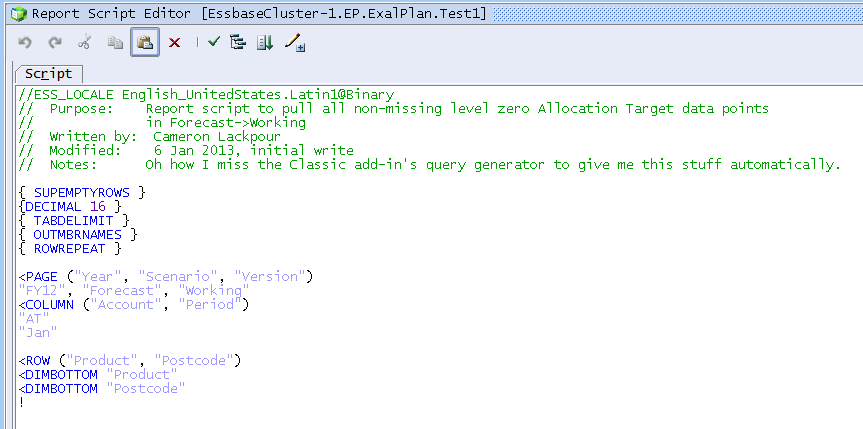
We likely want to run this in batch (I dunno, do you like staring at a screen as you wait and wait for a process to finish?  Me neither.) via MaxL:
export database db.dbname using server report_file "Test1" to data_file "c:\\tempdir\\Test1.txt" ;

How long does it take?  1269.72 seconds for 21,788 records (one for the header).  The output looks like this (I could have suppressed the headers with the SUPHEADING keyword but chose not to):

BSO calc script DATAEXPORT

DATAEXPORT is the darling of many because it can be invoked within the context of a calc script and because it can produce nicely formatted (well, cleanly formatted) exports and even write to SQL.  

Which produces something like this (which does look a bit a ugly in WordPad):

Why oh why did I open it in WordPad?  Because DATAEXPORT only writes a Line Feed (LF) at the end of the record, not CRLF as Windows requires.  Poor old Notepad can’t handle that so you get this:

How long did all of that take?  Why a mere 1070.79 seconds for a 21,787 record export.  That’s just about 16% faster than a report script, so if speed is the purpose, then DATAEXPORT is the way to go.

So what about MDX?

Well, this wouldn’t be where I would normally turn for data extraction, mostly because MDX is so ASO-ish and I’m not writing formulas in an ASO Essbase database.  But in fact MDX has a query language with ROWs, COLUMNs, PAGEs, and as many AXISes as one can shake a stick at (actually the max is 64).  

I really got inspired to try out MDX as part of a Really Special Project (i.e., a project that I am doing for “fun” and getting $0/hour for and OMG the hours are killing me – I’d be a freaking millionaire if I were doing this for a client.  Write constructive suggestions to me care of this blog on how to conduct oneself professionally with an eye to not going broke.) and because of a recent thread on Network54.

Well, after an amazing amount of pain for really very little output (this is, sadly, my modus operandi when it comes to new-to-me technology) and boost from my buddy Dan Pressman, Mr. ASO and by extension sorta-Mr. MDX query, I came up with the following:

That’s the query with pretty colors.  To make this actually somewhat readable when it gets output, I stuck the query in the following MaxL script:
spool on to "c:\\tempdir\\MDX_Extract_Test.log" ;

login username password on servername ;

alter application ep clear logfile ;

/*    The below settings are right out of Developing Essbase Applications    */
alter session set dml_output alias off ;
alter session set dml_output numerical_display fixed_decimal ;
alter session set dml_output precision 15 ;
set column_width 80 ;
set timestamp on ;

SELECT
    {CrossJoin({[Period].[Jan]}, {[Account].[Allocation Target]})}
ON COLUMNS,
    NON EMPTY (CrossJoin([Product].Levels(0).Members, [Postcode].Levels(0).Members))
ON ROWS
FROM [EP].[ExalPlan]
WHERE ([Version].[Working], [Scenario].[Forecast], [Year].[FY12]) ;

I have to give a plug to Gary Crisci – the settings I use to turn off aliases, set decimals and precision, and the column stamp are all out of Gary’s MDX chapter in Developing Essbase Applications.  As you’ll see, formatting in MDX isn’t all that great – it all goes into MDX_Extract_Test.log along with a bunch of other stuff.  Ick, yuck, eeewwwww.

The good news is that Network54 thread I referenced above has some great suggestions for getting round all of this.  Read it through and you’ll get some ideas.

How long does all of this take?  Ah, that’s where this gets interesting -- 638.926 seconds.  Now that is interesting – almost twice as fast as report scripts and takes just 60% of the time of the DATAEXPORT calc script time.

So what do we have?

Three different ways to write out data, with an increasing performance profile:
  • Essbase report scripts
  • DATAEXPORT report script
  • MDX queries

Looking at MDX versus Essbase report scripts, I really have to say, at least in the database I am using and for the extract I am using, MDX is by far the fastest way to do this.  Awesome, right?  We have a winner.  Or do we?

Undocumented, unrecognized, and unreal

All those times, all of those techniques I wrote about above?  Yes, they’re all going to pull the same data, and yes, I have shown you a way that is twice as fast as the most common approach, at least for this database.  But you know what?  They stink.  I have, thanks to a number of people and, I might add, Oracle, a much better way to do this.  It’s so fast the first, oh, eight or nine times I ran it I thought for sure it was simply an error.  It is no error and it is freaking awesome.  

Did I figure this out myself?  Nope.

Btw, I must tell you that I did not figure this out on my own but was told of the command by my fellow ACE Director Tim Tow.  And he discovered it whilst working with Bryan Bain, one of the original AFSG (Arbor Field Services Group) Essbase consultants, when he was trying to extract the last ounce of performance out of Essbase for his flagship tool, Dodeca.  I should also mention that I tested this out as part of that Very Special Project on one of John Booth’s test servers. I am, as always, standing on the shoulders of giants.

For the love of Mike, what is it?

It is an undocumented MDX BSO-only keyword that is hinted at in this old Network54 thread (which I was part of but, no, I did not hide it from you till this time) and mentioned in the 11.2.2 Essbase readme.  Look for defect 13037253.  And you have seen it in Planning forms.  Planning?  Yes, Planning.  Have you figured it out yet?

It is:  NONEMPTYBLOCK

How does it work?

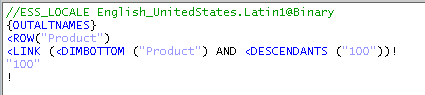
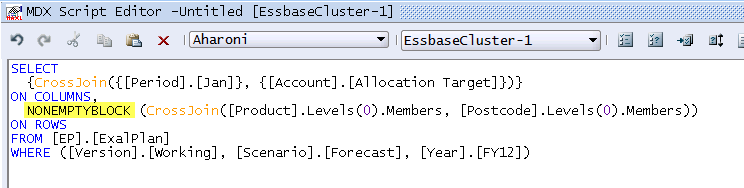
Just like this:
How long does it take?

The query (the same as the first MDX example save the keyword change) took 1.789 seconds with NONEMPTYBLOCK.  Really.  As I wrote, no, I didn’t believe it either.  Go on, try it yourself.

Are you laughing yet?  This didn’t make my day, or my week, or my month.  I think this is going to make me laugh all the way through 2013.  And considering I am stuck in an airport for hours and hours (thank you, US Airways, for eating all of my Sunday, again) after an ODTUG board meeting (the meeting was fun, the flying (or lack thereof) not so much), I’d say that is pretty strong medicine.

To put this into percent of time relative to an Essbase report script extracting the exact same data, this technique takes 0.14% as much time.  That’s right, not 14% but (I am going to say it out loud) zero-point-one-four percent.  In other words, it’s a freaking rocket.  And of course it’s Oracle that gave us this command and then mysteriously didn’t bother documenting it.  Why?  I have no idea.  It is still freaking neat.

Where does Planning fit in?

Have you ever edited a Planning (I am not going to bring up Planning just to snapshot this – trust me, it’s there and has been for a long time) form and ticked the box that tells Planning to suppress missing blocks?  Did you know that Planning builds its forms with MDX?  If not, you do now.  In any case, when you tick that box, you are using NONEMPTYBLOCK.  Remember, there is a slower (and documented) option to suppress missing in MDX – that is the NON EMPTY keyword I showed in the first MDX query example and that corresponds to Planning’s suppress missing form setting.

Does it always work like this?

With Essbase, the answer is easy:  no.  Or at least, test it, within the context of several constraints.

As I wrote above, this only makes sense within the context of BSO Essbase.  There are no blocks in ASO so this command doesn’t make sense and consequently doesn’t work (yes I tried it, no it doesn’t work).

This command also only makes sense if you are trying to extract lots of sparse at level zero of the database.  Per that Planning documentation link I gave you, if you do not have many missing blocks: “The Suppress missing blocks setting can degrade performance if few or no rows are suppressed.  Test forms before and after using this setting to determine whether performance is improved.”

And of course if you are not suppressing data then this command makes no sense at all.  Having said that, custom exports from Essbase almost always are at level zero and almost always suppress missing data, at least in my experience.  And if that is the case, NONEMPTYBLOCK is your BFF.  Btw, I would go with definition #3 on that link.  :)

Be seeing you and enjoy the hack.

09 January 2013

Get the FLASH about Kscope13

No, not that that superhero with Mercury’s wings on his ankles (Slight side note:  How was that supposed to make him run faster?  I mean, wings on his feet I understand, but those buggers were on his ankles.  Feet are attached to ankles and so the feet were fast too?  Why not attach the wings to his elbows?  They’re attached to his feet, kind of.  Ah, I would have made a lousy scholar of Classics.  One last question -- why is he wearing a hardhat?  None of this makes sense and yes, I am digressing in a most spectacular way.  Back to the task at hand).  And no, not a flashbang grenade (I read too many…odd websites).  And no, not a 32GB flash drive.  No, no, no to all of the above.

Nope, what I am talking about is a soon-to-expire, very-possibly-never-to-be-repeated-but-don’t-hold-me-or-ODTUG-to-it, Kscope13 offer that will get you a cool $150 off the Kscope13 registration cost.  Is there a catch?  But of course.  You must register before Friday, 11 January 2013, 12:30 pm EST to get this great deal.  And how do you do this?  With the code “FLASH”.  Yep, that’s the code and that’s the flash, and that’s all, folks.  

Be seeing you in New Orleans, 23 to 27 June 2013.

31 December 2012

Death of a thousand cuts

It is no secret

I have no love for Essbase Load Rules.  Mostly because I have comprehensively, completely, and utterly tied myself into knots using them.  And I should be clear about this – they are dangerous in my mind because it is easy to crude ETL in them that you (or at least I) will promptly forget about.  When it comes time to change things, or data changes, it is a complete Pain In The You-Know-What to figure out what was done in the rule.  Yes, they were Hot Stuff when invented, but that was almost 20 years ago (yes, really) and it is time for their closed nature to go, go, go.  Well, at least that’s my opinion.  I don’t really hate the things, but I do think that ETL via Load Rules is just asking for trouble and I wonder why there is no other lightweight way of sending data in an automated fashion.  Read on, gentle reader (all three or four of you), and yr. obdnt. srvnt. will reveal all.

Four exceptions to Load Rules

Actually, there are at least four different ways of sending data to Essbase without using Load Rules.

Load in free form

Have you ever locked and sent (BSO and the classic add-in)/sent (ASO and the classic add-in) or submitted (BSO or ASO and Smart View)?  Then you have used Essbase’s free form data format and yes, you can load it directly into Essbase sans Load Rule.  Want an example?  Take a look at CALCDAT.txt in Sample.Basic.  It is a free form data file with level zero and consolidated data values.  Why Arbor (yes, it is that old) did that, I cannot say, but they did.  

Load via ODI

ODI has an option to load data directly into Essbase without a Load Rule.  However, there seem to be lots of issues with that approach (go on, search for it and you will note that most ODI practitioners use a Load Rule because it is cleaner) and of course you have to buy into ODI in the first place.  I am a huge fan of the tool but its learning curve has a very cliff-like look to it.

Load via Studio

Essbase Studio is a great way to explore data, model it, and ultimately express it in Essbase.  And yes, there is nary a Load Rule to be seen in the tool.  But, at the end of the day, Load Rules are used to get metadata and data into Essbase.  I am inclined to cut Studio a break as Studio developers don’t so much as dirty their fingernails with Load Rules.  Nevertheless, programmatically derived Load Rules (that use ultra-secret API calls) are still part of the equation as they are generated by Studio so it is still tarred with that brush.

Load via MaxL

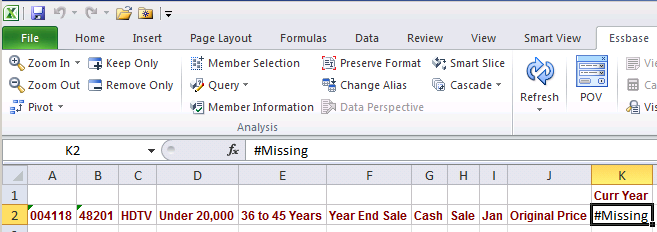
Did you know that MaxL allowed you to load data points to Essbase?  No?  Did you know import data did this?  It’s really pretty easy.

Before


MaxL


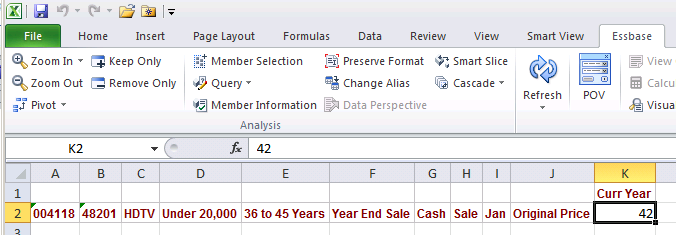
After


Pretty cool, eh?  You will note that this is essentially a free form data load which is the same as a submit (see, I am divorcing myself, reluctantly, from the classic add-in in every way and manner) from the Microsoft Office tool of your choice.  But this approach isn’t really suitable for more than a small amount of information.  

Four exceptions, but none necessarily right

Free form simply is not a practical solution, ODI is a great tool, but you have to be 100% committed to it and it has its caveats, Studio, while cool, is also not a simple solution and it resolves to the dreaded Load Rules in the end, and loading small bits of data via MaxL is interesting, but ultimately not practical.

What is needed is a lightweight way to load data, from SQL, without any of the above approaches and of course without Load Rules.  How oh how oh how can this be done?

HyperPipe to the rescue

Well, I didn’t write it

I was whining/complaining/ranting (I can do all of this at the same time and it is difficult to distinguish one from the other) to Jason Jones about Load Rules (yeah, this is one of the biggest bees that buzz around my bonnet) and he said (NB – Artistic License ahead), “Really?  You’d like to load data to Essbase without using Load Rules?  Give me a couple of days.”  And so it was.  It is great knowing people who are smarter than you.  

So what is it?

It’s a command line way to load from files or SQL to Essbase.  Note the words that are missing from that sentence – Load Rules.  <insert evil laugh>  This example will show loading to MVFEDINTWWW, aka Sample.Basic step by step.
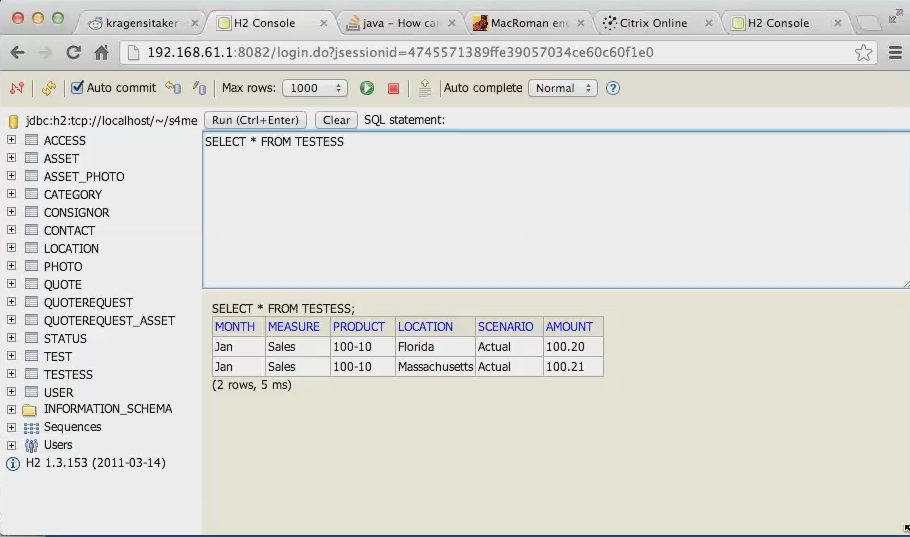
Data in SQLOh, did I mention that the Merant ODBC drivers are no more?  What you see below is the open source H2 Java database.  Did I mention the client is running on a Mac?  It made me laugh out loud.
I should note that the above is not implying a Mac version of Essbase, but instead shows that with a web application orientation, one can access data and processes across platforms and machines.

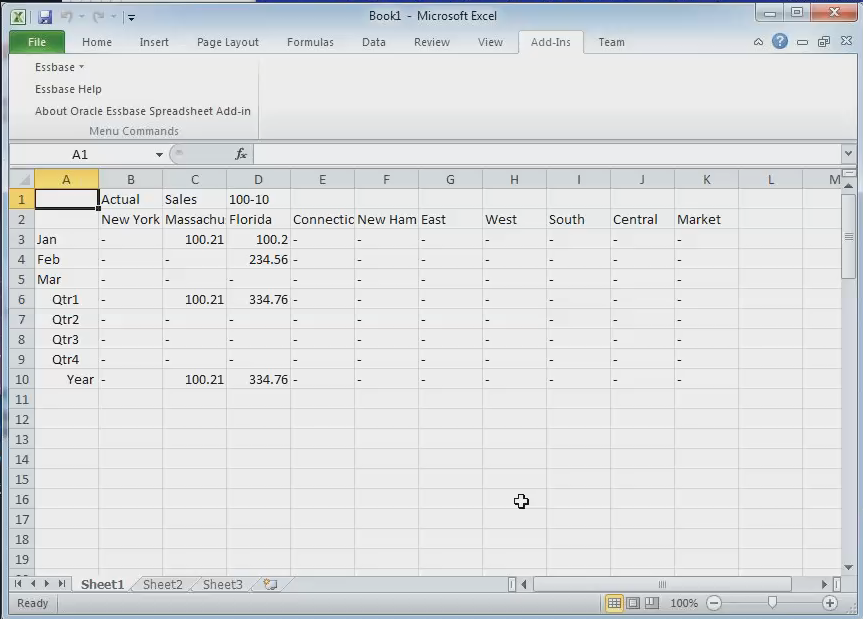
Data target

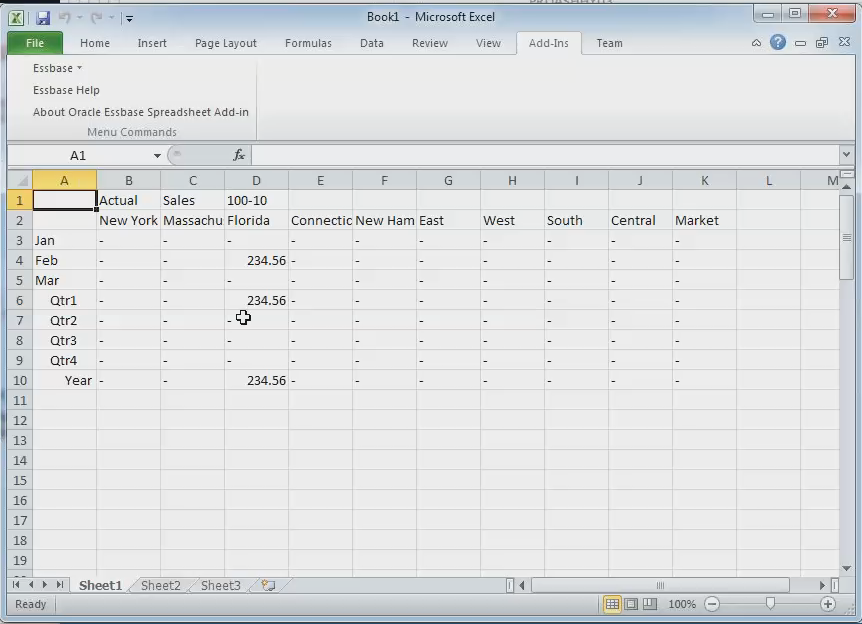
Here’s the data target.  Jason has not yet made the switch to Smart View.  I understand his pain.

Where does it run?

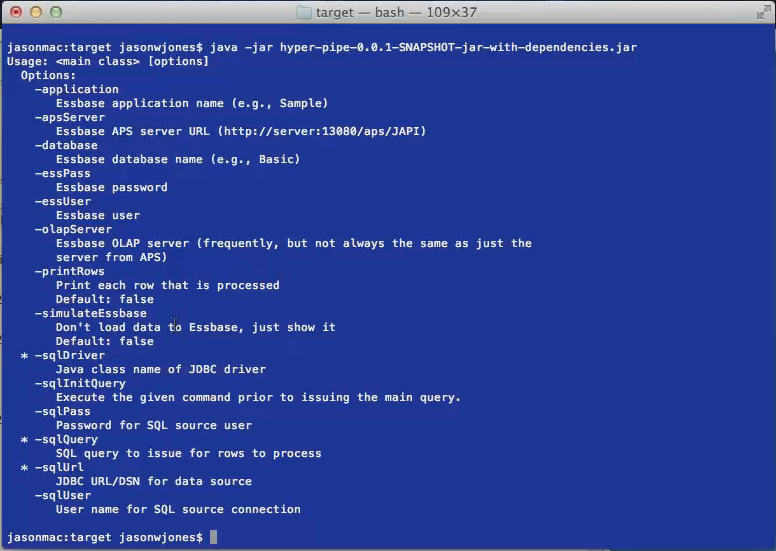
Jason is a Java guy, so the code to run this is in the hyper-pipe (HyperPipe?  hyper-pipe?  Tomatoe, tomatoh) jar file through the bash Unix shell.
Are you catching all of the properties?  Just about everything one could possibly think of wrt a data load to Essbase.  You can read the screen as well as I but I draw your attention to two parameters.

sqlDriver

JDBC to the rescue, ODBC goes bye-bye.  Neat, huh?

sqlInitQuery

Want to manipulate columns and data?  Do it in SQL, as Zeus declared on Mount Olympus.  At least I’m pretty sure he said that in Clash of the Titans.  Just watch the good (original) one -- I think me mentions it right after, “Release the Kraken”.  

You may fire when you are ready, Gridley

And that’s it.  A load to Essbase, from SQL, with Load Rules being conspicuously absent.  <insert big grin>

Data in Essbase

How does it work?

Jason described it as akin to the MaxL data load process.  And that is all I know of it as I am no Java programmer.  However, the good news is that Jason is going to release this as an open source project so you can download it and tear it apart.  Have fun.

So is that the end of Load Rules?

Alas and alack, no.  They will be around, quite possibly forever (if you define forever for as long as there is an Essbase, then yes, definitely forever) as there are simply too many people with too much code in them.

On the other hand, Oracle took the bold step of giving the chop to Hyperion Business Rules to be replaced in 11.1.2.2 onwards with Calculation Manager and the same is true for the Classic Excel add-in for Essbase, so there is hope.  

As of this writing, Jason has not released HyperPipe but as I noted, he is an open-source kind of guy.  Contact him via his blog and look there for a much more in depth review of the tool.

And let me also give a hearty thanks to Jason for figuring out how to do this.  Now if only a certain absolutely humongous software company takes this concept and runs with it.  <insert the biggest grin thus far>  As the immortal Robbie Burns wrote, “Ah, but a man's reach should exceed his grasp, Or what's a heaven for?

Be seeing you.

23 December 2012

Dodeca dynamic reports

Introduction

One of the greatest strengths of Dodeca are the many, many, many kinds of functionality that would require scads of code are simply not needed because Applied OLAP has already done all the work and built it into the tool.  Whether it be SQL drill through, frighteningly awesome member selectors that you can drive from dimensions, members, SQL, delimited lists, the ability to quickly convert complex Excel workbooks into highly-functional Essbase reporting decks – I could go on and on and I have.

But what happens when you need to do something outside of those great pieces of functionality?  Yes, Dodeca does many, many, many things, but what about custom stuff?  Why thank you for asking, because that is where Workbook Scripts come into play.

What the heck are Workbook Scripts?

That is a very interesting question, and not an entirely easy one to answer.  Okay, part of the answer is straightforward -- WS (I am not typing out Workbook Scripts any more in this post) are how you  customize a Dodeca View (for the uninitiated, Views are reports/forms/etc., usually, but definitely not always a marriage of Essbase and Excel workbooks as hosted in Dodeca).  But WS are not some new age Visual Basic for Applications for Dodeca.  They are more akin to Excel’s original Macros (this is pre-VBA) but with multiple twists – WS have their own Essbase/SQL/Excel language, are tied intimately into Dodeca’s event model, and can even directly execute Excel formulas.  Did I mention that all of this happens in unison with Dodeca events occurring on the sheet AND all of the functionality and formulas that are intrinsic to Excel AND the Essbase API AND Essbase report scripts AND/OR MDX AND well, you get the idea?  It is, in a word, cool.

Crawl before you walk

If the above sounds overwhelming, I am doing WS a disservice – they are actually pretty easy to use (that is sort of their point) and a whole bunch of coding that you might have to do in another tool is simply not an issue as Dodeca does it all for you.  Probably the best way to show this is an example and per the title of this blog post, I am going to show you how to create a report that dynamically sets the rows to the level zero descendant of whatever off grid/POV Product is selected.  To do this I will write an extremely simple two step WS that will:
  1. Read the member selection from the Product treeview POV control
  2. Run a report script to get the inclusive level zero descendants of that Product
  3. Dynamically increase or reduce the no. of Products on the sheet
  4. Retrieve the data from the sheet

A very simple report script


The first step is to write a report script for MVFEDITWWW (aka Sample.Basic) that mimics a drilldown in Excel.  I have been writing Essbase report scripts for longer than I care to think, so this was dead easy.  You could make this report as simple or as complex as you like – data is not the point, just metadata.  Here it is:
 

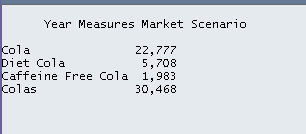
And the output (yes, there is data, no, I don’t care about the numbers, yet):

Tokens to the rescue

If I were writing this report to only do Colas I guess I could stop, but I have a mad lust for power, uh, flexibility, and who knows, I may share this report with someone who is responsible for Cream or Fruit Soda pop, so I am going to remove the member “100” and replace it with the string [T.Product].  See my other posts on Dodeca to explain how tokenization works.  

Tokens via ScriptText

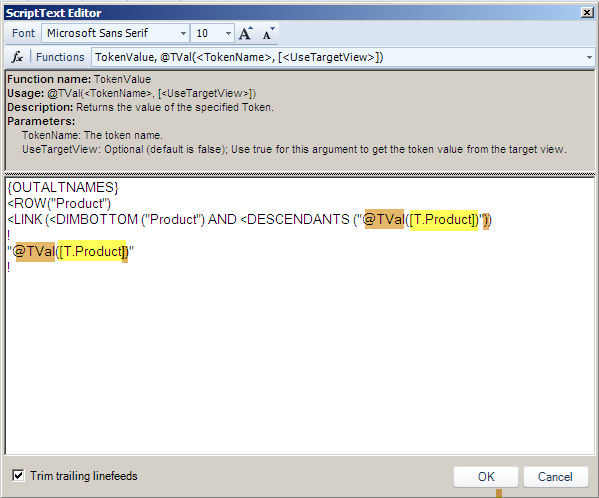
What matters now is that whatever Product member is selected is what gets put into the report script.  To do that, I will change the report and in the WS BuildRangeFromScript method’s ScriptText property I will put in a WS function called TokenValue or @TVal (see what I mean about this looking like Excel 4 and before Macros?).  The bits in yellow are the token string [T.Product].  The bits in a sort of horrible brown are the function @TVal(<TokenName>) which make Dodeca value the token before the report script is executed.  

Also note that the whole thing is enclosed in double quotes – this makes sense as the Product name could be Fruit Soda instead of Colas.  Remember, Dodeca can pass either the name or the alias, depending on what the user has selected for the dimension control, so the report script has to be accomodate either.

Just to be clear, to make Product tokenized, I put in the WS function and token string of:
@TVal([T.Product]) and encase that within double quotes so that it looks like:
"@TVal([T.Product])"

Ranges R Us

There are three ranges that must be defined for this process to work:
  1. An Essbase retrieve range – where Essbase will retrieve the data (remember, this is the range that we want to dynamically make larger or smaller).  This range will get larger or smaller depending on the output of the report script.  NB – Make this range one row (or column if this is a column build) longer than it needs to be to get Dodeca to insert rows correctly.
  2. A template range – a range that is repeated for each member in the output of the script.  Formatting, formulas, etc. go in here.  If the range is one row in height (which is the usual approach) then just one row will be inserted.  If the range is two or ten rows, then that many rows and their contents will be inserted when the row is repeated.  Think of this as a quick and dirty method to do multiple dimension drilldowns where the inner dimension is a fixed set of members.
  3. An Essbase target range – A single cell that tells Dodeca where to stick the copied template range.

Two simple range rules


  1. The target range must be inside the retrieve range
  2. The target range must be outside of the template range

Follow the above two rules and you will be happy.  Ignore them at your peril – I will illustrate later what happens to Essbase/Dodeca geeks that do not follow those two pretty simple strictures.  It’s ugly.

So what does this all look like?


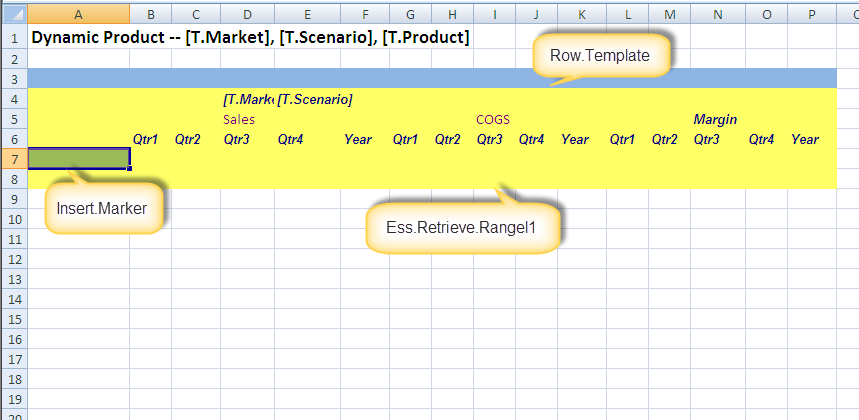
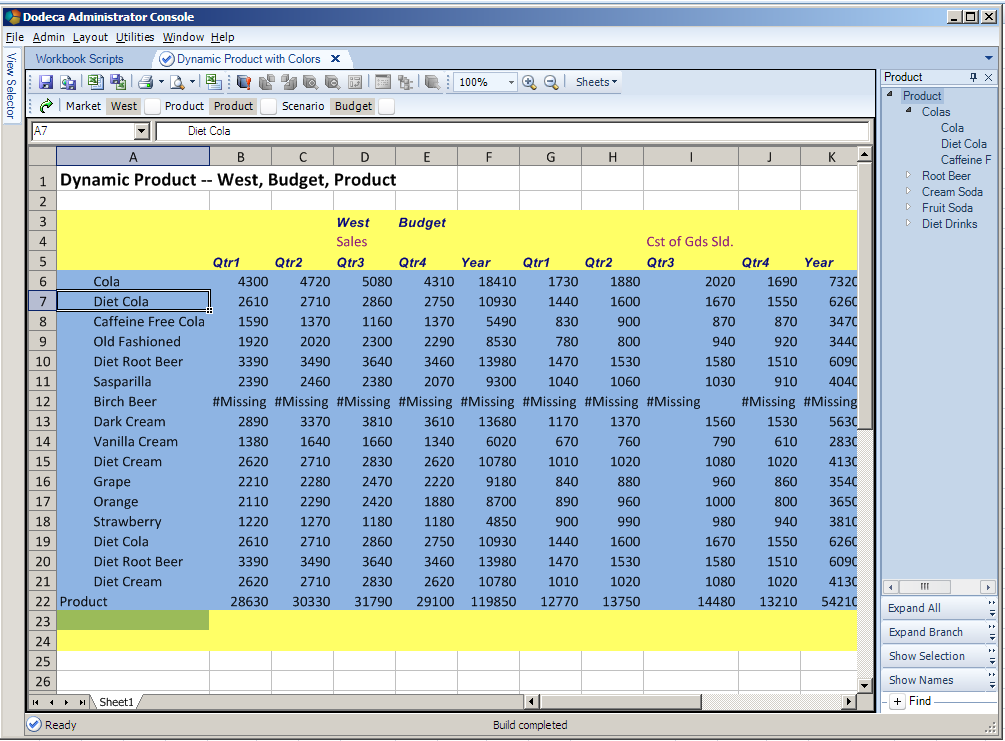
Here’s the View template.  Note that there are no predefined members in the row headers – that will be the output of the report script.  You will also note the three ranges that I have named (Ess.Retrieve.Range.1 is fixed, but I could have named the other two Platypus and Orange if I wanted to but as I am not totally insane, yet, I chose meaningful names; you should too.)  Just so everyone is clear (are you getting the idea that the position of these ranges is important?), the ranges are as follows:
  1. In green in cell A7 is the target row for the inserted Products.  Note that the Insert.Marker range is within Ess.Retrieve.Range.1.
  2. In yellow from A4 to P8 is the Essbase retrieve range Ess.Retrieve.Range.1.  Note that it is one row longer than needed – this is to get the insert function to grow the range, just like in Excel (go on, try it).  If you don’t make Ess.Retrieve.Range.1 one row longer than necessary, you’ll get this when everything fires:
Note that rows have been inserted onto the sheet, but the range Ess.Retrieve.Range.1 has not been expanded.  You Have Been Warned but I am jumping ahead of the narrative.

  1. In blue from A3 to P3 is the row template range Row.Template – this is what will get repeated for each selected Product.

Again, note the application of the two range rules:

  1. Insert.Marker is within Ess.Retrieve.Range.1
  2. Insert.Marker is outside of Row.Template

Setting the properties

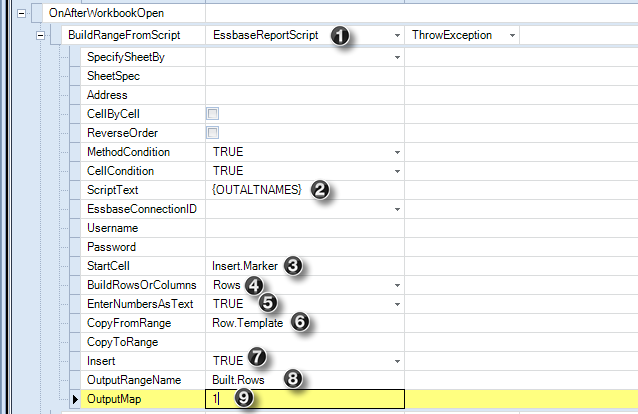
Dodeca helpfully supplies an event called OnAfterWorkbookOpen and just like the name suggests, this is after the workbook is open but before anything has been retrieved.  This is the time and the place to set the contents of the row.  To do that, this View must have nine properties set – it looks a little overwhelming at first but honestly it isn’t very hard.

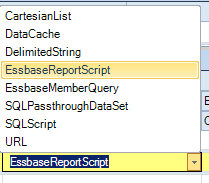
  1. BuildRangeFromScript -- You must decide how you are to build the row set.  I have an older version (I am too lazy/overwhelmed-with-so-many-things-to-do-it-scares-me to download the latest and greatest but I should) of Dodeca, so I am missing the MDX script option.  In any case, I want the EssbaseReportScript type.

  1. ScriptText – The report script text as shown in the ScriptText editor a few sections above must be entered here.  Tokens, btw, are not a requirement and indeed when I was proving that this WS worked, I just used the Essbase report script with Product 100.  Once I had that working, I tokenized it.
  2. StartCell – Range name of the repeated rows that are tied to the output from ScriptText.  This is the green range.
  3. Rows – This report has dynamic rows; it could just as easily be columns.
  4. EnterNumbersAsText – Just in case member names such as 100 are used, treat them as text.
  5. CopyFromRange – The name of the range to be repeated.  This is the blue range.
  6. Insert – Set to TRUE as I want the output of ScriptText to be reflected in the sheet.
  7. OutputRangeName – The name of the rows that are built during the insert process.
  8. OutputMap – The column that receives the output of ScriptText.

Attaching the WS to the View


Once you have written the WS and committed it, simply assign it to the View in the WS property:

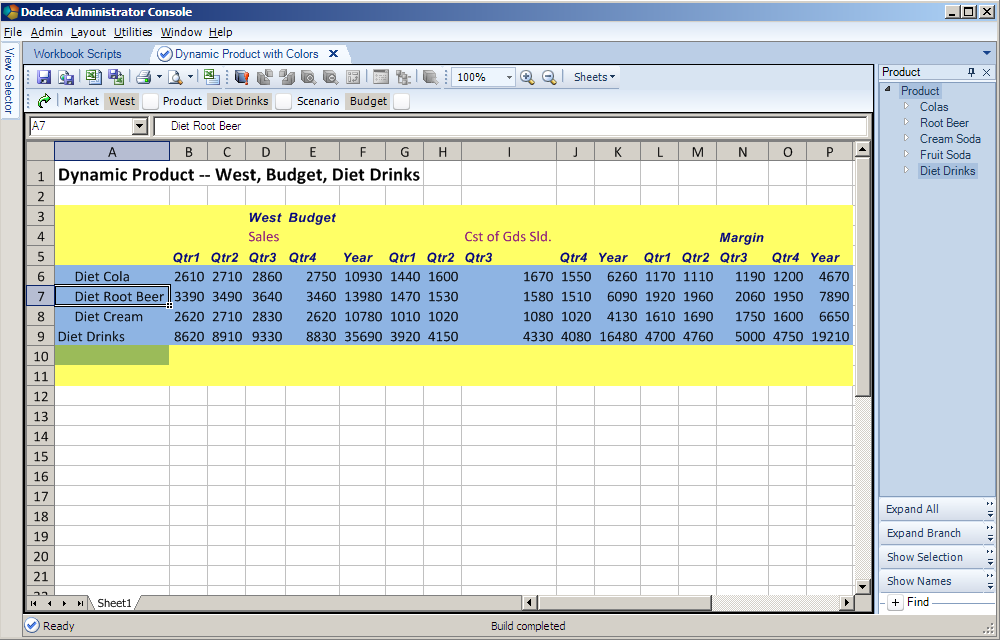
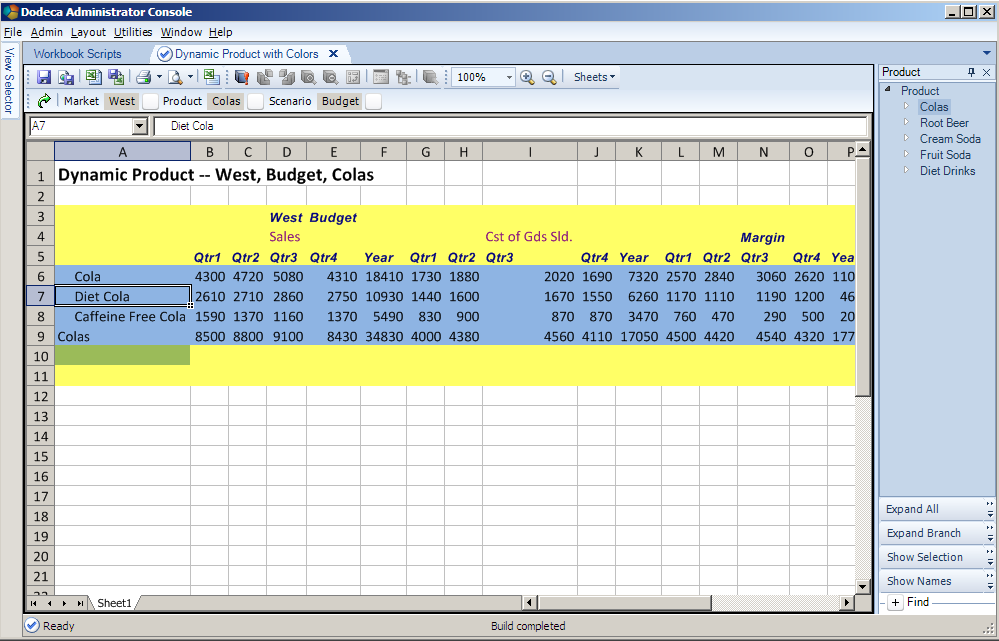
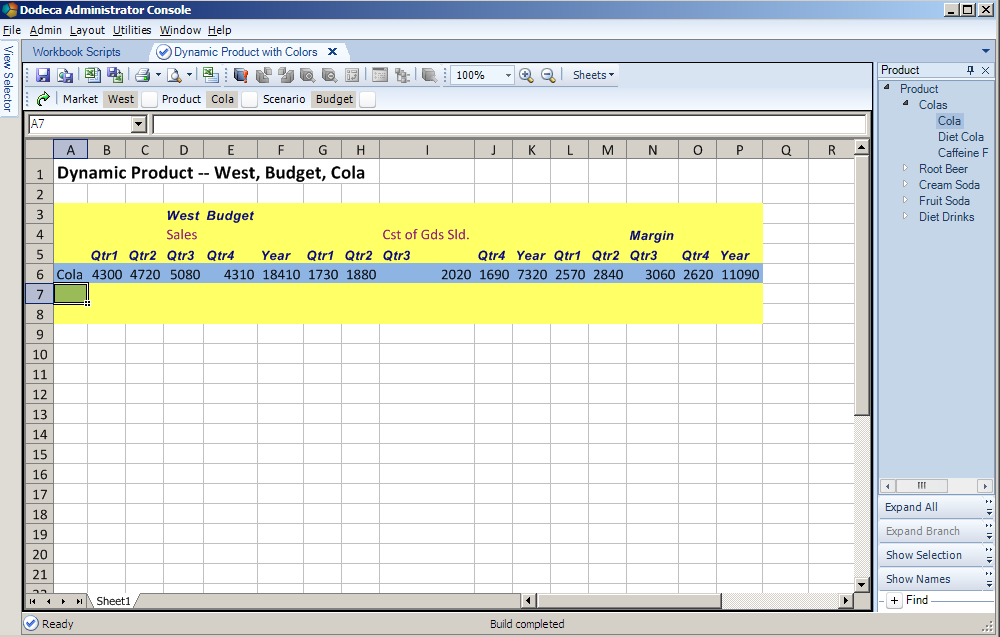
Let’s run the view

Diet Drinks

Colas


Cola


All Products


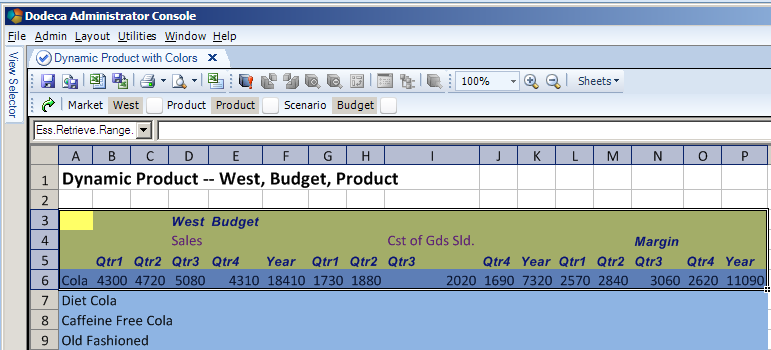
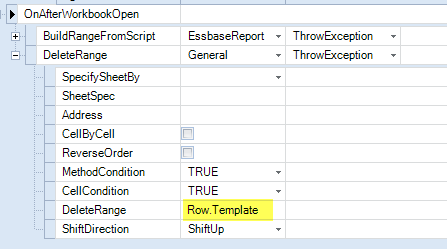
You get the idea from the colored ranges, right?  The Row.Template range in blue is repeated and inserted into Ess.Retrieve.Range.1 as many times as there are Products coming out of the ScriptText property.  Also note that Insert.Marker gets pushed down as the rows get inserted.  Lastly, the Row.Tempate range is no longer in the sheet – I put in a second step into the WS to delete that range once the retrieve was complete.
 

What users would actually see

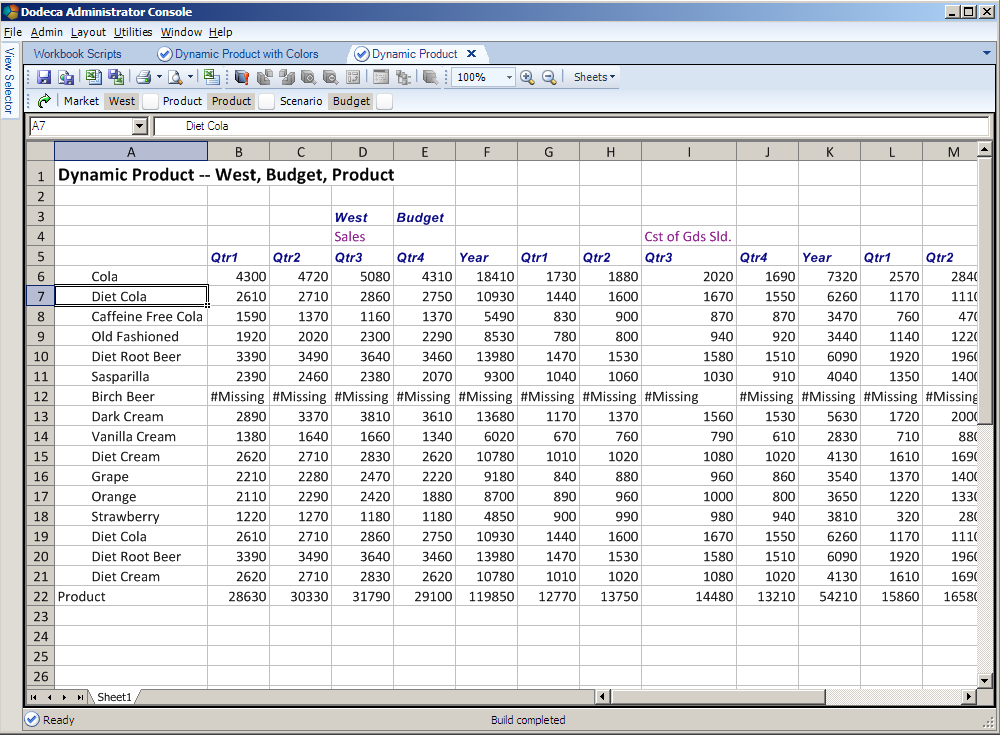
And lets look at the same report as the above but without the colors to show the addresses of the ranges post retrieve.


WS can be assigned to multiple views – think of it as a way to build a library of functionality within an application to be used over and over again.

That was easy, wasn’t it?

Think about how you would do that outside of Dodeca with a spreadsheet.  Think about all of the things Dodeca is giving you – connections, grids, selectors, tokenization, and now WS.  Think about the effort on your part to code all of that.  It’s sort of a consultant’s dream, isn’t it, so long as the dream consists of writing enormous amounts of code.  I’ve done it in the Classic (nope, now it is Legacy) Essbase Excel add-in toolkit and I don’t ever, ever, ever want to do it again coz I have way more important things to do with my life, like blog, or post on OTN or Network54 or work on “special projects” or prepare content for my three Kscope13 presentations or I dunno, try to have a life.  Yep, plenty of other things to do and not one of them includes writing tons of code.

Addendum – two examples of what not to do

I could have ended this post right up above but I thought I would save anyone who tries this approach from the errors I committed.  And more than that, it really illustrates how this technique works.  So with the thought that errors can be fun and educational, and the reminder that you should follow the below two rules at all times, let’s begin.

For the record once again (I think this is the third time I’ve written this, so yes, it is important) make your life simple and follow these two rules:
  1. Insert.Marker is within Ess.Retrieve.Range.1
  2. Insert.Marker is outside of Row.Template

What happens when you don’t follow those rules?  Or, in my case, had the rules explained to you by an ever-patient Tim Tow but then completely ignored them?  Pain, that’s what.  Let me show you what happens when Insert.Marker is not within Ess.Retrieve.Range.1.

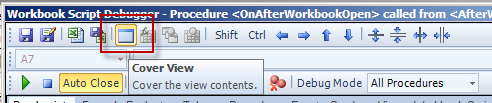
Btw, we can only view this by invoking the WS debugger and then stepping the process.  I should note that the only way to see what is on the sheet when there are WS errors  is to run the WS in debug mode and then use the CoverView button to display the View.  Otherwise, all you get is this:

The CoverView button is on the top toolbar of the debugger.


Error no. 1 – Insert.Marker outside of Ess.Retrieve.Range.1

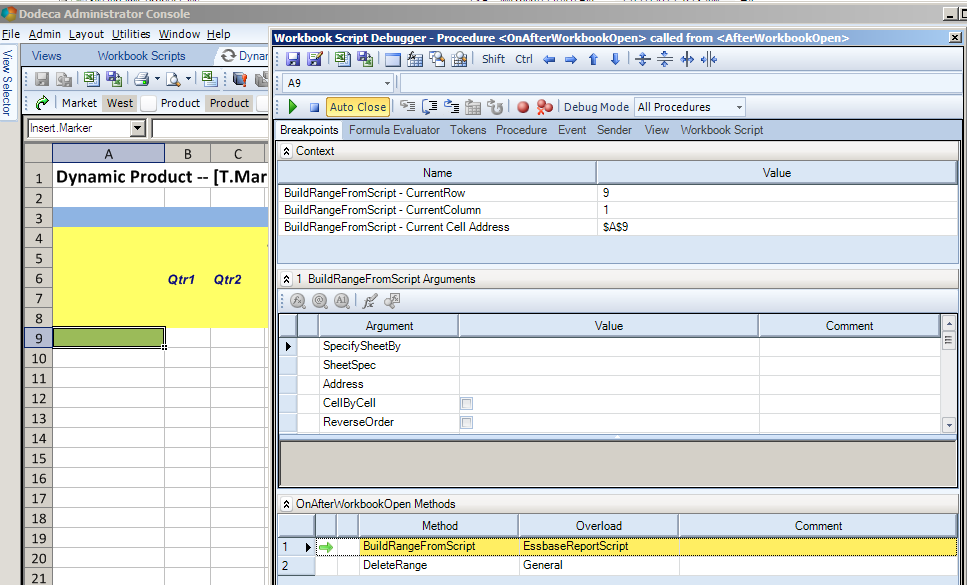
Assuming that the WS is being stepped, and that the CoverView button has been selected, here’s the sheet before the ScriptText is applied.  Note how Insert.Marker is outside of Ess.Retrieve.Range.1.

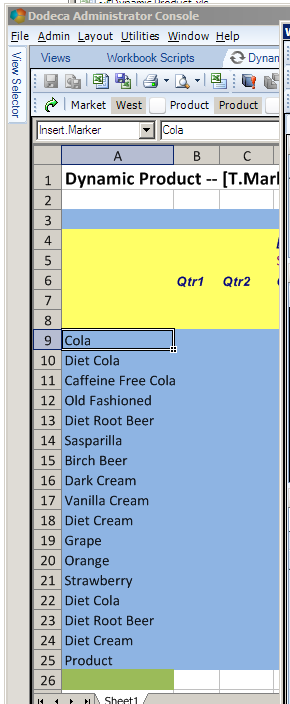
And we get…KABOOM!
 
Do you see what happened?  The Row.Template got repeated correctly, but the Ess.Retrieve.Range.1 did not get expanded.  When that retrieve fires, there will be no Product within the range.  The error message is a bit cryptic although if you look at the above range, you’ll realize it makes perfect sense.
Error no. 2 – Insert.Marker within Row.Template
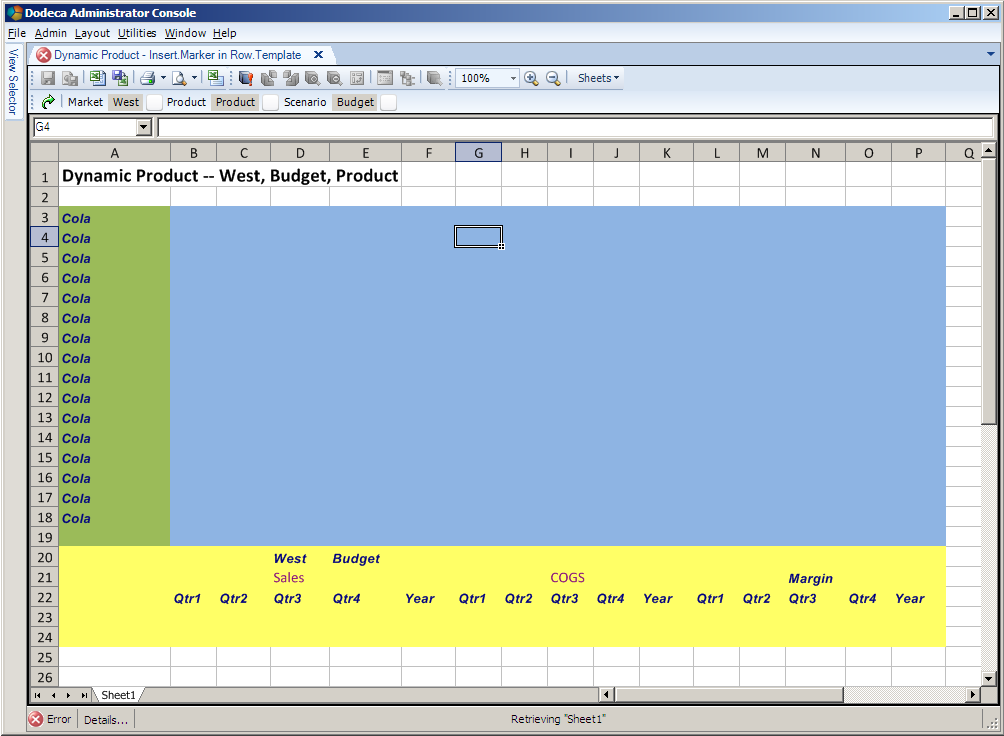
What happens if the Insert.Marker is within the Row.Template?  It’s actually quite logical – the ScriptText returns lots of rows one for each product, but doesn’t put the right members in, Dodeca inserts them but they are now within the expanded Row.Template range which gets expanded.  Ess.Retrieve.Range.1 is what gets retrieved but it doesn’t have any Products and so you get the below result.
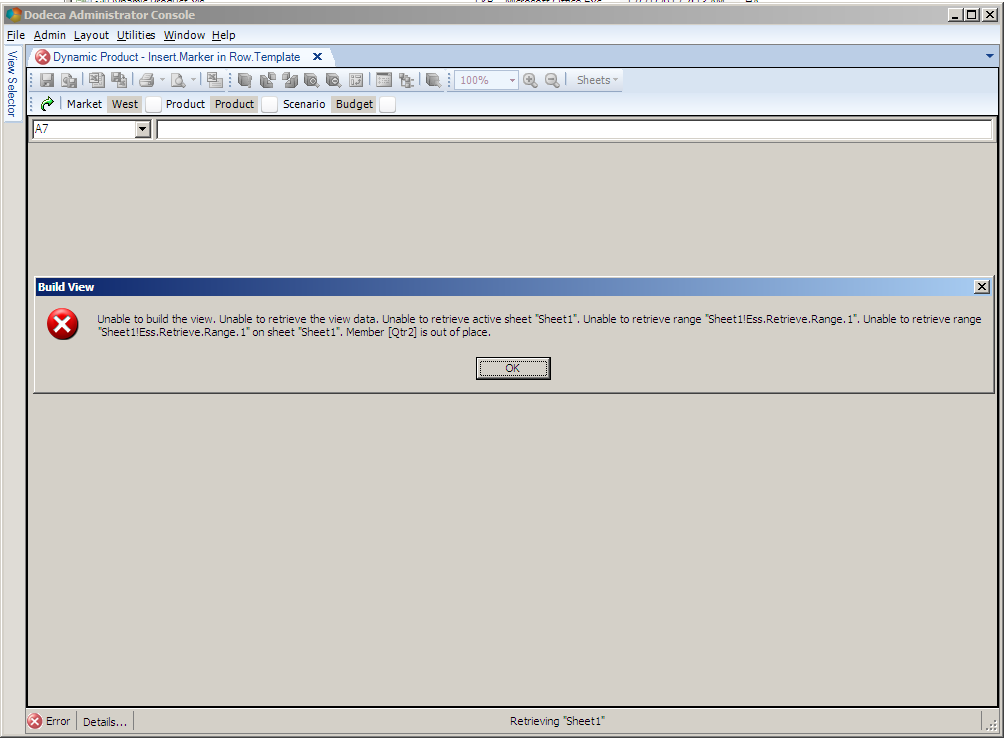
And a nasty error message of:
It’s the same error message (it is the same error from an Essbase perspective) but a completely different looking sheet.  Don’t do as I did and all will be well.  And use that debug function and even color the ranges if you are confused as to what is where and why.
And now really the end 
Beyond user-initiated error, i.e., I screwed up, this is dead easy and takes much longer to read about than it does to set up and run.  I think practically every Dodeca customer out there uses WS in one form or another, but like all powerful tools, there is definitely a learning curve.  Hopefully I’ve brought you a bit along the way with WS in Dodeca and showed you some of the power.  In case you can’t tell, I really like this tool.

Be seeing you.