Want to know The Truth About CPM?

16 February 2012

ODTUG Hyperion SIG Newsletter -- It's Free!

Do you get it?
It's free.  Do you get it as an email?  If you don't, you can sign up as an associate ODTUG member, log into your account, and then add EPM to your professional interest area.  (Thanks, Crystal).

Or you can just click here and view this quarter's issue, but this isn’t a dynamic link, i.e., there'll be another one next quarter and this link won't be it.  Welcome to the new and novel invention called email.  As I wrote above, it's yours for the asking.

This issue’s content

  • Awwww, a love note from ODTUG.  And I lurv you right back.  I do, really.  :)  Note this blog post.  At least it’s not unrequited love.
  • A note about the Hyperion SIG regional conference in Arlington, TX.  There are some big names there.  Did I mention it was free?
  • A note about the KSCope Early Bird deadline plus some sample letters to make the request stick with your boss.  Free yet again.  It’s like a bunch of talented people in our industry are trying to help you.  For free.  Think about it.  Yes, it is awesome.
  • A preview/teaser of tracks and highlighted sessions.  I know you are *all* going to be there, right?  Right?


So far, just marketing, not that there's anything wrong with that.  Actually, it's quite a bit more than marketing  This all feeds back into the ODTUG-is-awesome theme we all know (or should) so well. 

Now for the Truly Good Stuff:

  • Oracle Support Corner – How to Create a Service Request so that it actually gets answered - This is the Real Deal, as written by someone from Oracle.  Cool stuff. 
  • Oracle Ace Corner – A book review by yr. obdnt. srvnt of Oracle Essbase 11 Development Cookbook by Jose Ruiz.
  • Best of the blogs -- John Booth (the owner of the newsletter) has gone through recent blog posts and compiled a list of some of the more interesting blog posts, including, ahem, this blog.  John, the check for $20,000 is in the mail.  :)  

What does it look like?

Here’s a snippet out of my inbox:

Conclusion

If you don't get this, you really ought to.  There's good stuff here and it is 100% free.  What's not to like?

05 February 2012

Two interesting and free EPM bits o' info

Two (mostly) free things you should know

So long HTML, hello ADF

I’ll take it straight from the https://supporthtml.oracle.com web site:

In case you can’t read that:   

The new Oracle ADF-based UI has replaced the HTML version and will eventually replace the Flash version of My Oracle Support. After logging in, please refer to document 1385682.1 for more information.


All I can say is that it’s really, really fast.  I will not miss the Flash version at all.  Support just keeps on getting better and better.

So you want to play with Planning 11.1.2.1 but you too are an infrastructure idiot?

Hmm, perhaps that is too strong of a description for you but it is oh so apt for me.  I am good at some things (a vanishingly small number of them but such is life) and am bad a tremendously large number of them.  In the EPM world, I am afraid that infrastructure is my very worst subject.  Sigh.  

So we (and especially me) are all lucky that John Booth has provided us with a test Amazon Web Services Amazon Machine Instance.  Check it out here on John’s blog.  I like to think that my hapless goofing around with installs is his inspiration.  As an example, I recently patched Essbase, APS, and Smart View to the .103 release and it took me three hours.  It should have taken three minutes.  The AMI name is ami-09b26360 ami-3173a358.

John fixed an issue with the FR print service (you can see it NOT running in the screenshot below).  Now it works.

I’m not going to go through the process of using AWS – I’ve done that already here.  Just use the new AMI to get to Planning, Essbase, Essbase Studio, FDM, Financial Reports, and Web Analysis.

Here are the data source settings in case you are an infrastructure dolt like me:


Here’s the Planning sample application in all of its glory:


And a list of the services:


Did you catch the 17 gigabytes?  I love AWS.  I am 99% sure my next laptop is going to be small, cheap, and light.  Or I may just never get rid of the 8 GB boat anchor (it does have a pretty screen) I have now.

So is it free?

Sure, the new ADF version of Oracle Support is free, so long as you are a paid up customer or partner.  

And oh yes, the AMI is free, so long as you don’t mind setting up an AWS account and paying a paltry $0.62/hour for a two CPU, 17 GB box.  

It’s as close to free as EPM gets.  Enjoy.

29 January 2012

Where oh where have I been and why oh why would you care?

You may have noticed that I haven’t updated this blog in a long time, nor have I been feeding my obsessive need to be on OTN/Network54.  And you likely didn’t care, but I’ll tell you where I’ve been regardless.  :)

I and 12 other happy souls have been writing a book for the last six months.  No, not a book about coffee, or obscure French cars, or my imaginary service in the RAF (my callsign, if I had one, is Biggles 1 and in my imagination I fly this).  Instead, we have written something that I think is going to set the Essbase world on its collective ear – the first advanced topic Essbase book:  Developing Essbase Applications: Advanced Techniques for Finance and IT Professionals.  

No, you can’t buy it, yet, as it just went to the publisher as a first draft.  I hope it will be available by KScope12 but it will likely be available by Oracle OpenWorld.  We’ll see – this is the first book I’ve ever written and I have no real yardstick to compare times, effort, etc. against.  Yes, it has been quite the learning experience.

Again, who cares?  Why would I read this book?

You’ll read Developing Essbase Applications because:
  • That advanced topic orientation I talked about.  For the time being, you’ll simply have to trust me on this, but I am quite confident that you will find this book interesting.  Nope, I take that back, you will find this book revelatory, revolutionary, and amazing.  Hype, right?  I don’t think so – there is content in this book that exists nowhere else.  Some of it will blow your mind – really.  We’ve peer reviewed this beast and have received very positive feedback.  We’ve also gotten back the comments, “Wow, that’s really hard/amazing.  How did you guys figure that out?  I thought I knew Essbase and I didn’t know that.”  This is not a beginner’s book.  I’m not even sure it’s a midlevel developer’s book.  There’s Good Stuff inside the covers.
  • A good practices approach.  We’ve seen bad Essbase implementations.  We’ve (long, long ago) even been responsible for bad Essbase implementations.  The lessons from those bad systems were absorbed and the bad practices assiduously avoided.  Instead, we show you nothing but the right way to do Essbase.  Our internal motto during the writing of this book was, “We love Essbase and hate to see it done wrong.”
  • We do more than just tell you how to do something, we tell you why.  It’s like having a team of seasoned consultants in a book and they’re 100% dedicated to knowledge transfer.  More than a few people in on the secret have said, “Are you telling the world too much?”  If there was a finite amount of Essbase knowledge out there, then yes, maybe I’d be worried about writing ourselves out of a job.  Happily, Essbase is alive, well, and growing.  Making you grow is Developing Essbase Applications mission.

I am ever so slightly interested.  So what’s in it?

Developing Essbase Applications covers every area of advanced Essbase practice there is:
  • Essbase infrastructure
  • Data quality
  • Essbase Studio
  • BSO in depth
  • BSO to ASO conversions
  • Designing ASO for performance
  • Practical MDX
  • Essbase Java API
  • Automating with Groovy
  • Advanced Smart View
  • Implementing and administering Essbase

Who wrote the book?

An excellent question and oh how I do love writing these leading questions.  See if you recognize any names:  Dave Anderson, Joe Aultman, John Booth, Gary Crisci, Natalie Delemar, Dave Farnsworth, Cameron Lackpour, Michael Nader, Dan Pressman, Robb Salzmann, Tim Tow, and Angela Wilcox.  Jake Turrell edited.  Many more people contributed with their edits, comments, and ideas.  This was the group project to end all group projects and I am obliged to each and every one of you.

So you’re just one of 12.  What’s the big deal?

I was the editor in chief of this project.  What does that entail?  An editor in chief, at least within the context of this book:
  • Lands the publishing contract.  The Oracle ACE program helps.  No, this is not an endorsement of the book by the ACE program.  Oracle wants ACEs to write and they provide the all-important introduction to publishers.  
  • Handles all of the legal issues.  I now know more about copyright than I ever wanted to.
  • Project manages the writing.  I  will freely admit that project managing this large a group of what are essentially volunteers (yes, we are getting royalties, but split that 13 ways and figure the number of hours and it’s pretty close to volunteerism) was challenging, to say the least.
  • Helps edit each and every one of the chapters along with Natalie Delemar, Dan Pressman, Angie Wilcox, and Jake Turrell.
  • Writes a fairly awesome (ahem) chapter on data quality.
  • Lives, breathes, eats, sleeps, and anything else you can think of nothing, but nothing, but this book for the last two months.  


The writing process has been exhilarating and exhausting.  I’m happy to have done it and equally happy that it is finally over.  I need to go find billable work.

So what’s next?

I and my fellow coconspirators will keep you up to date with more information about Developing Essbase Applications as it gets closer to actual publication.  Like I wrote, we aren’t exactly doing this for money.  We wrote it to drive the art of practicing Essbase further, much further.  So think of the drip, drip, drip of news about this book as a service, not a marketing campaign.  ;)

We’re tremendously proud of what we’ve written and think you will find it tremendously valuable.

17 December 2011

Stupid Programming Tricks #9

Keeping it G-Rated

I have a focus problem – no, that’s not the part that is G-Rated.  My focus problem is that I jump around so many technologies I sometimes tie myself into knots trying to figure what should be, and maybe are, simple things.  No, that’s not bragging, more like an expression of frustration.  But it’s all fun, right?  Right?  My hat is off to those who find this stuff easy, ‘cause that for sure ain’t yr. obdnt. srvnt.

So with the warning to myself to keep both the whinging and the cursing to a minimum, let us proceed with an ODI Stupid Trick.

Going faster miles an hour    

Oh dear, that version is NSFW.  But you have to give the Pistols artistic license.  And it’s a fairly good comment on how much this issue frosted my cookies.

So I am working on my Essbase Special Project using ODI 11.1.1.5 and all is going swimmingly, sort of.  I’m even doing it all in the Cloud.  So what?

I had a Procedure that logs process status to a table (too many steps for emails).  I wanted one of the fields to be appname.dbname with those values passed by #VAR_AppName and #VAR_DbName.  I had these defined as Alphanumeric variables, No History, with a default value initially of ASOSamp and Sample; I subsequently set these to blank because I wanted to assign them via a Load Plan.  In any case, these were set to Declare Variables in my Package and off I went.

The problem
Except that some of the Procedures that used these variables didn't change their value.  Odd.  I deleted the variables from the Package and readded them and regenerated the Scenario(s).  Nope, still stuck, actually, no, only one of them.  Huh?

The Stupid ODI Trick, and yes, it was just luck that I found it
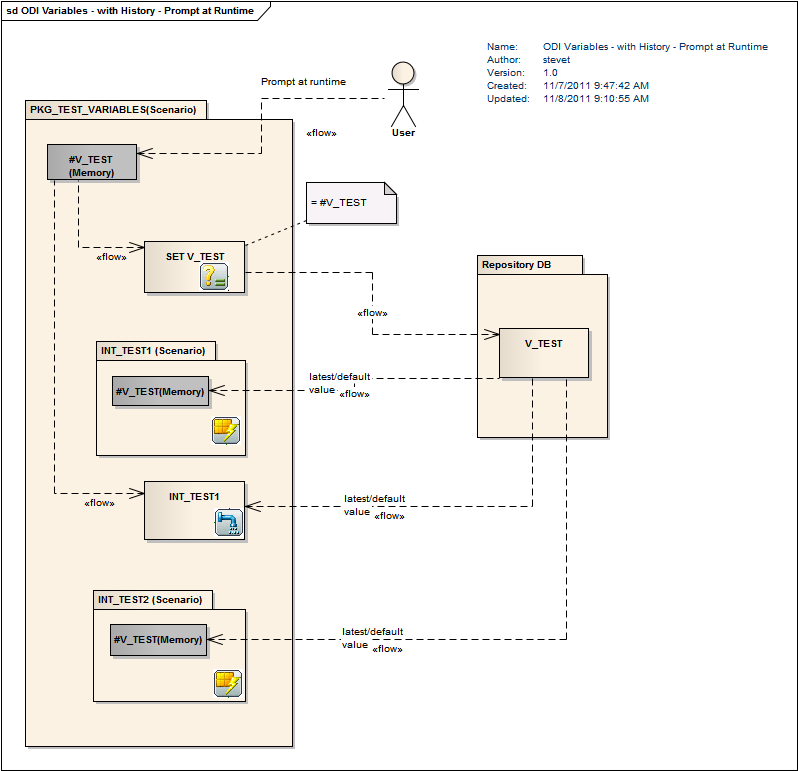
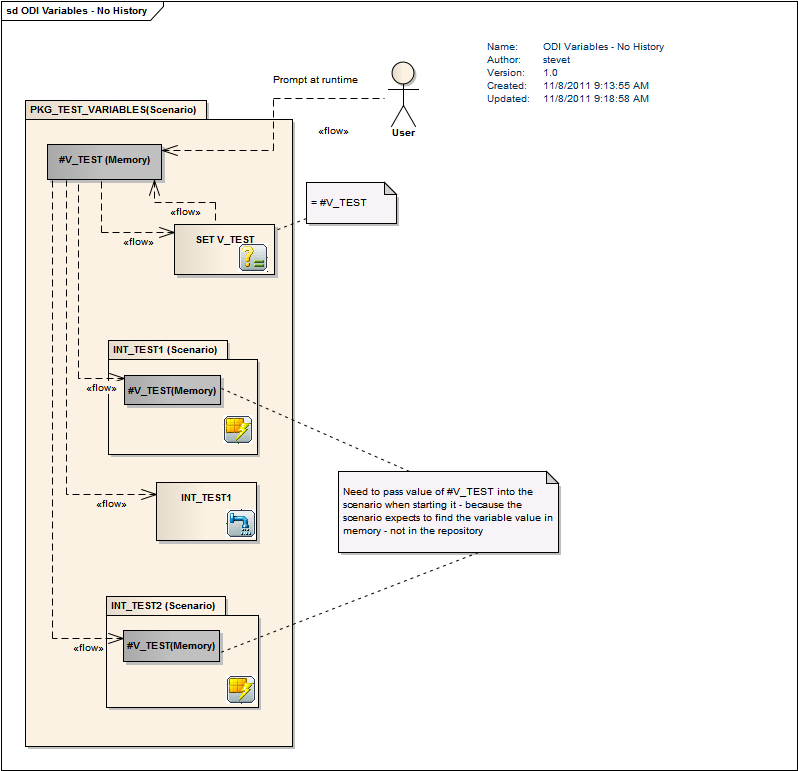
After a lot of experimentation which I believe included scratching my head and rubbing my belly while typing (that's hard to  do with one’s nose but I managed it), I was just about ready to delete the silly things (this would  NOT have been a trivial exercise as they are used through the Project) when I came across this (unanswered) post on OTN’s ODI forum by Steve Truesdale:
https://forums.oracle.com/forums/thread.jspa?messageID=9973095&#9973095
Which then led me to these two (instructive) links:
http://public.sttruesdale.fastmail.fm/ODI%20Variables%20-%20with%20History%20-%20Prompt%20at%20Runtime.png
http://public.sttruesdale.fastmail.fm/ODI%20Variables%20-%20No%20History.png

Simple, right?  :)  Just like everything else in ODI.
Nuke the entire site from orbit, it’s the only way to be sure
Channeling my inner Ripley, looking at the diagrams made me think -- I can't get that !@#$ing variable (whoops, so much for the G-rating) to change its value -- what if I changed its type from Alphanumeric to Numeric or Date or Text?  One of those ought to be an illegal type conversion and make the value GO AWAY. 

And so it was.

Sigh. 

At least the variables value now in the Load Plan, just the way they ought to.  That was NOT intuitive, but at least it worked.


07 December 2011

Two (no three) tips from Oracle Support

Introduction or who am I, anyway?

I like things that come in threes.  Perhaps my OTN handle should be “RD” instead of “CL”.

By the way, Rene Descartes had three dreams that drove him to pursue science.  FWIW, I had dreams (all too real) of working in a mainframe Adabas shop (that was subsequently off-shored) forever – I ran to the tender embrace of OLAP just as fast as I could.  I wasn’t always an idiot as a recent college graduate – just mostly.  As for what I am now I leave it for you to decide.  Good grief, what a digression that was.  Okay, the rest of this post is actually useful stuff.

Information Center

Would you like to have all of your EPM (and related BI) Support goodness wrapped into one package so you didn’t have to chase hither and yon, looking for specific articles?  How about a single location that’s even more consolidated than the Master Note Indexes and Oracle Advisors? What, you like searching through Support?  Uh-huh, you were only joshing me.  

There is now one single place to get:

And there’s more than the above, a lot more.  I think I could easily spend a month (or maybe more like a quarter) exploring all of the goodies on this page.

Pretty nifty, eh?  And how do you find this treasure trove, that is, by the by, updated every quarter?

Go right here to find out more:     
EPM and BI Support Newsletter Current Edition - Volume 2 : December 2011 (Doc ID 1347131.1)

ODI is left out, but there’s still great stuff for it

I’m working on a Special Project using ODI right now and it has been an interesting experience.  I’m pretty sure productivity in ODI = being beaten down by the product’s obtuseness, arbitrary nature, and just plain weirdness and then getting built back up by its awesomeness.  I guess it’s sort of like the Army’s BCT except we ODI developers don’t run around to a cadence march or yell Hooah!  I digress yet again. Regardless, ODI really is very powerful but anyone who doesn’t use it as part of his "normal" (can normal be used with me?) job can use all the help available.

ODI isn’t part of the EPM and BI newsletter, but here are three articles for you to obsess about.  What, you don’t do that when I post this stuff?  For shame.

There is a lot of good information in these notes – I wish I had known about them before I began my Journey of Pain that is ODI 11.1.1.5.

HTML rules, Flash, not so much

Oracle Support has this whiz-bang, super-duper web site full of all kinds of nifty interface functionality.  This is good.

If you are on a slow PC or a slow internet connection, it is S-L-O-W.  This is bad.  Do it on a laptop tethered to your mobile phone as an internet gateway and it is beyond slow.  Pouring molasses on a cold New England’s winter morn comes time mind as a barely-adequate analogy.

There is another way to get into Oracle Support’s web page and if you clicked on the above link, you’ve already experienced it – it is https://supporthtml.oracle.com.  All of the same great content, 100x (it is possible I am employing hyperbole to make the point, but it is fast) the UI speed.  What’s not to like?

And that’s it, for now

Yet again, Oracle Support does their very best to make our lives a little bit easier.  I for one am thrilled that this kind of consolidated information is making its way to us.  These products are complicated sophisticated and poor old implementation consultants like me need all the help they can get.  

I don’t know who in Support is responsible for supporthtml.oracle.com, but whoever that is – thanks, you are a life saver.

27 November 2011

AWS tricks #2 -- Treating that AWS instance as a real server


Introduction

I really like Amazon Web Services for development purposes.  It’s fast (enough), big (more than enough), and flexible (ah, just right) for my purposes.  What do you do with it?  Have you given any thought to treating that AWS EC2 instance (that’s an Amazon Web Services Elastic Computing Cloud virtual machine for the uninitiated) as a full-fledged server?

Splendid isolation

One approach, per the my earlier post, is to install all client software, including Microsoft Excel, on the server and just use Remote Desktop Connection (RDC) to connect to that EPM cloud instance.  This is a great approach if you are the only user of the instance (like me in my development/kick the tires/play with the product till you understand it usage).  But what happens when you want to collaborate with someone else or have multiple users check out the awesomeness that is your Essbase/Planning/HFM/Profitability/Close Management/Profitability/Studio/ODI/etc./etc./etc. work?

No geek is an island

Amazon Web Services (AWS) is predicated on servers, and after all the EPM software is server-based – why not treat your instance like a server and your PC like a client?  While connecting as a client to your EPM instance in the cloud is slightly harder than connecting to a server down the hall, it is easier than you think and requires just a few changes to the AWS Security Group.


And of course there is a huge benefit – more than one person, e.g., your customers, be they internal or external, can connect to the EPM server.  You do like to share, right?

Requirements

You must have:

  • A valid AWS id
  • An already created security group
  • A PC with Excel 2007 or 2010 (2003 is also supported but the examples show 2007/2010’s ribbon interface)
  • Already read the most-read (Google Analytics tells all) post I have ever written
  • Microsoft’s Remote Desktop Connection (RDC).  This client is standard in Windows; Macintosh users go here:  http://www.microsoft.com/mac/remote-desktop-client)
  • Time and a willingness to experiment  :)


Make sure you do not have Smart View installed as its download and installation is covered below.

Understanding AWS Security Groups

Ports

Security groups are used to define the open ports between an Amazon Web Services (AWS) instance and its clients.  By default all server ports are closed by Amazon’s firewall.  These ports must be opened for a client to connect to the instance.


As was illustrated in the “Yeah, yeah 11.1.2.1 is here, so what?” instructions, managing the AWS Windows instance required port 3389 to be opened to allow RDC to connect.

IP addresses

AWS provides a powerful method to limit unauthorized connection to an instance – internet protocol (IP) address filtering.  In essence, AWS allows you to do define which client external IP addresses will connect to a given instance.  It can be the whole world, or it can be just the EPM users in a given location or company.


This external IP address is not the same as your PC’s internal address on the LAN – it is the address the outside world sees and interacts with; usually one address is shared for a given organization or location.  Sophisticated AWS security is beyond the scope of this post (not to mention my abilities) but to get a taste of what is possible, investigate Amazon’s Virtual Private Cloud and the Elastic IP component of Elastic Compute Cloud for more information. 


For simplicity, this document will use a 0.0.0.0 IP address, as did the 11.1.2.1 instructions.  In AWS, a source IP address of 0.0.0.0 allows connectivity from and to all client IP addresses on the internet, including the ones belonging to those nasty people who do nothing but troll the ‘net looking for vulnerable servers.  You do not want to use this completely open IP address range for anything other than training purposes.  Figuring out your public IP address is easy; here is one site that provides this free service:  http://whatismyipaddress.com/ip-lookup


One final note on wide open IP addresses -- when the authors connect to AWS, whether it be from work or home, they always use their public IP address, never 0.0.0.0. 

Opening up the ports

A good test of true client/server connectivity is Smart View against Essbase.  Smart View uses ports 19000 for shared connections and 13080 for Essbase private connections.  If you set up your security group as described in the post-I-am-mentioning-yet-again, the only open port in your AWS security group will be Remote Desktop’s 3389.

Modifying the Security Group

You will need to expand the open ports by first logging in to AWS’s Elastic Compute Cloud (EC2) console and then clicking on the Security Groups link: 


Once in the group, in this case it is called KScopeTest, click on the Inbound tab:


Adding port 19000

You will see port 3389 already open.  To add port 19000, type in the port number in the Port range field and then the Add Rule button:

Adding port 13080

Do the same for the private connections on port 13080:


You can click on the Apply Rule Changes button at any time to commit the new port number; you must do so at the end of the port addition steps.

Knowing when to connect

As you know, it can be hard to determine when an AWS instance has started up after launch from an Amazon Machine Image (AMI).  The AWS console instance information is limited to four states:  terminated, stopped, pending, and started.  Started means just what it says – the instance is started, but all that really means initially is that the server has been turned on, not that you can connect.


When an instance has not fully booted, it cannot accept connections; the only way to know if you can connect or not is to try.

Ping comes to the rescue

One way to gain some insight into whether an instance can be connected to is to see if basic networking protocols can be used, e.g, pinging the box using the ping utility.  However, by default AWS instances can not be pinged because the protocol that allows ping and traceroute is disabled.  Thus a further modification of the security group is required to allow  ping from your client to reach the AWS instance. 


To do this, click on the Create an new rule dropdown and select Custom ICMP rule:


When you select Custom ICMP rule, the Type dropdown automatically switches to All.


Click on the Add Rule button to add the ICMP ports.  You must also click on the Apply Rule Changes button to commit the port changes.


Once committed, the Security Group should look like the following:


Port review

Port

Purpose

ICMP/All

Allow ping, traceroute, etc.

3389

Allow Remote Desktop connection

13080

Smart View private connections to Essbase

19000

Smart View shared connections, Workspace, etc.


We have only opened the ports required for connection:  ICMP, 3389, 13080, and 19000. 


As an example of port access, if your EPM instance were to support the classic Essbase Excel add-in, add port 1423 to allow connecting to Essbase and ports 32768 through 32778 to allow connections to the Essbase agent and databases.


As a general rule of firewall security, only open the ports needed for your work.

Launch that instance

The detail and rationale behind the steps required to launch an instance were covered in the post-whose-name-must-not-be-mentioned-lest-we-all-go-mad; refer to it for background.  If you dare.

Which one?

For the purposes of this example, John Booth’s free and public EPM 11.1.2.1 AMI will be used.  You can find out all about the AMI at http://www.metavero.com.

3…2…1…launch!

To find and then launch that AMI, enter the AMI id ami-de2bd4b7 in the filtering textbox in the AMI section of the EC2 console and click on the Refresh button.


Once it appears, right click on the AMI name and select Launch Instance.   Make sure you use the Security Group KScopeTest you previously created.


Follow the Launch Instance wizard (see the below for the kinds of selections you should make) and at the Review step start the instance by clicking on the Launch button.


Two ways to see if the instance is really ready

Approach #1 – Check System Log

Right click on the instance and select “Get System Log”.


Review the log

Remember, you are firing up a Windows 2008 server.  It is not going to be fast.  Give yourself time to get a cup of coffee.  In fact, you can likely dump the grounds, scrub the filter basket, put in a new filter, measure out the coffee grounds, put in fresh water, and hit the start button and wait for that delicious pot of Life Blood.  In other words, there is likely a 10 to 15 minute wait ahead of you. 


You will eventually see something like the below; you may need to check back several times.  When you do see it, the log is telling you the truth – you can now connect via RDC.


Approach #2 – Ping the server

Checking the system log is all very well, but it can require multiple tests to ascertain if the instance is strated. 


Instead, the familiar ping command can be used to go against the instance – when Windows has booted, the ping command will be echoed back to your client.

Get the DNS name

Once the AMI is launched, grab the public DNS name by trying to connect to the Instance.  Yes, that instance will almost certainly not be ready to connect to – you are just going through the motions to get the address.


Right click on the instance name and select Connect.


The AWS console will show the DNS name.  Copy that to the clipboard.


Ping from the comand line

Start up a command window, and then enter ping DNSnameIn the case of the above DNS address (every launched instance will have a different one and yours will not match the above), the command would be ping ec2-184-73-120-11.compute-1.amazonaws.com


Although a successful reply from the instance is not complete proof that Windows is ready receive Remote Desktop connections, it is a good gauge that the EC2 instance and related Elastic Block Storage (EBS) drive have been created from the AMI and that the OS is in the process of booting up.


This is one of those differences between a GUI and a command line – the GUI requires you to act again and again, while the command line just keeps chugging away until it receives a reply.  Which would you rather do?

Connect via Remote Desktop

Once you get a reply from your ping command or from the Get System Log menu, connecti via Remote Desktop by going back to that AWS dialog box and then clicking on the Download shortcut file link.


In Firefox, Remote Desktop will open the .rdp (a config file for RDC) file.


A scary message will ensue.  Ignore it – this has nothing to do with AWS and is intead a feature of Windows 7/Remote Desktop.


Enter the password “epmtestdrive”.


Another scary message pops up – again this can be ignored by clicking on the Yes button.


When you have connected to your instance, minimize your Remote Desktop window as you will now connect from your client PC.

Connecting to an EC2 EPM image from your PC

Prove that Workspace is running

On your client PC, launch a browser instance (this example shows Internet Explorer as Workspace is optimized for that browser) and create a url to launch Workspace.


The normal Workspace url is:

http://servername:19000/workspace/index.jsp


The public DNS name of this instance is ec2-184-73-120-11.compute-1.amazonaws.com


Incorporate the DNS name into the url as follows (remember, in your case the DNS name will be whatever Amazon assigns to the instance):

http://ec2-184-73-120-11.compute-1.amazonaws.com:19000/workspace/index.jsp


Type that url into the browser’s address bar and hit the Enter key.  If all of the services are running on the AWS instance, you should see the below Workspace login screen.


Enter a username of admin and a password of epmtestdrive and you will see the familiar Workspace home page.


Download SmartView

The goal is to connect Smart View, not Workspace.  Navigate to the Workspace Tools menu, select Install, and then Smart View.  This will begin the download to your client PC.


NB – This guide assumes that Smart View is not installed.  If it is, unistall it to follow the remaining steps.


Internet Explorer will prompt for a save location for Smart View.exe.

Install Smart View

Once saved, navigate to the same location and right click on SmartView.exe and select Run as administrator.


Vista and Windows 7’s User Account Control will ask if you really want to run this file – you do.


Click on Run and the installation process will begin.


Pick a language – in the case of this guide, that is English (United States) and click on OK.  The installation process will begin.


The installation process begins…


Follow the wizard all the way through to the end.


Launch your PC’s local copy of Excel – you should see the Smart View ribbon.

Defining the Application Provider Services (APS) address

After going to the Smart View ribbon, click on the Open button and then the Shared Connections link in the Connection Manager.  Smart View will surface a dialog box asking you to modify the url for Shared Services.  Smart View connects to Essbase through APS – this is the address you are really providing.


In the case of this EPM instance, all services are installed on a single server.


The default url is:  http://server:port/workspace/Smart ViewProviders


Using the same DNS name that was used to ping the server and to connect to Workspace, change that URL to (again, your DNS name will differ from the below):

http://ec2-184-73-120-11.compute-1.amazonaws.com:19000/workspace/Smart ViewProviders


Paste it into the Shared Connections URL dialog box in Smart View’s Options dialog box.


Smart View will then show the Connect to Data Source dialog box.  Enter the same username and password of admin and epmtestdrive and then click on Connect.


Now go into Connection Manager and click on the server drop down to define an Essbase server.


Then click on the Add new server dropdown.


Paste in the public DNS name of: ec2-184-73-120-11.compute-1.amazonaws.com and click on OK.


Smart View will show you the Essbase service in your instance.  Below are the sample applications that come with Essbase.


From here on out, you can connect to Essbase just as if the server was in your data center.


It’s the same Essbase you know and love, only in the cloud.  It really is that easy.


When you are done

AWS instances are billed by the hour – if there is no usage, nor is it anticipated, it might be in your best interest to stop the server. 


If you want to retain your work you have two choices:

1)      Stop (not terminate) your server via the EC2 console.  This is akin to shutting down your server.  You can bring it up at any time and will incur small storage costs based on size of $0.10 per gigabyte month.

2)      Create an AMI (coming soon on this blog) from the instance and Terminate the instance.  Charges for AMI storage are slightly less than EC2’s EBS model, but mean that you have to launch the AMI and manage multiple AMI copies.


If this was throwaway work, simply terminate the instance.  Remember, there is no going back to the data once the instance has been terminated.

DNS changes

Once you stop (or create an AMI and terminate the source instance) the instance, the public DNS name will be lost.  On subsequent startup, you will need to rename Smart View’s APS server name. 


One way around this is to use AWS’ Elastic IP service; find out more about it here:  http://aws.amazon.com/ec2/  Elastic IP will allow you define a static IP address and AWS will map the dynamic IP address to that static one so that clients do not have to change their server names; there are further configuration steps beyond the scope of this guide – search the web for more information.


Two alternate DNS providers are:

http://www.no-ip.com/

http://www.dyndns.com/services/dns/dyndns/

Conclusion

What do you now have?

  • A fully functioning Essbase server in the cloud that you, and your colleagues, can use for any purpose Essbase might fill.
  • A test server that can be created in minutes for experimentation when your development server is unavailable.
  • A platform for learning the features of the very latest EPM release.
  • A server that can be almost instantly adjusted, whether it be the number of CPUs, the amount oF RAM, or the hard drive size.


All for mere pennies an hour.