Want to know The Truth About CPM?

13 March 2011

Why you should be at KScope11

If you’ve read this blog at all, you’ve heard me blather on and on about how wonderful ODTUG Kaleidoscope is and why you should go.  Yes, I am not shy about my enthusiasm for the conference.

I’m not the only one who likes KScope11.  How about hearing what other people have to say about this most excellent of Oracle conferences?  ODTUG’s President and author of the ODTUG Blog, Mike Riley, has been interviewing some Oracle community luminaries (and an exception – no points if you can guess who the 5 watt bulb might be) about:
  • The thing they like most about KScope.
  • What presentations they are looking forward to the most.
  • Have they ever been to Long Beach, California.
  • What their best ODTUG Kscope moment has been.

Who are these august few?  People just like you, that’s who.

Who do I mean?

Check out the responses to Mike’s questions.  The passion for Kscope11 runs deep and swift.  If you were on the fence re coming to KScope 2011, I’ll bet a read of one or two of the above ought to push you over onto the side of signing up right now, before the 25 March 2011 deadline for the Early Bird Registration.  

I know I’ll see you there this year.  :)

08 March 2011

Stupid Programming Tricks #7

The Warning Before the Introduction Along With An Advertisement

Is it bad to start off a blog post with a recommendation to not read that very same blog post?  Oh well, here goes:  If you use Calc Manager in Planning this post is a complete waste of time as you have already figured all of this out. 

May I suggest spending your time doing something more constructive, like thinking about how you are going to go to the most awesome Oracle EPM conference in the whole wide world, i.e., ODTUG KScope, and see over 100 EPM and BI presentations, experience seven half day labs, attend multiple symposiums, party like a crazy EPM geek at Monday Night Madness, drink deeply of the Functional and Technical content, and oh yeah, visit http://www.kscope11.com/biepm for more information.  Hmm, that wasn’t very subtle.  I wonder who inspired me to write this?

For the rest of us, no one should spend the 30 minutes I did trying to figure this out.  The Happy Few still ought to contemplate the awesomeness that is ODTUG Kaleidoscope.

Introduction

With that preamble out of the way, for those of you who know and love EAS (is there anyone who *loves* EAS?) also know that EAS' days are numbered.  How many that may be is up to Oracle product management, but it's time to at least think about moving on down the road.

EAS and Hyperion Business Rules

With that thought (the wordplay is breathtaking) in mind, I was playing around (no life at work here but I know I'm not the only one) with Calculation Manager and was wondering -- where does security get assigned in Calc Manager for Planning?  How do I give the Planner John Q. Public access to a particular Business Rule?

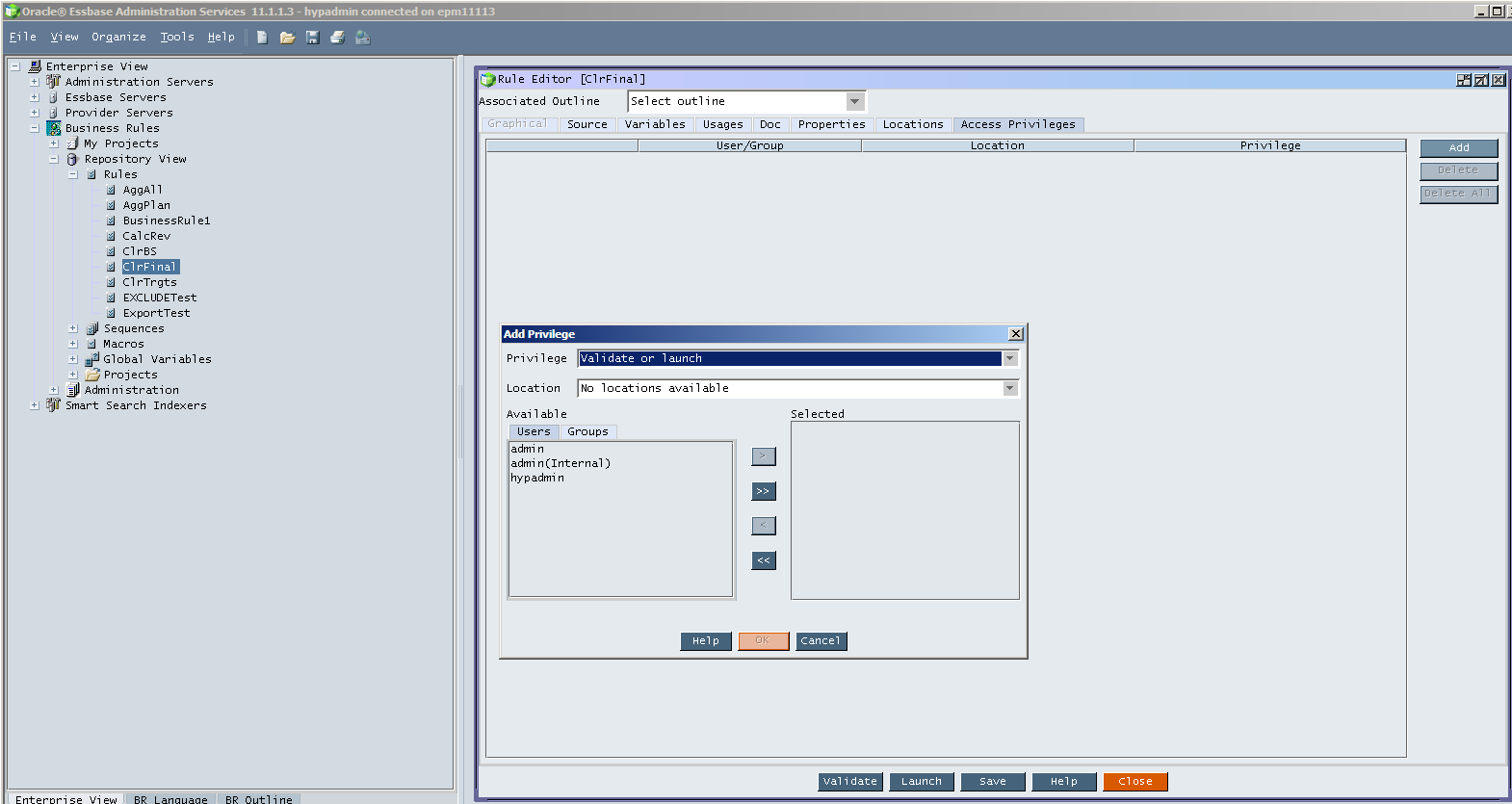
For those of you who don't use EAS/traditional HBRs, security assigns look like:

To show the above, I right clicked on the HBR "ClrFinal", opened up the rule, clicked on the tab Access Privileges, and then clicked on Add to grant one of the many, many, many users in my VM.

Calculation Manager

That's fine, but where on earth do you do it in Calc Manager?  It can't be in EAS because that's the whole (well one of the) point.  Business rules aren't in EAS, they're kind of, sort of part of Workspace.
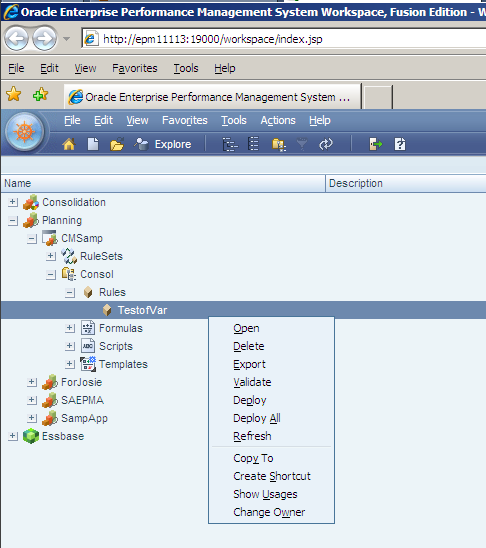
Well, when I go into Workspace, and then go to Calc Manager, security is AWOL:

Don't get fooled by that Change Owner -- that does just what it says and has nothing to do with Planner John Q. Public being able to run a rule.


So how do you do you assign access?

First, deploy the rule (you do not need to be using the Devil's Own, aka EPMA to do this as Calc Manager has its own deployment functionality) to the Planning application.

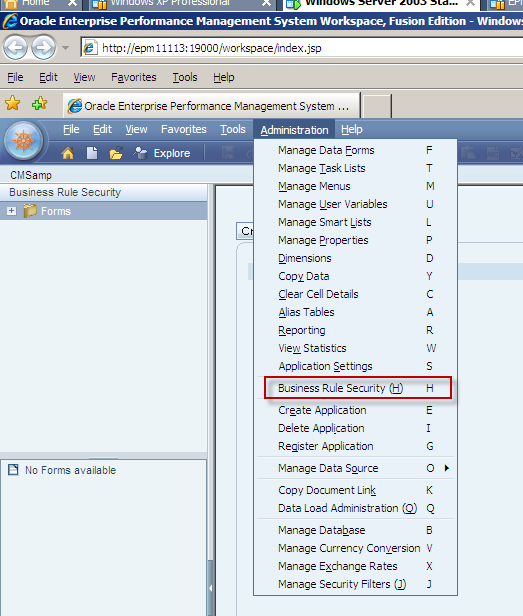
Secondly, go into Planning as an administrator and click on the Administration menu.  Do you see it?


I hope so, I highlighted it in red.  :)

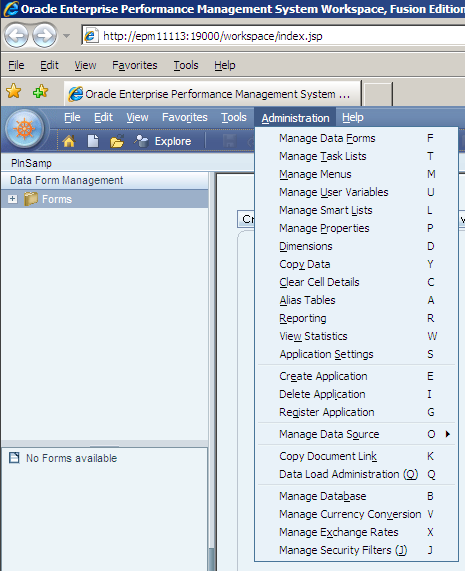
Is this menu choice in Planning in non-Calc Manager Planning apps?  Nope.

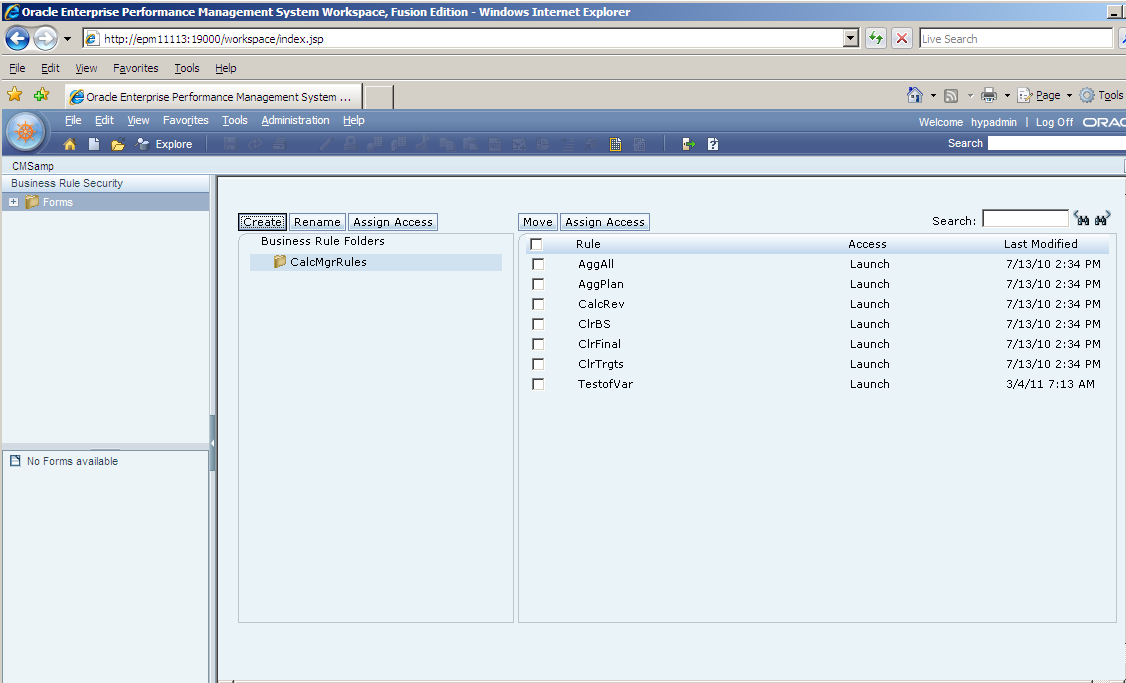
Okay, going back to Calc Manager-enabled Planning apps.  Select Business Rule Security:

This is beginning to look familiar.  Select the business rule (maddeningly, just like forms, you cannot select multiple rules) and then click on the "Assign Access" button.

You will then see the standard access assign dialog box that you know and love for member security, forms, etc.


If you click on "Add Access" you will note that there are only two actions a Planner can make -- Launch or No Launch.  You don't see anything here because in Calc Manager, admins can't have access to a Calc Manager rule, just like they can't have access to a form -- they are above security.  This is at least consistent with the way Planning works for other objects and a big improvement over HBR’s crazy you-can-write-the-rule-but-not-launch-or-validate-it-till-you-give-yourself-rights-to-it model.

To my point about the oddness that was once known as Hyperion Allocations Manager, aka, HAM, this is different than EAS' HBR security, which can assign validation/launch and modify access.

So where is the provisioning for modifying the rule?  It's driven by Shared Services roles.

Phew, a lot of writing for a very simple thing.  But I've saved you 1/2 hour of your life, so you owe me.

Addendum

P.S.  Extra credit, and again, if you use Calc Manager you already know this one -- did anyone catch the weird thing about the screenshot for assigning security access in Planning versus the HBRs available in Calc Manager?  This is a fairly well known bug as documented here:  http://forums.oracle.com/forums/thread.jspa?messageID=6685183&#6685183  No, I have not patched my VM to fix this.

18 February 2011

Not Groundhog Day, but ODTUG Month

Not Groundhog day, but ODTUG month

The hits keep coming from ODTUG.  And why not?  We are talking about the very best Oracle EPM conference, ever.  Yep, even better than last year’s and that was pretty darn good.

What do I mean?  

Take a look at the hands on training.  

There’s going to be some amazing content:
DayTimePresenterContent
Monday11 am to 1 pmAdam Bloom, OracleUsing Actions to Integrate Oracle BI EE with External Systems

1:15 pm to 3:30 pm123OlapEPM Architect against Planning

4:00 pm to 6:00 pmRon Moore, MTGEssbase Studio:  The Basics and Beyond
Tuesday8:30 am to 10:45 am123OlapHFM Consolidation Rules

1:45 pm to 5:30 pmJohn Booth, Emerging SolutionsInstalling the 11.1.2 Release Efficiently
Wednesday8:30 am to 10:45 amRatan Vakil, interRel ConsultingOBIEE on Essbase:  The Future of Ad-hoc Analysis

1:45 pm to 5:15 pmRittman MeadOracle BI 11g Answers and Dashboards Hands-on Labs
Thursday10:30 am to 12:45 pm123OlapAn Intro to ODI in the Hyperion Environment
That is a tremendous amount of training.  Think about it – how much would that cost you if you went to each one of those classes separately at a training partner or Oracle?  Big, big, big bucks is how much.  A lot more money than the member (you are a member of ODTUG, aren’t you) Early Bird price of $1,400.

Running, not crawling

Did you read the bit about your lab server (and oh by the way, you are going to get your very own for the duration of the lab)?  No more woefully underpowered laptops.  You are going to be in the Cloud.  I hope you’re all a fan of Amazon, because it’s going to be Full360’s EPM Amazon Machine Image (and yes, OBIEE and ODI 11g will be in that cloud image as well) running on a nice big, fat, juicy 15 gigabyte server (Amazon is a little weird with the memory sizes) with four CPUs.  Feel the power.

Bring your laptop and even your Macintosh

You’re going to connect using Microsoft Terminal Services, aka Remote Desktop Connection, a standard part of Windows.  Just make sure you have it by going to Start->Run and typing in mstsc.exe.  If you see this you are good to go:

Macs need a download

Having owned a Macintosh since the 128k Thin Mac of 1984, I am thrilled to announce that Macs can also play in the Windows cloud.  Just make sure that you download and install Remote Desktop Connection Client 1.0.3 for Mac.

So what are you waiting for?

The registration page is right here.  Labs fill up quickly, as I have found to my sorrow when I dawdle.  Don’t be like me – sign up now and get that great value that is ODTUG Kscope 11.

08 February 2011

A great deal for ODTUG members

A great deal for ODTUG members

Those of you who follow the insane rambling that is this Essbase blog (my mother reads it because I nag her about it and Glenn does it because he loves to heckle me and correct my manifold technical errors before I corrupt the world) know that I had a fun old time trying to run Oracle EPM 11.1.2 on my what-I-thought-was-quite-the-powerful-laptop.  Unfortunately, that dream assumed room temperature some time ago.

I ended up going with Full360 as they have the most complete Oracle EPM 11.1.2 product and their pricing model seemed to work best for me.

And now the deal gets better

I’ve been paying $99/month for the EPM 11.1.2 stack (I am a loyal ODTUG individual member so I get this low price) plus all of my Amazon Web Services costs.  It’s about $150/month and some of you may choke on that but if I were to compare it to buying that $14,000 laptop it really doesn’t seem bad at all.

But you don’t have to spend the way I do, and actually, even I don’t have to the way I do (huh?).  I am in the silent and vocal majority that likes to lower costs, and I suspect you are too.

Full360 has a limited time offer that will lower your monthly cost to…nothing.  

How do I (and you) save $350?

This is so easy.
  1. Contact Full360 via the web or on email
  2. Sign up for Amazon Web Services at http://aws.amazon.com.  Yes, that same id that you use to buy those awesome Tintin books can get you into the cloud and into 11.1.2 lickety-split.
  3. Use this great tutorial to get your feet wet.
  4. Pay a one-time setup fee of $49.99 and then until 30 May 2011, pay Full360 exactly…nothing.

Even I can do the math

My current Full360 charges

Number of months between February to May = 4
Current monthly cost = $99
Full360 charges = 4 * $99 = $396

And the future

Number of months between February to May = 4
Current monthly cost = $0
One time set up fee = $49.99
Full360 charges = (4 * $0) + $49.99  = $49.99

When I do the math, that’s $396 - $49.99 = $346.01.  Okay, I rounded up, but that’s still a lot of dosh and a pretty penny all at the same time.

What are you waiting for?

An invitation from the Queen?  You’ve got an invitation from a geek (that would be me, HRH is unfortunately unlikely to request and require your participation).  Go for it and dive deep into the goodness that is Oracle EPM 11.1.2.  The price and effort level is low.  What are you waiting for?

Shameless plug

And oh yes, come to my presentation at ODTUG Kaleidoscope 2011 at Long Beach.  Rohit Amarnath of Full360 and I will walk you through the awesomeness that is EPM in the cloud if you haven’t already figured it out thanks to this great deal.

05 February 2011

Top 10 Quotes for Coders

And now for something completely different

I have Dave Farnsworth to thank for a really funny link.  Yes, it is related to our beloved Essbase, at least tangentially.

Some of these are old saws; others are fresh to my ears.

The Spartan helmet is…odd.  But hey, this is an industry that attracts odd people.

You can either click on the embedded video below or here:   Larry The Rejected Spartan's Top 10 Quotes For Coders Countdown


What’s your favorite?  I am a particular fan of number six and they are words I conduct my life by.

Top 10

19 January 2011

Introducing Data Detective

Introduction

Sometimes working on this blog is a nightmare, other times it’s a joy, and when I’m really lucky, someone else does all the work; this is one of those times. 

Several (well, like two) people have told me that they can't find the link to this tool.  Never let it be said that I stand in the way of disseminating cool stuff.  Download Data Detective RIGHT HERE and enjoy Dave’s generosity.

No test like production

What do you do when you change a formula, calculation, data source, etc. in your superduper Essbase database?  Never check for correctness and pray for the best?  Create a copy of the app and make the changes there (there is this concept called development, quality, and production) and then spend endless hours recursion testing?

I’m guessing you do the latter as my readers are smart, intelligent, and continuously employed.  And when you do that testing, I’m going to bet that you compare the existing database against the new one.  I do this all the time, setting up retrieve sheets for the original and the new databases and then creating a variance sheet.  This is an acceptable approach, but every time I find a difference, I invariably drill into it, and then have to replicate the modified retrieve in the other database and then manually rewrite the variance formulas, ad infinitumHeretofore, this has been the only way to do this kind of compare, but it is an inefficient and error prone process.

Dave Farnsworth has a solution to this problem with one of his great utilities – this man knows Excel.

In his own words

Data Detective is one of those programming ideas that hang around in my head. I intended to write the utility if I ever had the time and motivation. Finally after many years I’ve put pen to paper and this utility is the result.

Commonly consultants and Essbase administrators engage themselves in the tedious task of comparing two Essbase databases checking that the values are equivalent. After too many years of retrieving from two databases, creating a delta sheet and then pivoting the original report and doing it all again I said enough! Delta Detective is my new favorite tool.

Very simply, Delta Detective is an Excel based macro that uses the classic Essbase add-in tool kit. As the user, you open Delta Detective.xlsm, connect to Essbase using the normal Add-in dialog, Format your first query. Next, start the macro using ctrl+q which brings up a dialog where you enter the connection information for both database that you want to compare. Hit the run button and the macro creates exact duplicates of your original sheet, retrieves data from the second database, computes the delta’s and colorizes the mismatching cells. Returning to the original report sheet you can drill, pivot, or whatever using the classic menu and then rerun the delta report. Excel formats from the original report carry over to the others and you can always be sure that the sheets are connected to the proper databases.

Please look at the ReadMe particularly if you are using an Office version earlier than 2007.

A couple of points

The classic add-in, not SmartView

Another quote from Dave, this time from his documentation (yes, he’s that good), “Since this utility is freeware, the idea was to make it simple, so that it didn’t consume Excel resources when not in use. Additionally it needed to be relatively version independent with regards to Essbase and Excel. For these reasons it requires the traditional Essbase add-in and not SmartView.”

Why not an add-in?

Dave wrote this as .xlsm file instead of a xll because of the loss of menus in Excel 2007/no ribbon bars in Excel 2003.  One day we’ll all be in the ribbon-driven world, but that is definitely not true today.  Until then, this approach removes the UI from the equation.

If you’re using Excel 2003

To allow you to open Excel 2007’s Macro-Enabled Workbook format you must first have Excel 2003 SP3 (I tried skipping SP3 – nope, it doesn’t work) and then you must install Microsoft Office Compatibility Pack for Word, Excel, and PowerPoint 2007 and later File Formats (Compatibility Pack).  Read all about it here.

Macro security

This workbook isn’t signed, so in both Excel 2003 and 2007 (sorry, this hasn’t been tested on 2010 but go ahead and leave a comment telling us), you are going to need to allow Excel to run the macro. 

2003


Just follow the instructions and set the security level to medium.

2007


You’ll see the warning message right up front when you open the file.  Click on the Options button, and enable the content.

Tested variants

Essbase version
Excel version
9.3.1
2007
11.1.1.3
2003
11.1.1.3
2007
11.1.2
2003
Has every release under the moon been tested?  No, but I’m going to guess that since there was zero problem in getting this to work in such a wide span of Essbase releases, there isn’t going to be any problem in your world, either.

Documentation

In addition to the utility itself, Data Detective comes with its very own tutorial. 

Conclusion

I’ve used Data Detective in beta on a project as I tweaked and optimized complex financial allocations.  Data Detective is an easy to use tool to generate the deltas between the databases and helped me quickly hone in on problematic calculations, all without me laboriously creating dual retrieves and variance sheets.  Very, very nice.  Download Data Detective RIGHT HERE and enjoy Dave’s generosity.

03 January 2011

Stupid Programming Tricks #6

Introduction

Number Six in my Stupid Tricks collection. 

Should I be worried that so much of what I know falls into this category?  I’ll Keep Calm, and Carry On and hope that one day I’ll get smart.  Ah, but a man’s reach should exceed his grasp, Or what’s a heaven for?

Here’s a block, there’s a block, where are MY blocks?

Block creation is sort of the Achilles heel of BSO calc script writing.  We have all written an allocation script (or two, or three, or four) that looks good but when we run it – nothing, naught, nada, zip, zero, zilchAfter a hopefully quick sanity check to ensure that the data assignment and the Excel retrieve are pointing to one and the same data set, the answer is almost always…block creation, the bane of calc scripts.

Happily, there are lots of ways to create blocks, including sparse assigns, crossdims on the left hand side of the equal sign within a calc block, SET CREATEBLOCKONEQ, the sometimes performance-sapping SET CREATENONMISSINGBLKS, and of course, the old standby DATACOPY.  11.1.2 has its new and nifty XWRITE function which you can combine with a LOOPBACK function.  Oooh, tricky.

But it’s DATACOPY that is the surefire, never-fails, gold standard way to create blocks.  And it is.  Until you remove the blocks, especially when you think you didn’t.  Arrrgh.

That old devil CLEARDATA

Quick quiz -- what does CLEARDATA do?  Why, it clears data.  Duh.

And what doesn’t it do?  Remove blocks.

Sez who?  Our friend the TechRef:
CLEARDATA does not clear blocks, even if all data values in a block are #MISSING. Use CLEARBLOCK if you wish to clear blocks from the database, which can improve performance.

What does CLEARDATA have to do with DATACOPY?  Well, typically after copying data to create blocks, clearing out the data at the target is a good idea as the code that uses the blocks may or may not touch all of the DATACOPY targets.  This may seem inefficient, but given the speed of DATACOPY (usually), this isn’t an issue.

Watch out for that documentation

I was working on an allocation and used that the never-fails, sure-shot, good-as-gold block creator, DATACOPY.

But something odd was happening – the script was running, but I wasn’t getting any results.  What oh what could it be?  Surely not a block creation issue as I was, after all, using DATACOPY to create the blocks and then CLEARDATA to remove the data values. 

Happily, my client, Dave Anderson, is smarter than I am (NB – Consultant  trick #1 – somehow convince the client you’re not an idiot, make sure he’s smarter than you, have him solve the problems, you blog about the solution.) and suggested that the blocks I thought I was creating in fact weren’t really there.

I will admit a certain degree of skepticism because I knew CLEARDATA does not clear blocks, even if all data values in a block are #MISSING.  (NB – Consultant trick #2, when nothing works, and the client makes a suggestion, at least go through the motions of listening to him.  You might be surprised.

I ran just that segment of the code and did a before and after block count.  Yes, I cleared out the entire database and ran everything from scratch and stopped right before this step; that was my initial block count.  Then I ran the code and checked the block count in EAS.  Uh-oh, same number of blocks.  Commenting out the CLEARDATA gave me…a higher block count.  Double uh-oh and a what the ? moment.

MVFEDITWWW, aka Sample.Basic

My Very Favorite Essbase Database In The Whole Wide World is the place I prove out BSO concepts. 

Sample.Basic’s density

Dimension
Type
Year
Dense
Measures
Dense
Product
Sparse
Market
Sparse
Scenario
Dense

Yeah, it’s weird, particularly the dense Scenario dimension at the end.  But the density setting of Scenario will be important as we’ll shortly see.

Are you sitting comfortably? Then I'll begin.

Lock and load

I created a copy of Sample.Basic, cleared it out, and populated the following spreadsheet.
If this is the only data in the database, how many level zero blocks do you think there are?  You get a gold star if you say, “One, and duh, what else could there be?”

Fire for effect

Now run this code:
SET UPDATECALC OFF ;
SET AGGMISSG ON ;
SET EMPTYMEMBERSETS ON ;
 
CALC ALL ;

How many upper level blocks?  Eight – take a look at the spreadsheet below and count the highlighted rows:

I know, I know, block creation 101. But this is important and there’s a test at the end of the semester, so let’s review:  You had one block from the lock and send and eight blocks from the CALC ALL. 

A change is as good as a rest

Bringing DATACOPY and CLEARDATA in, let’s create a block and then clear out the data

SET UPDATECALC OFF ;
SET AGGMISSG ON ;
SET EMPTYMEMBERSETS ON ;

CALC ALL ;

FIX(@LEVMBRS("Market", 0))
  DATACOPY "Actual"->"Product" TO "Budget"->"100-10" ;
  FIX("Budget")
    CLEARDATA "100-10" ;
  ENDFIX
ENDFIX

Data is copied to Budget->100-10.  Does this increase the block count?  Nope, Budget is dense and data already exists at Actual->100-10, so the DATACOPY doesn’t add a block.

The number of blocks is now nine – one from the lock and send, eight from the aggregation in CALC ALL, and zero from the DATACOPY as the block at 100-10->Budget already exists.

CLEARDATA does just what it ought to – remove the value of Actual->Product from Budget->100-10 and nothing more.  It sure doesn’t remove the block.

Stop making sense

So let’s make this all blow up/work just like most Essbase databases and make Scenario sparse, not dense.

In theory, the database will now have 10 blocks:
1 level 0 from a lock and send
8 upper from the CALC ALL
1 additional 0 from the DATACOPY

Clear out the database, send that first sheet, and then run the code with the CLEARDATA.

What happens?  Do we in fact have 10 blocks?  Nope, because a CLEARDATA when dealing with purely sparse dimensions…removes blocks.  Well, it also clears out the data, which is after all sort of implied in its name.

Arrgh.

Fix it in one step

Get rid of the CLEARDATA and replace it with =#Missing.  Yes, it’s that easy.

SET UPDATECALC OFF ;
SET AGGMISSG ON ;
SET EMPTYMEMBERSETS ON ;

CALC ALL ;

FIX(@LEVMBRS("Market", 0))
  DATACOPY "Actual"->"Product" TO "Budget"->"100-10" ;
    FIX("Budget")
      "100-10" = #Missing ;
    ENDFIX
ENDFIX

Run it all again and ta-da, 10 blocks.  Whew. 

Yes,  assigning  a value of #Missing is slower than CLEARDATA.  But it works, and in the end that’s what counts.

Conclusion

This was a real stinker to figure out.  CLEARADATA not removing blocks is (was) such a basic piece of my BSO knowledge I refused to believe my eyes when my code didn’t work. 

So this was a salutary lesson in observing and questioning.  And oh yes, listening to your client as well.